Table Of Contents
Generating a New WorldStill have questions?
Come chat with us and we will get back to you as soon as possible!

Shockbyte
Support Team
How to Generate a New World on your Necesse Server
Necesse server owners may wish to start a fresh world. This can be quickly configured in the Shockbyte Control Panel, allowing owners to create a new world easily.
Knowledgebase
Looking to reset your entire server instead? You can follow our other article on the topic here: How to Reset Your Necesse Server
#Generating a New World
Generating a new world allows you to switch to and play on a new world without deleting any of the server files, including the server settings and your old world data.
-
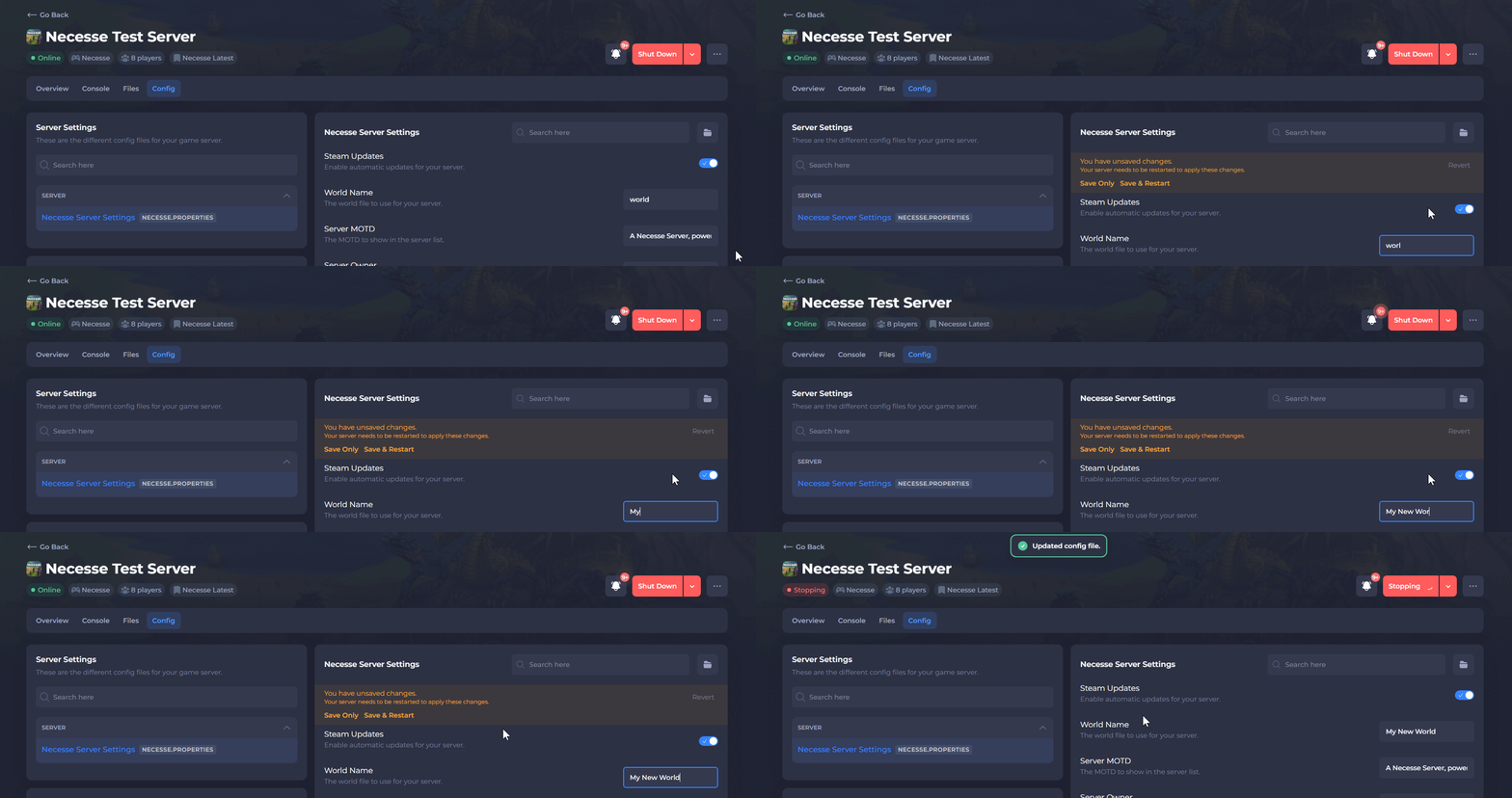
Open your Server Control Panel.
-
Navigate to Config and open Necesse Server Settings.
-
Locate the World Name setting and enter a new name that has never been used before.
-
Save the file and Restart your server.
To learn more about Necesse server hosting, you can browse our library of Knowledgebase articles here.