How to Install Plugins and Mods on your Counter Strike 2 Community Server
Still have questions?
Come chat with us and we will get back to you as soon as possible!

Nuno Paiva
Game Integration Specialist @ Shockbyte
How to Install Plugins and Mods on your Counter Strike 2 Community Server
Installing plugins allows you to expand your server’s functionality by adding new features, automation tools, and custom gameplay mechanics. Shockbyte's CS2 servers support plugin installation through CounterStrikeSharp and Metamod.
#Enabling Plugin Support
Before installing any plugins, you must first enable support via your control panel:
- Navigate to your control panel and Stop your server.
- Go to the
Configtab. - Find the option Enable Metamod & CounterStrikeSharp and set it to
true. - Save the changes and Start your server.
This will automatically install all necessary files and set up your server to support plugins.
#Installing a Plugin
Once plugin support is enabled, you can add any compatible plugin to your server:
- Navigate to the
Filestab in your control panel. - Go to:
/game/csgo/addons/counterstrikesharp/plugins - Upload the plugin folder here.
For example, to install the Auto Map Changer plugin:
- Visit the GitHub page: https://github.com/skaen/Auto-Map-Changer
- Click the Releases section and download the latest version.
- Upload the
AutoChangeMapfolder to:/game/csgo/addons/counterstrikesharp/plugins

- Restart your server.
#Verifying Plugin Installation
After your server restarts, you can confirm the plugin is installed correctly by opening your server console and running: css_plugins list
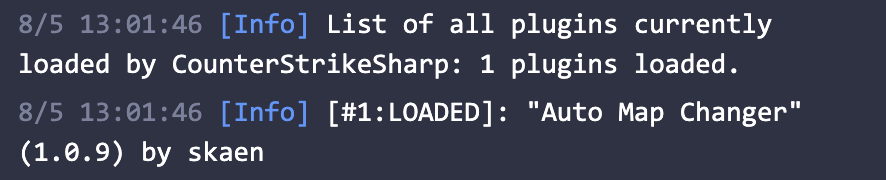
This command will show a list of all active plugins currently running on your server.
If you require any further assistance, don't hesitate to get in touch with our support at: https://shockbyte.com/billing/submitticket.php