Table Of Contents
Adding a PasswordStill have questions?
Come chat with us and we will get back to you as soon as possible!

Shockbyte
Support Team

How to Set your RuneScape: Dragonwilds Server to Private
Runescape Dragonwilds
·Mar 25, 2026
·2 min read
This guide explains how to add a password to your RuneScape: Dragonwilds server. Setting a password allows you to restrict access and control who can join your server.
You can configure this through the RuneScape: Dragonwilds config file located in the Settings section of your panel. The steps below will walk you through updating the setting so your server is properly secured.
#Adding a Password
To add a password to your RuneScape: Dragonwilds server, you will need to do so in the Settings area.
- Access your Control Panel and Stop your server.
- Navigate to the Settings tab and select the RuneScape: Dragonwilds Settings file.
- Locate the
World Passwordoption. - Set a password for your server to allow only people with the password to join your server.
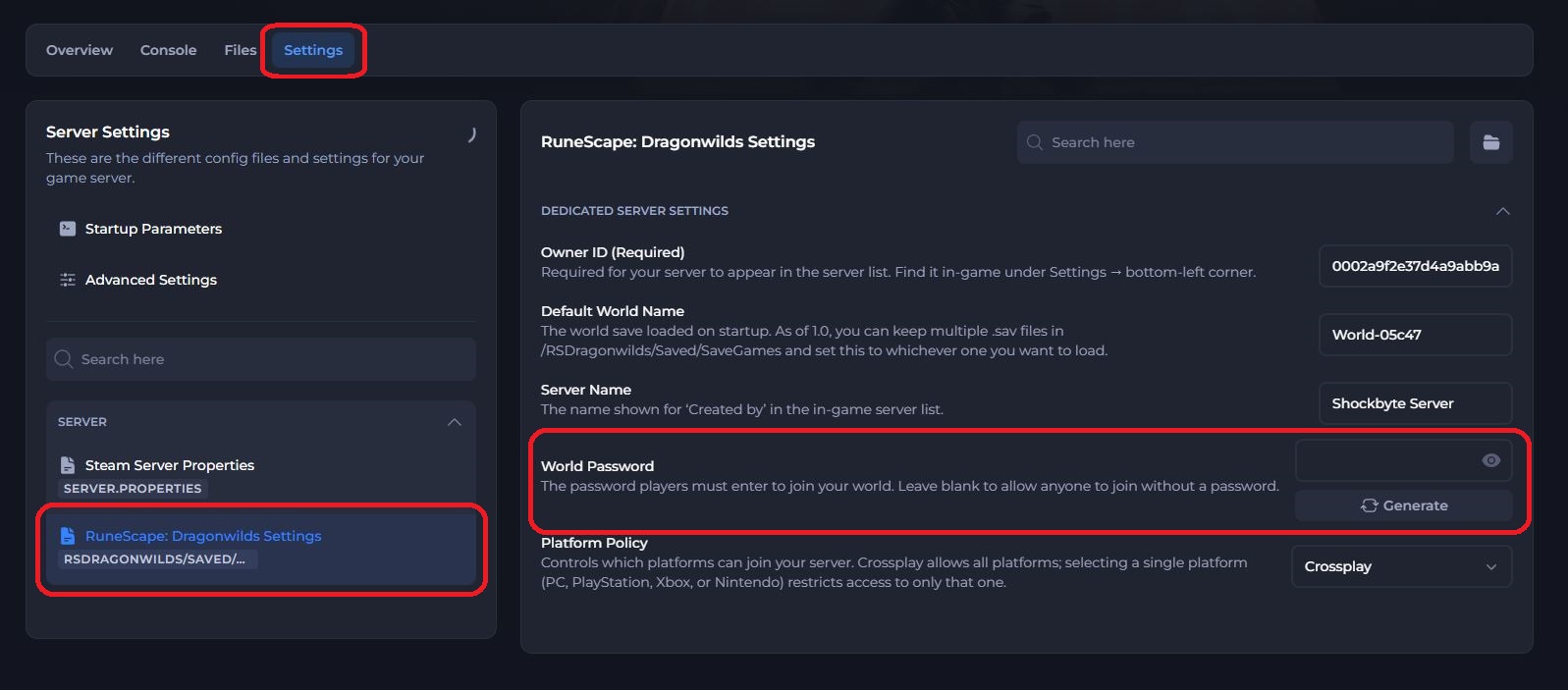
- Save and restart the server to ensure the new changes apply.
If you require any further assistance, please contact our support at: https://shockbyte.com/billing/submitticket.php