Still have questions?
Come chat with us and we will get back to you as soon as possible!

Ruben B
Partnership Manager

How to Join your Icarus Server
Once your Icarus Shockbyte server is configured the way you would like it to be you're ready to join. There are two options available when joining your server either using direct connect or the in-game server list. The easiest method is using direct connect.
Note:
In order to identify your server on the server list you will need to set your server's name.
#Using Direct Connect
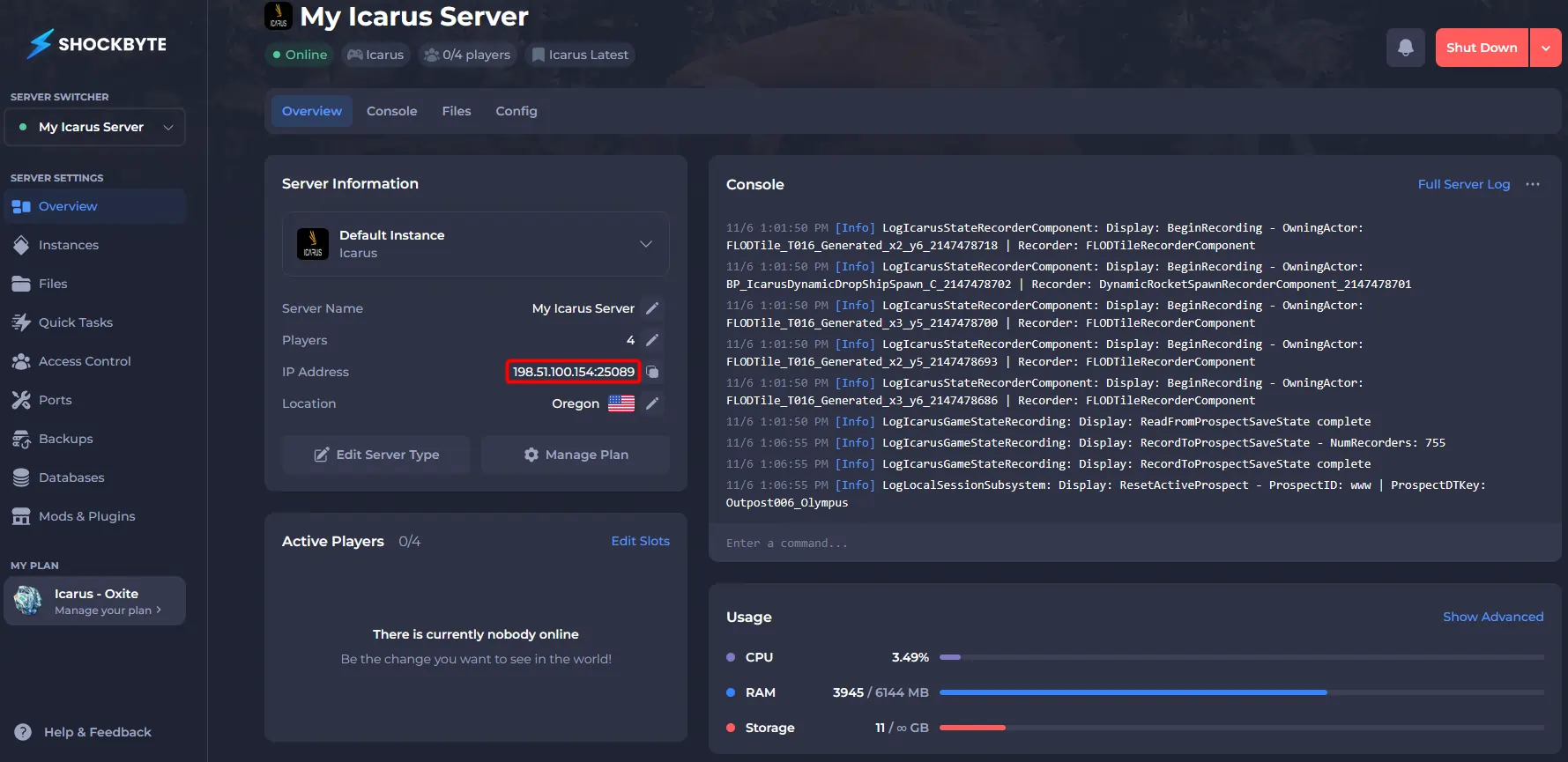
In order to connect to your server using direct connect you will need to know your server's IP and port.
- Access your control panel and locate your Server Address.
- Open Icarus and click Play.

- Select or Create a character.
- Click Join.

- Click Dedicated Servers.

- Click Direct Connect.

- Enter your Server Address then click Confirm.

- If your server has a password enter it then click Confirm.

#Using the Server List
It is also possible to join your Icarus server using the in-game server list. In order to identify your server on the server list you will need to set your server's name.
- Navigate to the Dedicated Servers screen using steps 2-5 of the Using Direct Connect section above.
- Wait for the server list to fully populate, then enter your Server Name.

- Select your server.

- If your server has a password, enter it, then click Confirm.
If you would like any additional information or have any other questions about your Icarus server, you can find our other articles here.