How To Change A Player's Character On Your Don't Starve Together Server
Still have questions?
Come chat with us and we will get back to you as soon as possible!

Ruben B
Partnership Manager

How To Change A Player's Character On Your Don't Starve Together Server
A player on your server may wish to change the character they picked when first joining your Don't Starve Together server. This article will walk you through the process of helping them change their selected character.
Note
In order to follow this article, you must be connected as an administrator. You can find our article to assist you with this here.
#Drop a Player's Inventory
Despawning a player will also delete their items. Before despawning them, you may wish to have them drop all of their items.
-
Open the developer console by pressing the ~ (tilde) key.
-
Run the command
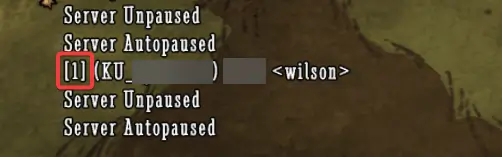
c_listallplayers()to find the player's ID. -
Run the command
AllPlayers[number].components.inventory:DropEverything()replacing number with the player's ID.
For example: AllPlayers[3].components.inventory:DropEverything()
#Despawning a Player
In order for a player to re-pick their character, they will need to return to the character selection screen. This can be done by despawning them.
-
Open the console by pressing the ~ (tilde) key.
-
Run the command
c_listallplayers()to find the player's ID. -
Run the command
c_despawn(AllPlayers[number])replacingnumberwith the player's numerical ID as seen below.
For example c_despawn(AllPlayers[3])
If you need any more assistance getting started with your Don't Starve Together server, you can find a list of our other Knowledgebase articles here.