Still have questions?
Come chat with us and we will get back to you as soon as possible!

Shockbyte
Support Team
How to Enable the In-Game Console on Your Garry's Mod Client
Enabling the console in Garry’s Mod is a useful tool for players wanting to use cheat codes or run admin commands.
#Enabling the Console for English Keyboards
-
In the main game menu, select Options.
-
Navigate to the Keyboard tab in the pop-up window that appears.
-
At the bottom, select Advanced.
-
Check the
Enable developer consolebox.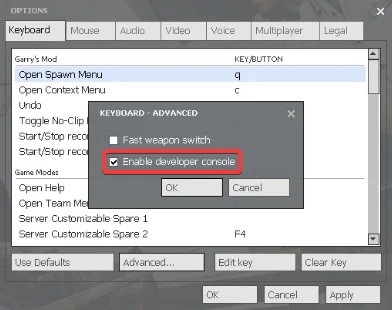
-
Press OK and then Apply to save your changes.
You can now open the developer console by clicking ~, or the key above the Tab key.
#Toggling the Console for Non-English Keyboards
If you have a non-English keyboard, you may want to change the keybind to toggle the console.
Note
Not all keys will bind to toggleconsole, so make sure to use a key that is not used regularly for typing. F1-F12 is most commonly used for this.
-
In the main game menu, select Options.
-
Navigate to the Keyboard tab in the pop-up window.
-
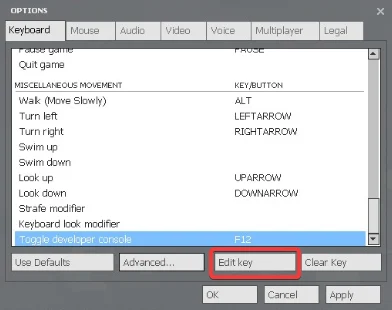
Scroll down to the Miscellaneous Movement section.
-
Select Toggle developer console and click Edit Key.
-
Set the keybind to a key of your choice.
You can now toggle the console with this key!
If you require any further assistance, please contact our support at: https://shockbyte.com/billing/submitticket.php