Still have questions?
Come chat with us and we will get back to you as soon as possible!

Ruben B
Partnership Manager

How to skip the Aquatica update on ARK:SE
Due to compatibility issues with the latest ARK: Survival Evolved update (Aquatica), the developers have released a public beta, which you can use to roll back your game. This will allow you to keep enjoying your server, while fixes are being released.
Note
If you want to go back to the latest version of the game, please follow these steps to set your Steam Beta to None, and server type to stable.
#Enabling a Steam Beta on Your Client
To enable a Steam Beta on your client, you must navigate to your ARK: Survival Evolved properties through Steam and select your desired beta.
-
Open Steam and navigate to your Library.

-
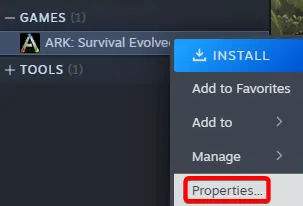
Locate and right-click ARK: Survival Evolved, then select Properties.
-
Click the tab Betas and select
preaquatica.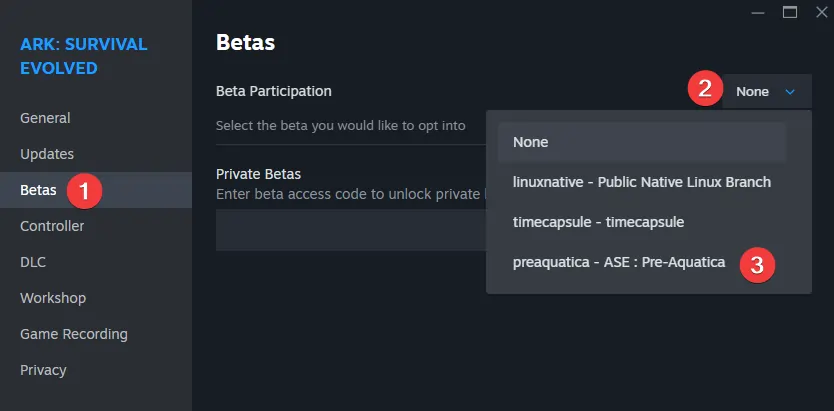
-
Wait for the beta to install and Start the game.
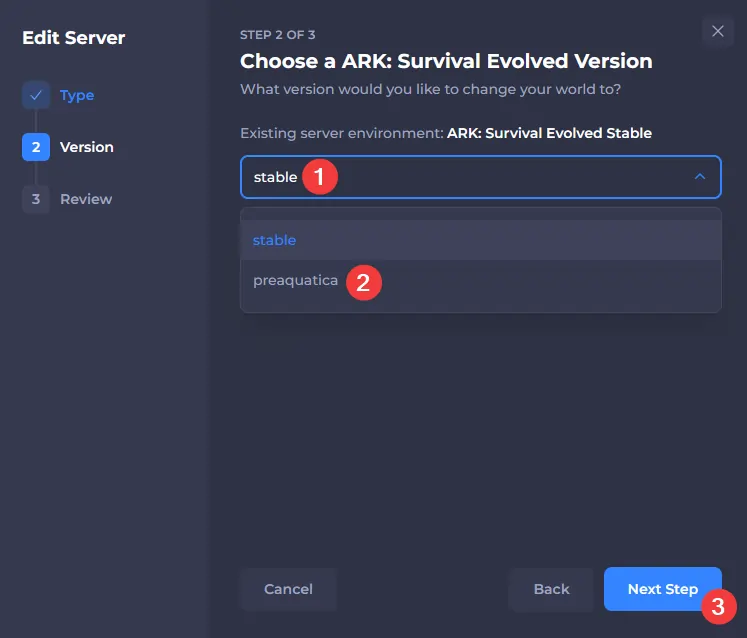
Select preaquatica as Server Type
With your client now running the preaquatica beta, the server must be downgraded as well.
- Access your control panel and Stop your server.
- Edit your server type.
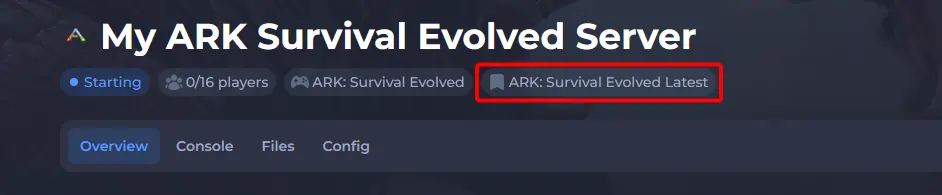
- Select the preaquatica beta.
- Start your server, and wait for the new version to be downloaded.