Table Of Contents
Adding Custom Startup ParametersStill have questions?
Come chat with us and we will get back to you as soon as possible!

Shockbyte
Support Team
How to Add a Custom Startup Parameter to Your Garry's Mod Server
Garry's Mod uses startup parameters, also known as Command Line Arguments, to configure various settings when a server starts. This can include assigning a Game Server Login Token, or changing which game mode is used by the server. A server owner may want to use a custom startup parameter to enable or disable certain features such as disabling the Steam Workshop or automatic Lua refresh.
| Parameter | Description |
|---|---|
| noaddons | Disables the loading of folders located in your server's addons folder. |
| noworkshop | Disables the Steam Workshop integration and prevents workshop addons from being installed on your server. |
| disableluarefresh | Disables the automatic refresh of .lua script files on your server when it is running. |
| nochromium | Disables the Chromium integration if your server is running the Chromium steam beta. |
#Adding Custom Startup Parameters
You can add a custom startup parameter by editing your gmod.properties file through the Files area of your server's control panel.
-
Access your Control Panel and Stop your server.
-
Navigate to the Files tab and locate the
gmod.propertiesfile.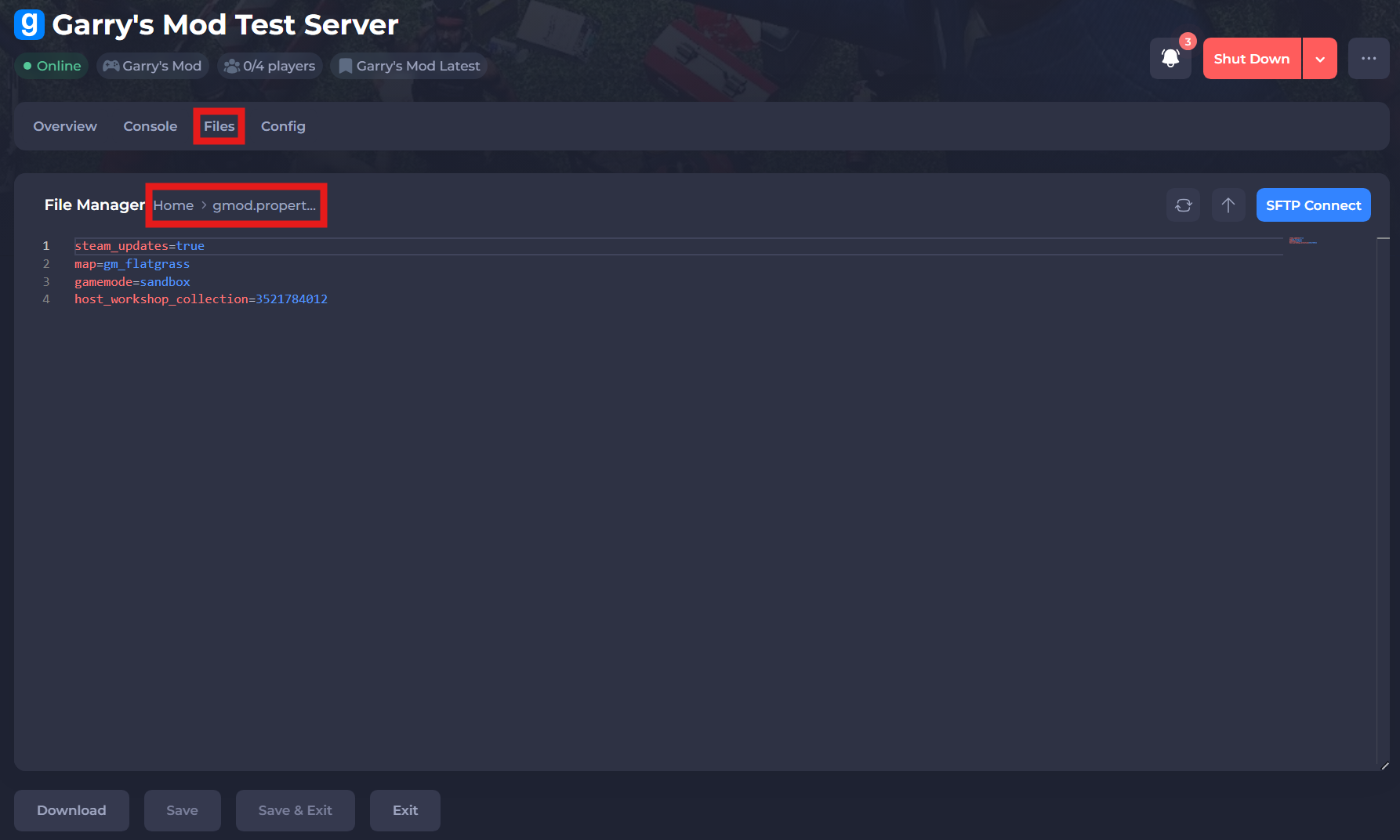
-
Add the desired custom startup parameter and value.
-
Save and exit the file. Restart your server to ensure the new changes apply.
If you require any further assistance, please contact our support at: https://shockbyte.com/billing/submitticket.php