Still have questions?
Come chat with us and we will get back to you as soon as possible!

Shockbyte
Support Team
How to Adjust Custom Game Settings on Your Enshrouded Server
Custom Game Settings let you change how your Enshrouded world plays. You can make enemies tougher or weaker, speed up crafting and plant growth, adjust how much XP players earn, and change the length of each day and night. You can turn off weapon durability, pacify enemies for a relaxed building server, or turn on starvation for a harder survival challenge.
You can adjust every setting from the Settings tab on the Shockbyte Panel, so you don't need to edit the server's configuration file by hand.
#Turning On Custom Game Settings
Your server uses a Game Settings Preset to decide which settings apply. To use your own values, you need to set the preset to Custom first.
-
Navigate to the Shockbyte Control Panel and open your Enshrouded server.
-
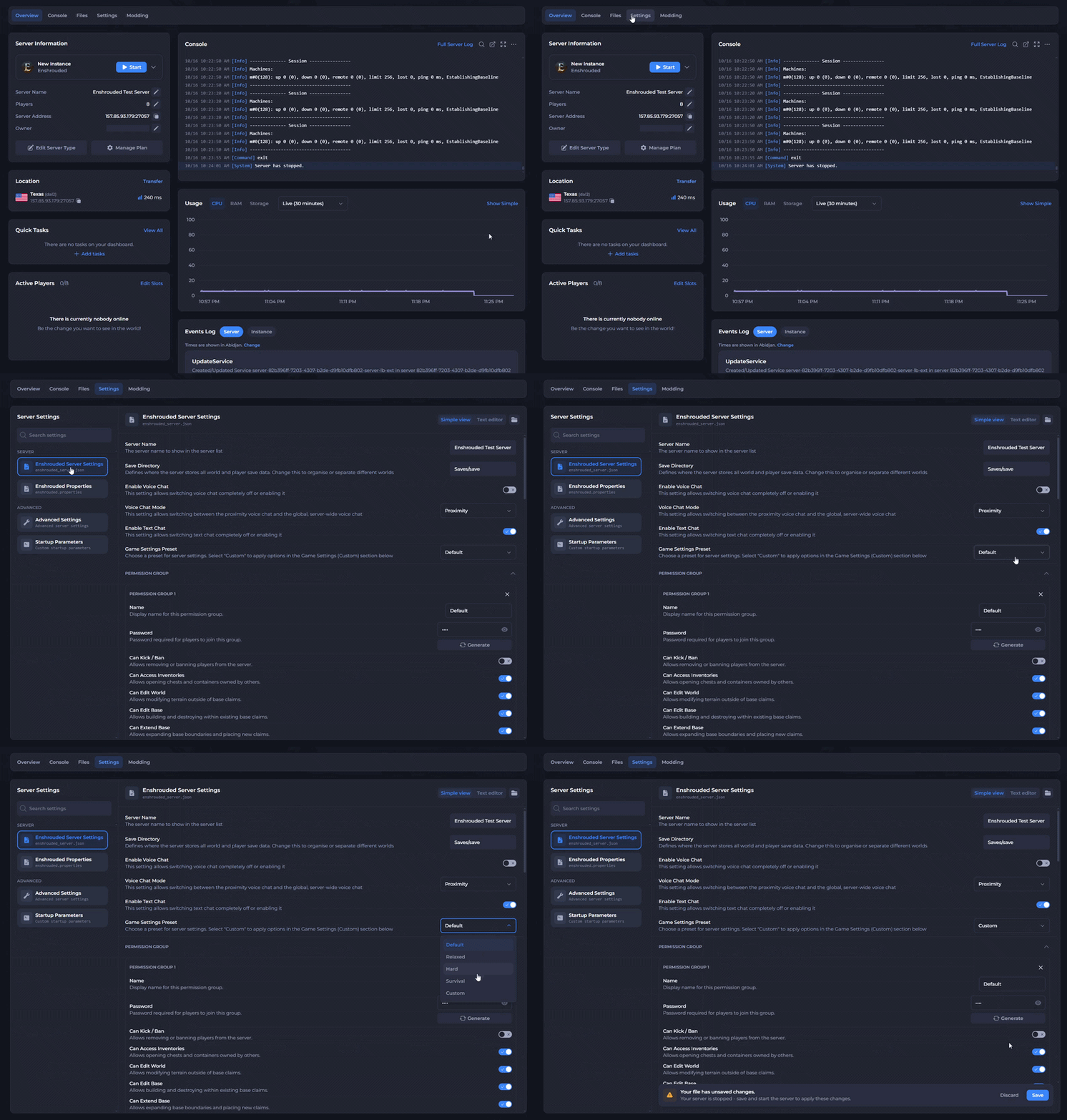
Click Stop to shut down your server and open the Settings tab.
-
Under Server, select Enshrouded Server Settings.
-
Make sure Simple view is selected in the top right.
-
Find Game Settings Preset and select Custom from the dropdown.
-
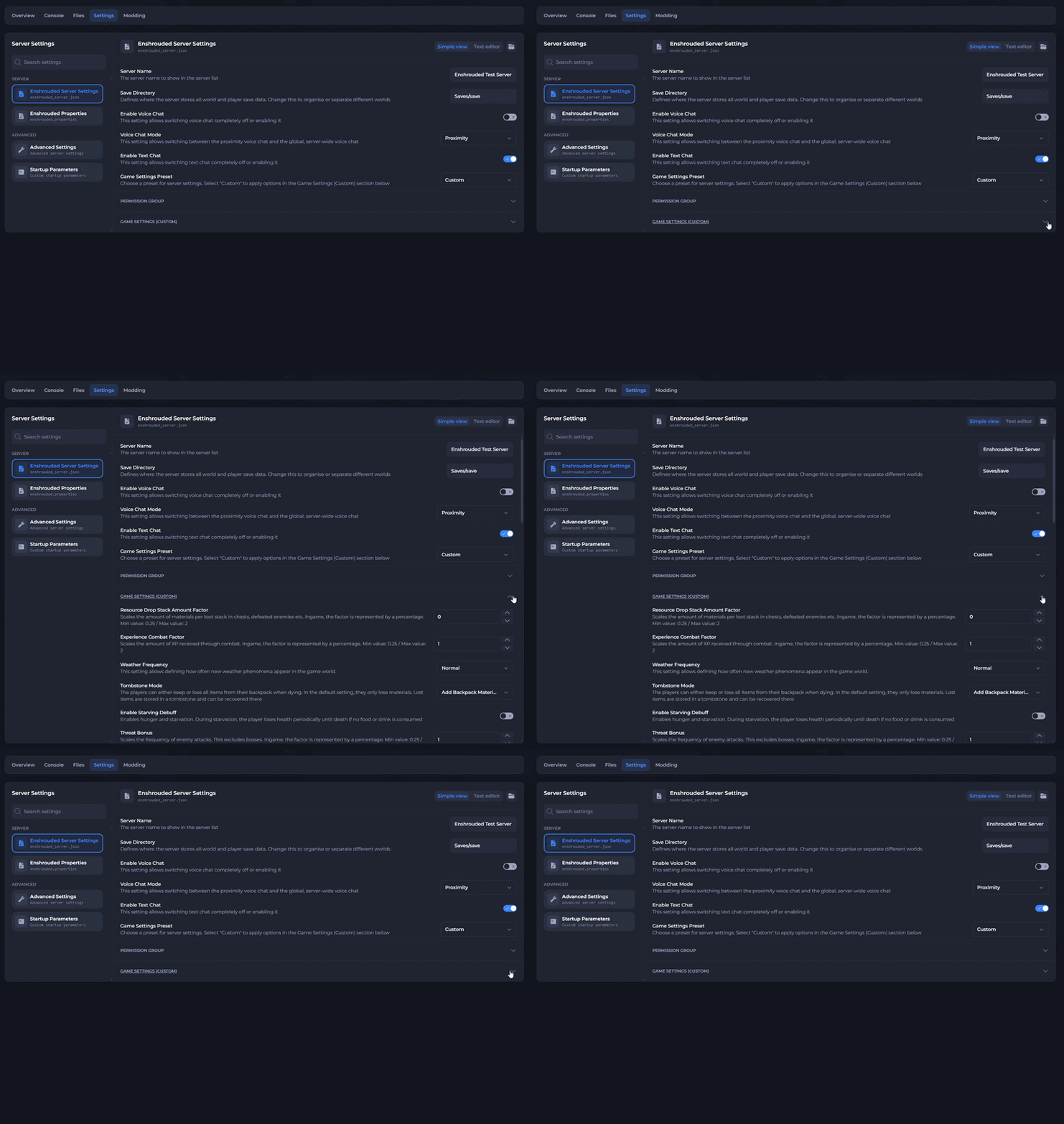
Scroll down and click Game Settings (Custom) to expand the section.
-
Change the settings you which to have on your server. (The tables below explain each one.)
-
Save your changes.
-
Click Start Server to start your server with the new settings.
Important
Your server ignores the Game Settings (Custom) section unless the Game Settings Preset is set to Custom. If your changes don't apply, check the preset first.
#How Factor Settings Work
Most settings use a factor. A factor of 1 keeps the game's normal value, which Enshrouded shows in-game as 100%. A factor of 2 doubles the value (200%), and a factor of 0.5 halves it (50%).
Each factor setting has a minimum and maximum value. The panel shows these limits under each setting, and the tables below list them too.
#Player Settings
| Setting | What it does | Min / Max |
|---|---|---|
| Player Health Factor | Scales the max health for players. | 0.25 / 4 |
| Player Mana Factor | Scales the max mana for players. | 0.25 / 4 |
| Player Stamina Factor | Scales the max stamina for players. | 0.25 / 4 |
| Player Body Heat Factor | Scales how much body heat players have. A higher value lets players stay in very cold areas longer before hypothermia sets in. | Dropdown |
| Player Diving Time Factor | Scales how long players can stay underwater before running out of oxygen. | 0.5 / 2 |
| Shroud Time Factor | Scales how long players can stay inside the Shroud. | 0.5 / 2 |
| Enable Durability | Turn off to stop weapons from breaking. | On / Off |
| Enable Glider Turbulences | Turn off to stop air turbulence from affecting the glider, as in earlier versions of the game. | On / Off |
| Tombstone Mode | Decides what players lose when they die. By default, players lose only materials. Lost items go into a tombstone that players can recover. | Dropdown |
#Enemy Settings
| Setting | What it does | Min / Max |
|---|---|---|
| Enemy Health Factor | Scales the health of all enemies except bosses. | 0.25 / 4 |
| Enemy Damage Factor | Scales the damage of all enemies except bosses. | 0.25 / 5 |
| Enemy Stamina Factor | Scales the stamina of all enemies except bosses. Enemies with higher stamina take longer to stun. | 0.5 / 2 |
| Enemy Perception Range Factor | Scales how far enemies can see and hear players. Excludes bosses. | 0.5 / 2 |
| Threat Bonus | Scales how often enemies attack. Excludes bosses. | 0.25 / 4 |
| Aggro Pool Amount | Controls how many enemies can attack at the same time. | Dropdown |
| Random Spawner Amount | Controls how many enemies appear in the world. | Dropdown |
| Pacify All Enemies | Turn on to stop enemies attacking players until a player attacks first. Excludes bosses. | On / Off |
| Curse Modifier | Controls the chance of enemies giving players the Shroud curse. Easy turns the curse off and Hard doubles the chance. | Easy / Normal / Hard |
#Boss Settings
| Setting | What it does | Min / Max |
|---|---|---|
| Boss Health Factor | Scales the health of all bosses. | 0.2 / 5 |
| Boss Damage Factor | Scales the damage of boss attacks. | 0.2 / 5 |
#Experience Settings
| Setting | What it does | Min / Max |
|---|---|---|
| Experience Combat Factor | Scales the XP players earn through combat. | 0.25 / 2 |
| Experience Mining Factor | Scales the XP players earn by mining resources. | 0 / 2 |
| Experience Exploration Quests Factor | Scales the XP players earn by exploring and completing quests. | 0.25 / 2 |
#Resource and Crafting Settings
| Setting | What it does | Min / Max |
|---|---|---|
| Resource Drop Stack Amount Factor | Scales the number of materials in each loot stack from chests, defeated enemies, and other sources. | 0.25 / 2 |
| Mining Damage Factor | Scales mining damage. Higher mining damage increases terraforming and the resources players get from each hit. | 0.5 / 2 |
| Plant Growth Speed Factor | Scales how fast plants grow. | 0.25 / 2 |
| Factory Production Speed Factor | Scales how long workshop items take to produce. | 0.25 / 2 |
| Perk Cost Factor | Scales the number of Runes players need to upgrade weapons. | 0.25 / 2 |
| Perk Upgrade Recycling Factor | Scales the number of Runes players get back when they salvage upgraded weapons. | 0 / 1 |
| Flame Level For Shroud Removal | Sets the Flame level a world needs before Flame Altars push back the Shroud around them. Lower it to unlock Shroud removal earlier. | 0 / 11 |
| Fishing Difficulty | Controls how strong fish are during the fishing minigame. | Dropdown |
| Taming Startle Repercussion | Decides what happens to taming progress when a player startles the wildlife. The game shows taming progress as hearts. | Dropdown |
#Survival Settings
| Setting | What it does | Min / Max |
|---|---|---|
| Enable Starving Debuff | Turns on hunger and starvation. Starving players lose health over time until they eat or drink, or until they die. | On / Off |
| From Hunger To Starving | Sets how long players stay hungry before starvation sets in. | 5 min / 20 min |
| Food Buff Duration Factor | Scales how long food buffs last. | 0.5 / 2 |
| Weather Frequency | Controls how often new weather appears in the world. | Dropdown |
#Day and Night Settings
| Setting | What it does | Min / Max |
|---|---|---|
| Day Time Duration | Sets the length of daytime. A smaller value gives a shorter day. | 2 min / 60 min |
| Night Time Duration | Sets the length of nighttime. A smaller value gives a shorter night. | 2 min / 60 min |
#Converting Minutes to Nanoseconds
The configuration uses nanoseconds for Day Time Duration, Night Time Duration, and From Hunger To Starving, while the game shows these times in minutes. One minute equals 60,000,000,000 nanoseconds, so you multiply the number of minutes you want by 60,000,000,000.
| Minutes | Value to enter |
|---|---|
| 2 | 120000000000 |
| 5 | 300000000000 |
| 10 | 600000000000 |
| 12 | 720000000000 |
| 15 | 900000000000 |
| 20 | 1200000000000 |
| 30 | 1800000000000 |
| 45 | 2700000000000 |
| 60 | 3600000000000 |
Note
Enter the number without commas or spaces. For example, enter 1800000000000 for a 30 minute day.
#Troubleshooting
- My changes didn't apply. Check that the Game Settings Preset is set to Custom. Your server reads its settings when it starts, so restart your server after saving any change.
- A setting won't save. Check that the value sits between the setting's minimum and maximum. The panel lists these limits under each setting.
- The day or night length looks wrong. Check that you entered the time in nanoseconds, not minutes. Use the conversion table above to find the right value.
- I want to edit the settings as code. Click Text editor in the top right of the Enshrouded Server Settings page. Your custom settings appear in the gameSettings section of the enshrouded_server.json file.
If you still need help, contact our support team and we'll take a look for you.