Still have questions?
Come chat with us and we will get back to you as soon as possible!

Shockbyte
Support Team

How to Update the Plugins on Your Rust Server
Rust plugins should be kept up to date to prevent issues and ensure that your server stays visible in the server list. Plugins can be updated automatically, or with the Automatic Plugin Updater.
#Automatic Plugin Updater
We recommend installing the Automatic Plugin Updater as this will update the server plugins upon each restart. It also adds a command which can be ran to update the server plugins and check for plugin updates.
The following commands can be entered in the Server Console while the server is online:
| Command | Description |
|---|---|
| update * | Checks for and automatically updates all of your plugins. |
update pluginname | Checks for and automatically updates the specified plugin. |
#Manually Updating Plugins
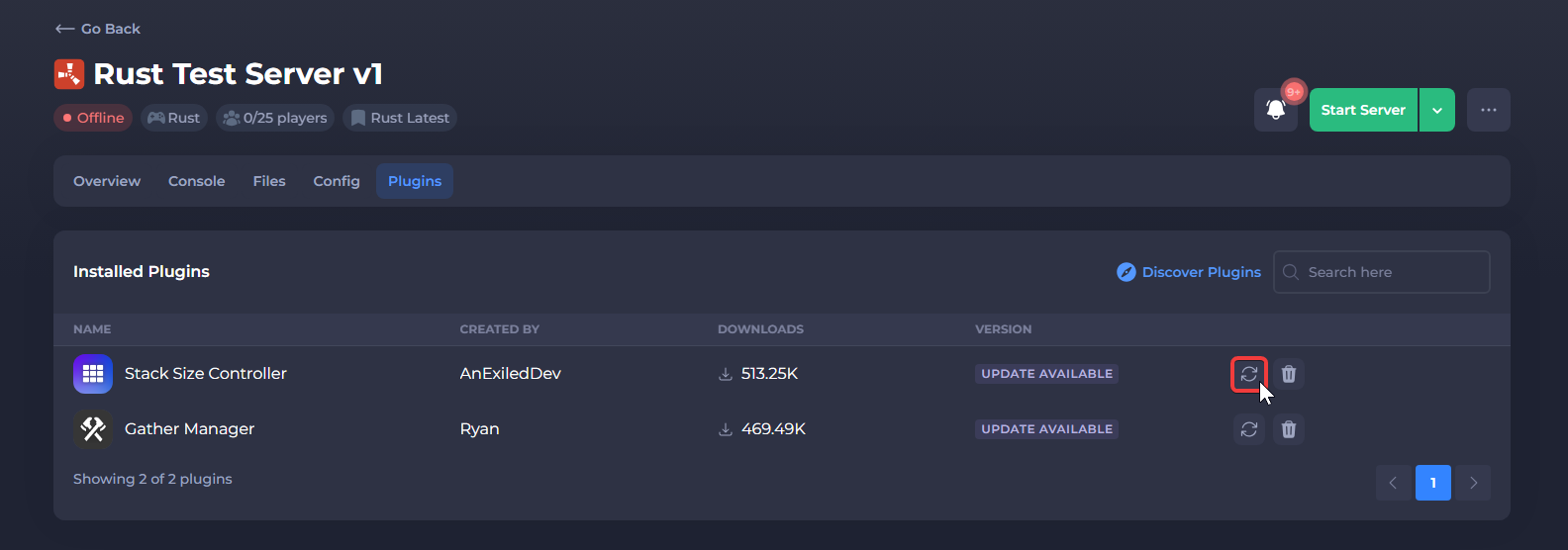
Plugins can be updated manually through the built-in "Plugins" tab in the Shockbyte control panel, or by manually reinstalling the plugin files.
To learn more about Rust server hosting, you can browse our library of Knowledgebase articles here.