Table Of Contents
How to Add a UserStill have questions?
Come chat with us and we will get back to you as soon as possible!

Jay Miller
Game Engineer

How To Add Friends To Your Shockbyte Panel
An exceptional feature of the Shockbyte Panel is the ability to share your server with other users. Adding a user to your server can allow them to see your console, edits the files, and much more. With the ability to assign roles, you can edit permissions of a user as you desire.
Sharing is great for servers that are owned by friends, or that require constant attention by administrators. As it can be quite a lot of work to run a server by yourself, there may be times where you would want assistance in making changes!
#How to Add a User
You can add a user by inviting their email from within the Shockbyte Panel.
-
Open your control panel, and navigate to Access Control.
-
Under Invite User, enter the e-mail of the new user, then set their Role.
-
Click Send Invite.
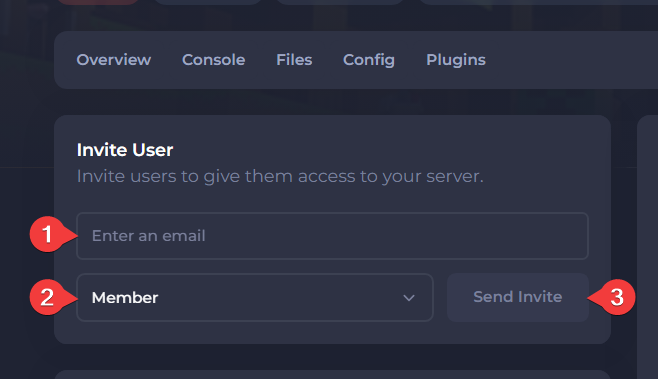
Once invited, you will see the persons email under the Pending Invites section. Once the invite is accepted, they will appear under the Members section with their assigned role.
To create & assign custom roles to members, you can click here to learn how to do so.