Still have questions?
Come chat with us and we will get back to you as soon as possible!

Jay Miller
Game Engineer

How To Set Up And Customize Your SCP: 5K Server Settings
Hosting your own SCP: 5K server allows you to have complete control over your gaming experience. Whether you want to organize private matches or customize settings to fit your preferred playstyle, managing a server provides the flexibility you need. You can adjust SCP spawn rates, create custom game modes, and more.
Important
Before you start making any changes, it is a good idea to back up your server first. There is a guide on how to do that here.
#Editing SCP: 5K Server Settings via Config Tab
You can find the primary settings for your server in the SCP: 5K Server Settings under the config tab on your control panel.
-
Access your Control Panel and Stop the server.
-
Navigate to the Config Tab.
-
Make any necessary changes in the SCP: 5K Server Settings.
Here is a table summarizing the settings and their functions:
| Setting | Description |
|---|---|
| FriendsOnly | Restricts server access to players on the owner's friends list. |
| Reset Zombie Spawners | Clears all existing zombie spawners to refresh the map’s spawn points. |
| Server Password | Sets a password to control who can join your server. |
| Server Name | Sets the public name for your server in the server browser. |
| Disable Godmode | Turns off invincibility for players on the server. |
| Use Server Password | Enables password protection for the server. |
| Max VAC Bans | Limits players by the maximum number of VAC bans they can have. |
| Zombie Spawn Amount | Adjusts how many zombies spawn at each spawn point. |
| Team Damage Enabled | Allows teammates to damage each other during gameplay. |
| Anyone Use Admin Cam | Lets all players access the admin camera feature. |
| Devs Always Join | Automatically allows developers to join the server. |
| Deny Community Ban | Blocks players banned in the community from joining the server. |
| Score To Win | Sets the target score required to win a match. |
| Treat Devs As Admin | Grants developer accounts the same permissions as server admins. |
| Steam API Key | Required key to integrate Steam services with the server. |
| Round Timer | Sets the duration of each round in minutes. |
| Respawn Time | Determines how long players must wait before respawning. |
| Empty Server Restart Time | Configures how long the server waits to restart when no players are online. |
| Show on Server List | Toggles whether the server is visible in the public server list. |
| Deny VAC Ban | Prevents players with any VAC bans from joining. |
| Restart Server Each Game | Automatically restarts the server after each game ends. |
| Max Zombie Count | Sets the maximum number of zombies allowed on the map at one time. |
| Min Days Since Last Ban | Specifies the minimum days since a player’s last ban to allow them to join. |
| Zombie Respawn Time | Adjusts how quickly zombies respawn after being killed. |
| Whitelist | Restricts server access to a list of approved players. |
| AFK Timer | Sets a time limit for how long players can remain idle before being kicked. |
| Deny Game Ban | Blocks players with bans from specific games from joining the server. |
| Max Game Bans | Sets the maximum number of game bans a player can have to join the server. |
| Admins Always Join | Gives admins priority to join the server even when it is full. |
| Team Damage Reflection | Reflects damage dealt to teammates back onto the attacker. |
- Save and Start the server.
#Finding Config Files on the Server
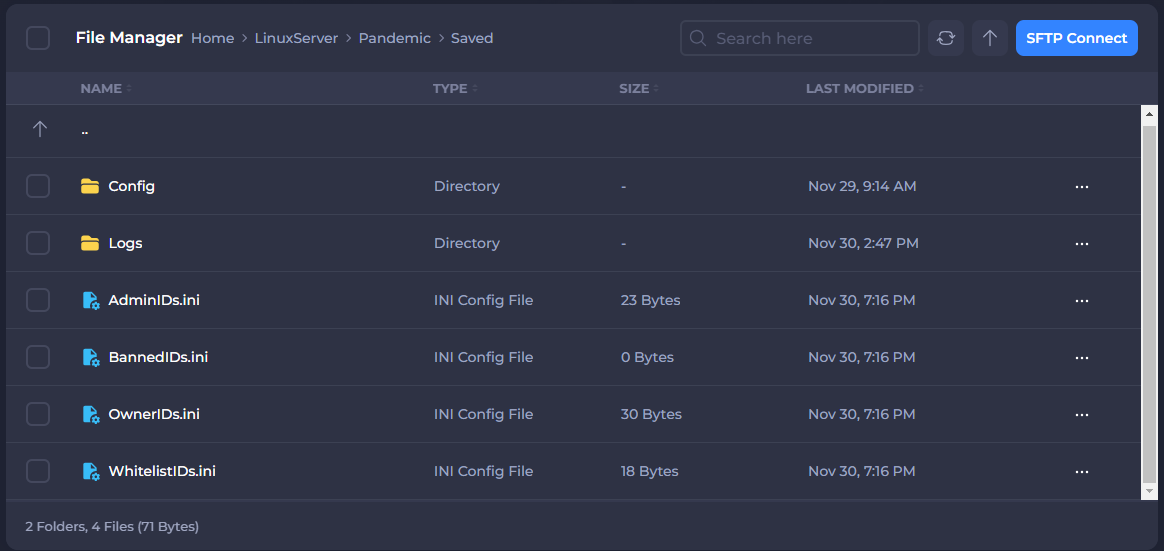
If you need to make additional changes to your server, most of your server's config files can be found by navigating to LinuxServer > Pandemic > Saved in the server files.
-
Before making any changes to your server, be sure to Stop the server first.
-
Go to your server Files tab.
-
Navigate to
LinuxServer > Pandemic > Saved.
- Open and Edit the config file you need.
Here is a table summarizing the config files and their functions:
| Config File | Description | Location |
|---|---|---|
| AdminIDs.ini | Stores Steam IDs of players with admin privileges. | LinuxServer > Pandemic > Saved |
| BannedIDs.ini | Lists Steam IDs of players banned from the server. | LinuxServer > Pandemic > Saved |
| OwnerIDs.ini | Contains Steam IDs of server owners with full control over settings. | LinuxServer > Pandemic > Saved |
| WhitelistIDs.ini | Includes Steam IDs of players approved to join the server if Whitelist is enabled. | LinuxServer > Pandemic > Saved |
| ServerConfig.ini | Main configuration file for server settings like game rules and restrictions. | LinuxServer > Pandemic > Saved > Config |
| GameUserSettings.ini | Advanced settings for server and client-side configurations. Edit only if confident in changes. | LinuxServer > Pandemic > Saved > Config > LinuxServer |
| Advanced Config Files | Additional advanced config options for custom server modifications. Advanced knowledge required. | LinuxServer > Pandemic > Saved > Config > LinuxServer |
- Save and Start the server.
And that’s it! With your SCP: 5K server set up and customized, you are ready to jump into the action. Adjusting settings like SCP spawn rates, maps, and game modes ensures the experience fits exactly what you want.