How to Use Sandbox Codes and Difficulty Presets on Your 7 Days to Die Server
Still have questions?
Come chat with us and we will get back to you as soon as possible!

Shockbyte
Support Team

How to Use Sandbox Codes and Difficulty Presets on Your 7 Days to Die Server
Since the 3.0 update, 7 Days to Die bundles all of its difficulty and gameplay settings into a single Sandbox Code - a short string like AAAJABJACJADJARFBNC that stores your entire ruleset. Instead of editing dozens of individual values, you set one code and the server applies the whole configuration on startup.
This guide covers how to add a Sandbox Code to your server, and the classic difficulty presets you can use out of the box.
#Adding a Sandbox Code
- Open your Server Control Panel.
- Stop the server and wait for it to go offline.
- Open the Config tab and open 7D2D Server Settings.
- Locate the Sandbox Code option and paste your code into the field.
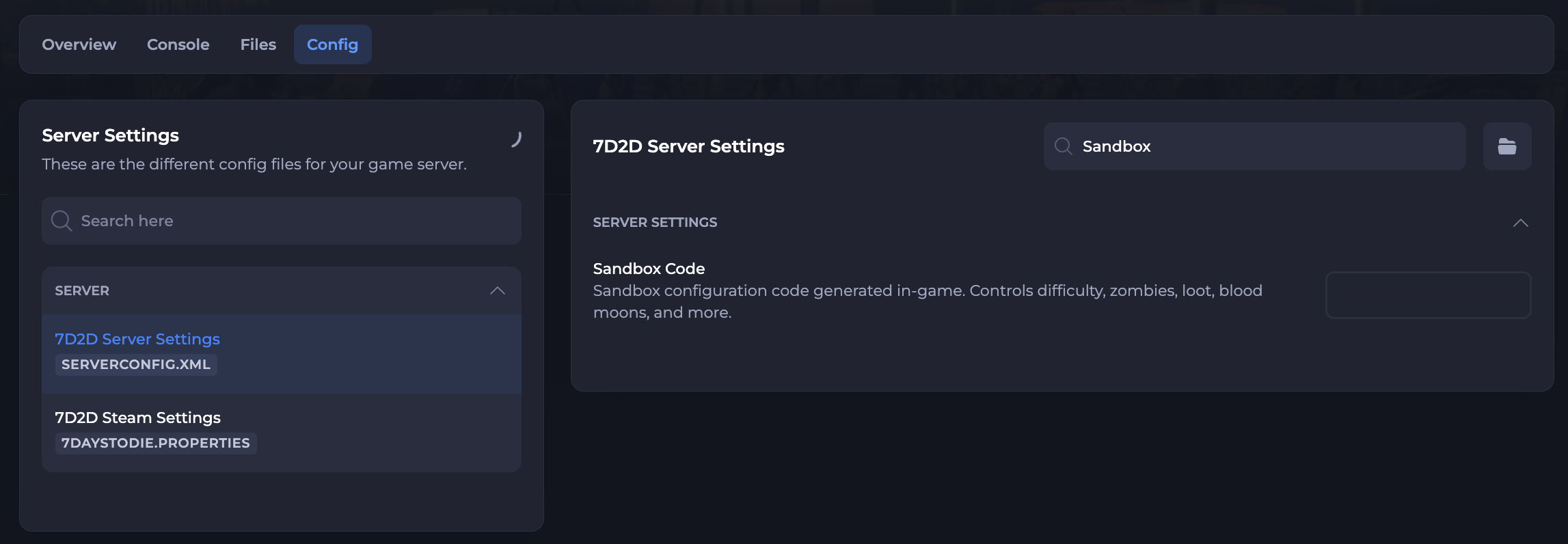
- Save the file and Start your server.
Your server will apply the new configuration as soon as it boots.
#Classic Difficulty Presets
If you don't want to build a custom code, you can drop in one of the game's six built-in difficulty presets. By default your server uses Adventurer. The difficulty shown below is the game's own difficulty score, from 1 (easiest) to 9 (hardest).
Paste any of the codes below into the Sandbox Code field using the steps above:
| Preset | Difficulty | Sandbox Code |
|---|---|---|
| Scavenger | 2/9 | AAAKABKACKADKARDBNB |
| Adventurer (default) | 3/9 | AAAJABJACJADJARFBNC |
| Nomad | 4/9 | A |
| Warrior | 5/9 | AAAGABGACGADGARJBND |
| True Survivalist | 6/9 | AAAEABEACEADEARKBNE |
| Insane | 7/9 | AAADABDACDADDARLBNF |
Why is the Nomad code just A?
A Sandbox Code only stores settings that differ from the game defaults. Nomad leaves everything at default, so its code is simply the version header, A.
#Creating Your Own Code
Want something beyond the built-in difficulties? The 7 Days to Die Sandbox Code Generator is a great tool for building a fully custom setup. You can tweak any of the 150+ available options, load any of the official presets as a starting point, and the generator builds your Sandbox Code as you go.
Once you're happy with your settings, copy the generated code and add it to your server using the steps above.