Still have questions?
Come chat with us and we will get back to you as soon as possible!

Shockbyte
Support Team

How To Edit Your Stardew Valley Save
With the help of Stardew Valley Save Editor (Farm Foundry), it is possible to make a number of changes to your Stardew Valley save including season, weather, farmer level, unlocked recipes and a range of other helpful options.
Important
Changing your Farm Type may cause cabins and placed furniture/items to become stuck inside terrain.
#Downloading/Running SDVSE
Before editing your save you will first need to download SDVSE from Nexus Mods.
-
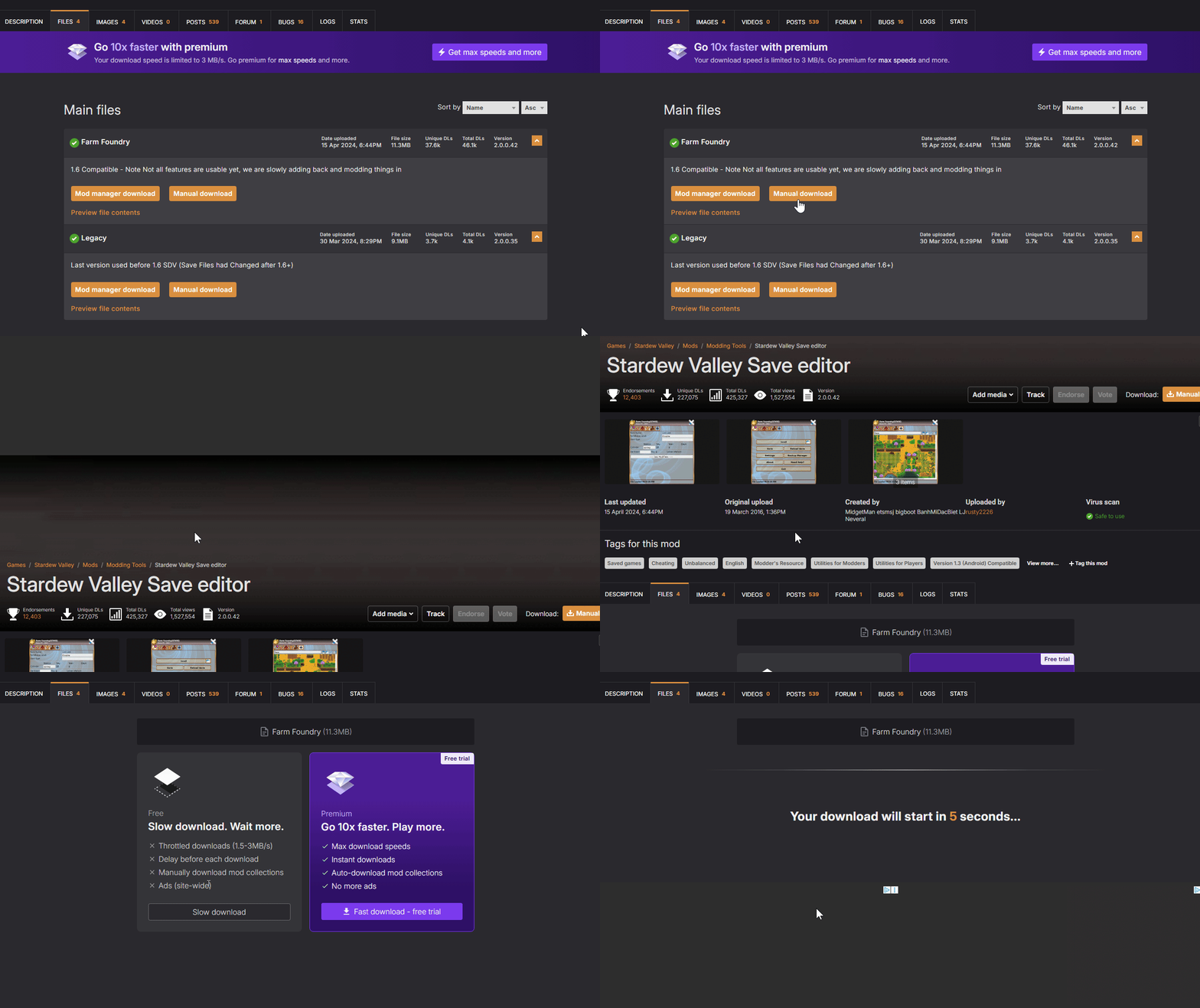
Navigate to SDVSE's Nexus Mods page.
-
Scroll down and select the Files tab.
-
Select Manual Download > Slow Download.
-
Extract the downloaded .zip file.
-
Double click FarmFoundry.exe to open the save editor.
#Downloading your Farm's Save
Your server's save file can easily be downloaded using your server control panel's built-in file manager.
-
Open your Control Panel.
-
Stop your server and wait for it to go offline.
-
Navigate to the Files tab.
-
Locate and Open
/StardewValley/Saves/<Your Farm's Name>/. -
Right-click on the file with your farm's name and click Download.
#Editing your Farm's Save
Once you have your farm's save and SDVSE downloaded you're ready to make any required changes to the save.
-
Open SDVSE (FarmFoundry.exe).
-
Click Load.
-
Click Load From File.
-
Locate and Open the save file you downloaded in the previous section.
-
Make the required changes to your Farm's Save, then click Save.
#Uploading your Farm's Save
After making any changes to your farm's save you'll need to upload it to your server.
-
Open your control panel.
-
Stop your server and wait for it to go offline.
-
Navigate to the Files tab.
-
Locate and Open
/StardewValley/Saves/<Your Farm's Name>/. -
Locate and upload your edited farm save file.
-
When prompted to Overwrite the file and click Overwrite.
-
Start your server.
To learn more about Stardew Server dedicated server hosting, you can check out our knowledgebase articles found here.