Table Of Contents
Installing ModsStill have questions?

Jay Miller
Game Engineer
How to Install Mods to your Vintage Story Client
Vintage Story has a wide range of mods available, such as new content, blocks, electronics, and more. When connecting to a server, your client will automatically download the mods required to connect to the server. However, this article may be beneficial for those who wish to use mods on their single-player saves.
If you wish to install mods to your Vintage Story dedicated server, you can follow this article.
Note
You can download Vintage Story mods from the VS Mod Database.
#Installing Mods
Mods can be installed by uploading the .zip files to the mods folder, then enabled with the in-game mod manager.
-
Push
WinKey+Rto open the Run console. -
Open the folder
%appdata%/vintagestorydata/mods.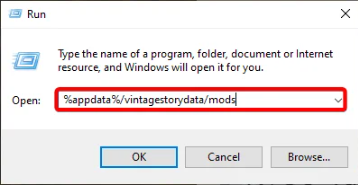
-
Upload any mod
.zipfiles you have downloaded to this folder.
-
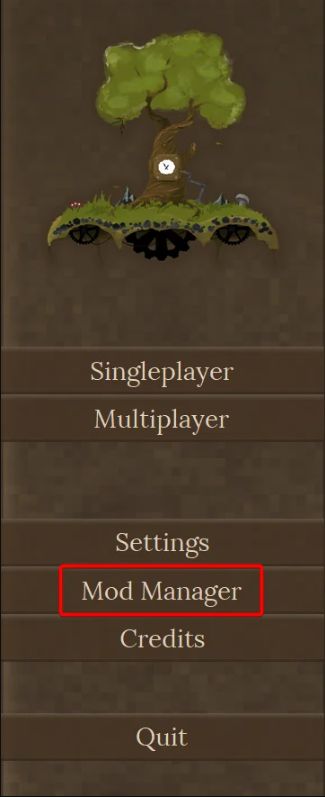
Launch Vintage Story, and navigate to Mod Manager.
-
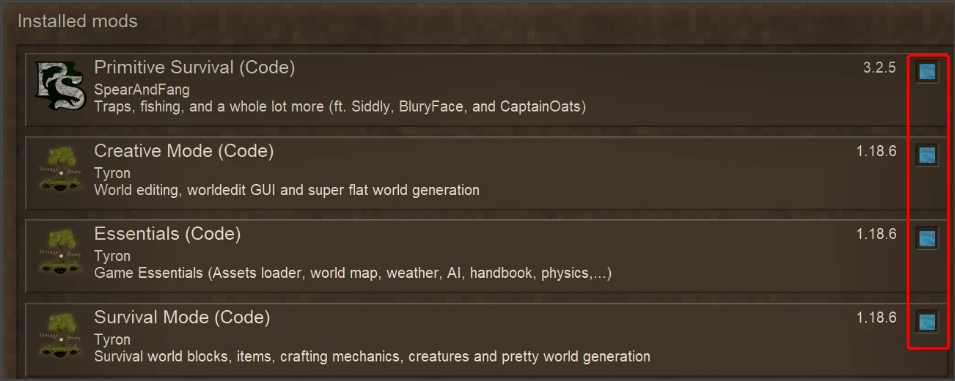
To enable a mod, ensure the enable box is highlighted in blue.
If you require any further assistance, please contact our support at: https://shockbyte.com/billing/submitticket.php