How To Use Custom Game Mode Settings On Your Sons Of The Forest Server
Still have questions?
Come chat with us and we will get back to you as soon as possible!

Jay Miller
Game Engineer

How To Use Custom Game Mode Settings On Your Sons Of The Forest Server
A custom game mode in Sons of the Forest allows server owners to pick and choose various game settings available to them. This can be a great way to spruce up the gameplay experience that Sons of the Forest provides.
There are settings such as damage multipliers, day/night length, animal spawn rate, and much more.
Important
When changing game modes, you must start a new save otherwise the changes will not apply.
#Enabling Custom Settings
You can select the custom game mode in your Sons of the Forest Server Settings section, found in your control panel.
-
Access your control panel and Stop your server.
-
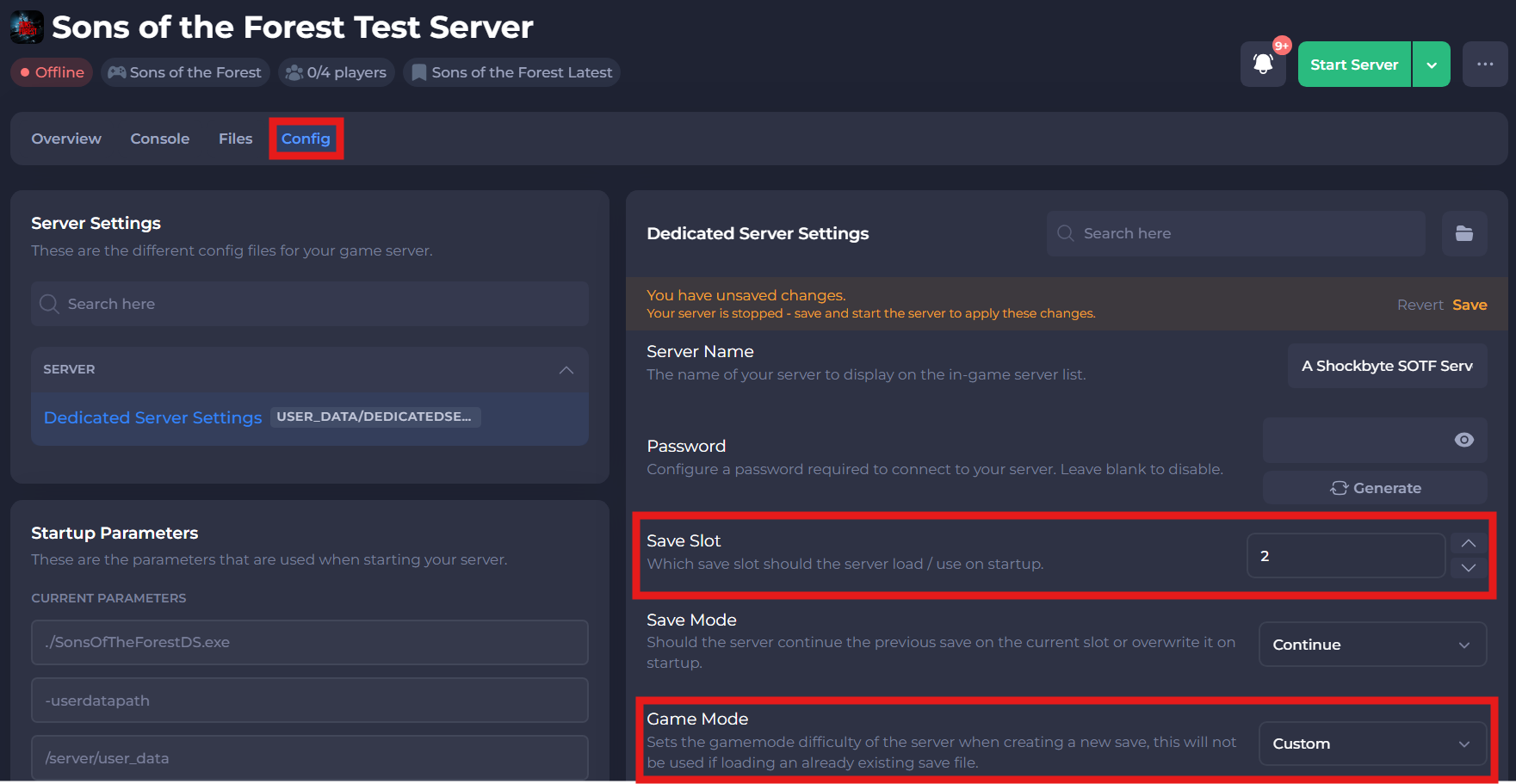
Navigate to the Config tab and click on Dedicated Server Settings.
-
Set Save Slot to a new save number, that you have not used before.
-
Set Game Mode to Custom.
-
Save your changes.
#Configuring Custom Settings
You can set custom game mode settings in the dedicatedserver.cfg file, found in your servers files.
-
Navigate to the Files tab.
-
Locate the
user_data/dedicatedserver.cfgdirectory and Open the dedicatedserver.cfg file. -
Within the CustomGameModeSettings parameter, enter each of the game mode settings that you would like applied to your server with a new line. A full list of settings can be found in the table below.
| GameMode Setting | Description | Values |
|---|---|---|
| GameSetting.Vail.EnemySpawn | Enable enemy spawning. | true, false |
| GameSetting.Vail.EnemyHealth | Starting health of enemies. | low, normal, high |
| GameSetting.Vail.EnemyDamage | Amount of damage enemies do. | low, normal, high |
| GameSetting.Vail.EnemyArmour | Amount of armour enemies have. | low, normal, high |
| GameSetting.Vail.EnemyAggression | Aggression level of enemies. | low, normal, high |
| GameSetting.Vail.AnimalSpawnRate | Spawn rate of animals. | low, normal, high |
| GameSetting.Environment.StartingSeason | Set the starting season. | spring, summer, autumn, winter |
| Structure.Damage | Allows buildings to be damaged. | true, false |
| GameSetting.Environment.SeasonLength | Adjust season length. | short, default, long, realistic |
| GameSetting.Environment.DayLength | Adjust day length. | short, default, long, realistic |
| GameSetting.EnvironmentPrecipitationFrequency | Adjust the frequency of rain and snow. | low, default, high |
| GameSetting.Survival.ConsumableEffects | Enables damage taken when low on hydration and low fullness. | normal, hard |
| GameSetting.Survival.PlayerStatsDamage | Enables damage from each bad or rotten food and drink. | off, normal, hard |
| GameSetting.Survival.ColdPenalties | Adjusts the severity that cold will affect health and stamina regen. | off, normal, hard |
| GameSetting.Survival.ReducedFoodInContainers | Reduces the amount of food found in containers. | true,false |
| GameSetting.Survival.SingleUseContainers | Containers can only be opened once. | true,false |
If you need additional help, our support team is always happy to assist: https://shockbyte.com/contact