Table Of Contents
Adding a PasswordStill have questions?
Come chat with us and we will get back to you as soon as possible!

Ruben B
Partnership Manager

How To Make Your HumanitZ Server Private
HumanitZ server owners are able to password protect their server, allowing them more control over who can join their server. After configuring a password on your server, only those with knowledge of the password will be able to connect.
#Adding a Password
A password can be added to your server using the HumanitZ Server Settings file in your server's control panel.
-
Access your control panel and Stop your server.
-
Navigate to Config.

-
Click HumanitZ Settings.
-
Enter your desired password in the Password field and Save the changes.
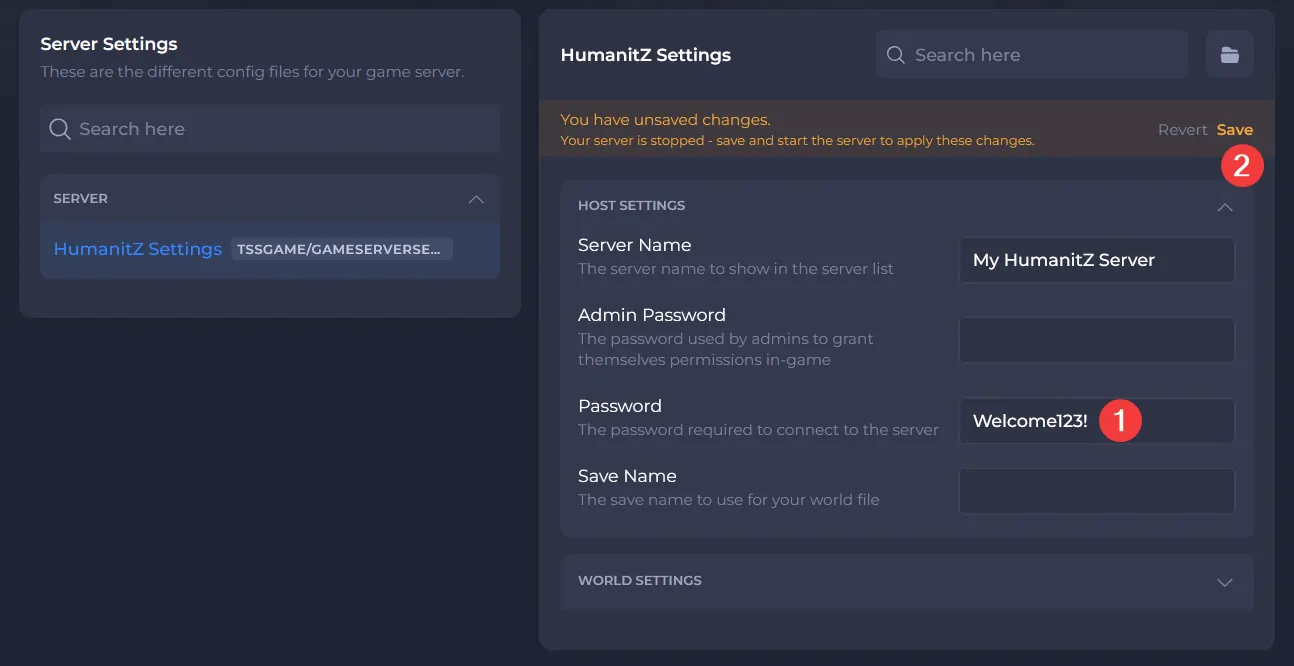
- Start your server.
Interested in purchasing HumanitZ servers with instant activation, easy customisation, and great & extensive Knowledgebase articles? Click here to purchase one!
To learn more about HumanitZ Server Hosting, you can browse our library of Knowledgebase articles here.