
Conan Exiles
Conan Exiles Console Commands: The Ultimate Admin Cheat Sheet
 Cami
CamiConan Exiles is brutal, unforgiving, and totally wild—but sometimes, it bugs out or you just want to skip the grind. That’s where Conan Exiles console commands come in. Whether you’re stuck in a rock, need to move a player, or just want to roleplay as a god (no judgment), this guide has all the Conan admin commands you’ll ever need.
Let’s break it down by category so you can find exactly what you need, fast.

#How to Access the Admin Panel and Use Console Commands
Before you go full god-mode, you need access to the admin panel. Here’s how:
#1. Enabling Admin Rights:
• Hit Escape (PC) or open Settings on console
• Go to Server Settings
• Click Make Me Admin (you’ll need the admin password if on a server)
You’ll see a confirmation: “Admin Rights Granted”
#2. Open the Console Command Line:
• Press ~ (tilde) or Insert on PC
• Double tap ~ for extended console options
• On consoles, open the menu > Admin Panel
Once you’re in, you can use console commands Conan Exiles style—fast, powerful, and sometimes dangerous.
#Essential Admin Commands in Conan Exiles
These are the must-know Conan Exiles admin commands for managing your game or server.
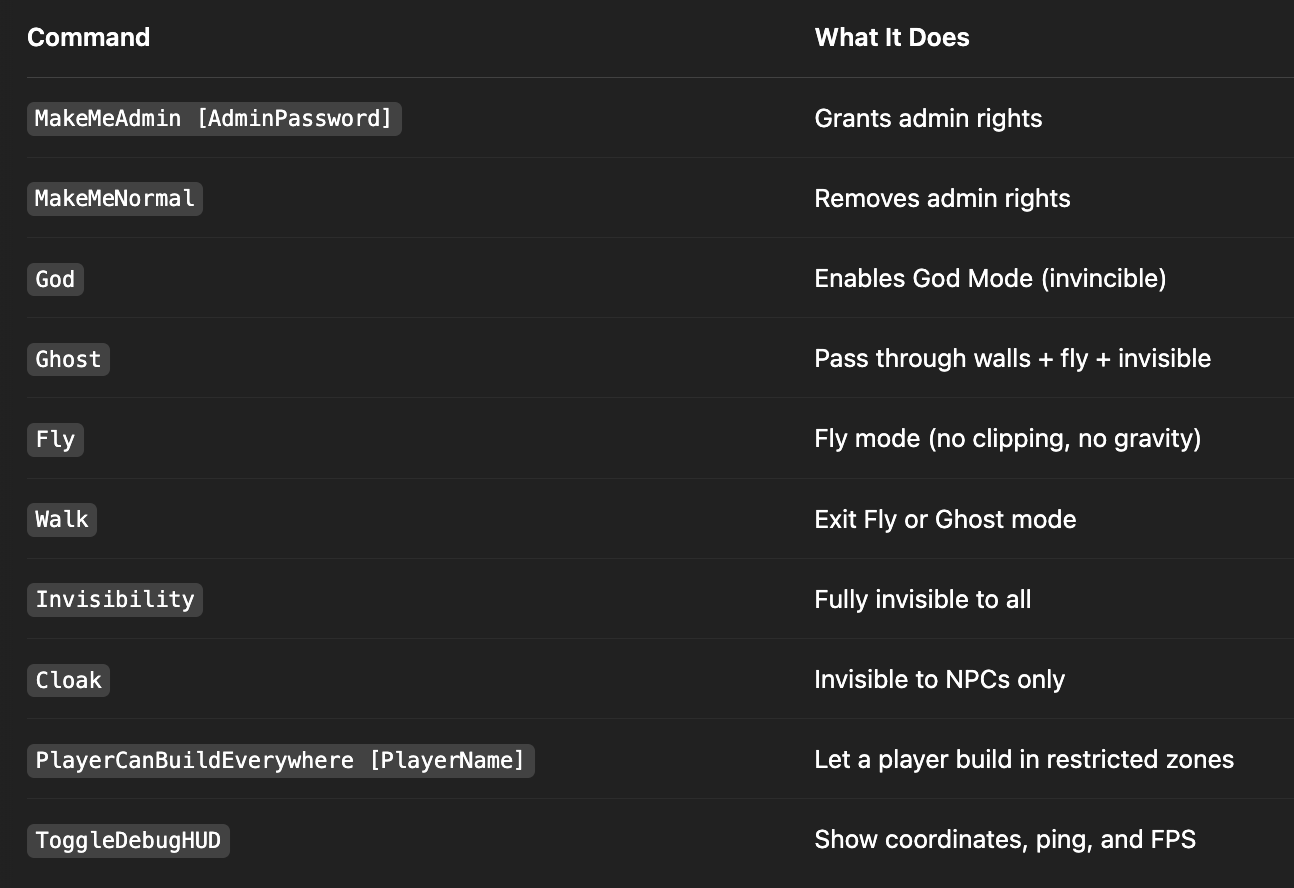
These are your bread-and-butter commands—use them to fix glitches, build without limits, or just vibe with total control.
#Movement Commands: Teleport, Fly, and Escape Glitches
Stuck in a rock? Need to warp across the map? Use these movement commands:
#Basic Travel
• Teleport: Teleport to where you're looking
• TeleportPlayer X Y Z: Teleport to coordinates
• TeleportToPlayer [PlayerName]: Go to a player
• SummonPlayer [PlayerName]: Bring a player to you
#Advanced Movement
• Fly: Fly freely (toggle on/off)
• Ghost: Fly + pass through objects + invisible
• Walk: Return to normal movement
• NoSprintCost: Run forever without stamina loss
#Visibility Tweaks
• Cloak: Hidden from NPCs
• Invisibility: Hidden from everything
These console commands Conan Exiles style are perfect for admin travel or escaping terrain bugs.

#Building & Destruction Commands
Want to spawn items, destroy glitched buildings, or inspect structures? Here’s what you need:
#Item & Structure Commands
•SpawnItem [ItemID] [Quantity]: Get any item instantly
•DamageTarget [Value]: Damage the object or NPC in your crosshair
•DestroyTarget: Deletes the selected object or structure
•BuildingIdentify: Shows structure ID, owner, and more
•BuildingDestroy [ID]: Destroys an entire structure by ID
#Useful for Admins:
•BroadcastMessage [Message]: Sends a message to all players
•PrintPlayerInfo: Gets a player’s Steam and in-game name
•ShowPlayers: Lists all connected players
Pro Tip: Use DestroyTarget with caution—it can wreck whole buildings and terrain. Always backup your server!

#Purge Commands: Start, Stop, or Control Events
The Purge system is epic but sometimes buggy. Fix or trigger waves with these commands:
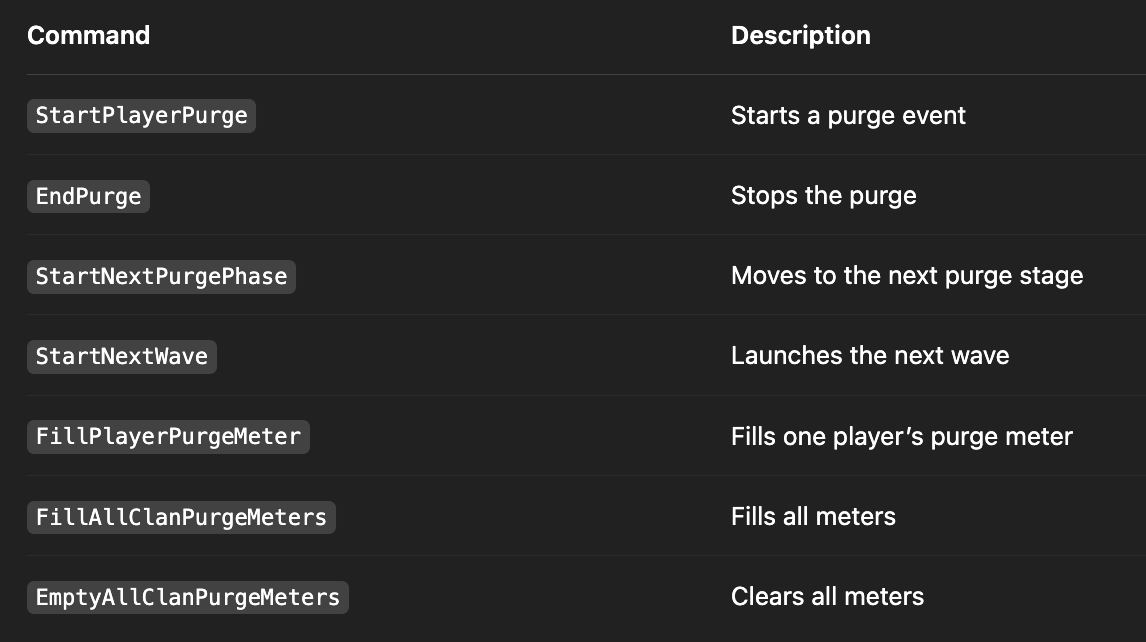
Ideal for testing bases, creating challenge events, or just chaotic fun on your server.
#Perspective & Camera Controls
Ever wanted to spy on players or get cinematic shots? These commands make that easy:
•ViewPlayer [PlayerName]: Move your camera to another player
•ViewSelf: Return to your own view
Great for server admins filming events or checking on players without interfering.
#Server & Debug Commands
These are more advanced but super helpful for admins:
•GetAllServerSettings: Lists all server configs
•SetServerSetting [Setting] [Value]: Change a setting on the fly
•GetServerHealth: Shows server stats like FPS, player count
•FlushLog: Clears the event log
•r.ShadowQuality [Value]: Adjust shadow detail
•p.clothphysics [Value]: Adjust cloth physics for performance

#Popular Use Cases for Console Commands
Here’s where these commands really come in clutch:
#1. You’re Stuck in Terrain
Use Ghost or Teleport to get unstuck.
#2. You Want to Build Freely
Use PlayerCanBuildEverywhere and NoBuildingCosts.
#3. Someone’s Glitched or Lost
Use SummonPlayer or TeleportToPlayer.
#4. Purge Event is Bugged
Use StartNextPurgePhase or EndPurge.
#5. You're Testing a Mod or Base
Use God, Fly, SpawnItem, and DamageTarget.

#Final Tips Before You Cheat Like a Barbarian
•Use a backup before destroying things—some commands have no undo
•Don’t give admin rights to untrusted players on multiplayer servers
•For single-player, feel free to go wild—it’s your world!
Console commands are an incredibly powerful tool, but with great power… yeah, you know the rest.
#Ready to Build Your Own Conan Server?
Want full control over your game world 24/7? Host your own Conan Exiles server with Shockbyte! We offer fast, affordable, and fully customizable servers that make admin life even easier.