Still have questions?
Come chat with us and we will get back to you as soon as possible!

Shockbyte
Support Team

How to Add a GSLT Key to your Insurgency Sandstorm Server
This guide explains how to set a GSLT key on your Insurgency: Sandstorm server. A Game Server Login Token (GSLT) is used to authenticate your server with Steam services and helps ensure your server appears correctly in the server browser.
Configuring a valid GSLT key is an important step for maintaining a stable and publicly accessible server. The steps below will walk you through generating and applying a GSLT key to your server configuration.
#GSLT Key Requirements
In order to be able to generate a GSLT, you must have a steam account which:
- Is not banned or blocked.
- Is not limited.
- Has a qualifying registered phone.
- Owns the game for the server you are making a key for.
- Has not reached the cap of 1,000 GSLT keys.
If your server is found to be breaking Valve's ToS, the server and your linked steam account may be banned.
#Obtaining a GSLT Key
-
First, make sure that you are logged into Steam Community.
-
Navigate to Steam Game Servers Account.
-
At the bottom of the page, fill out the App ID value of the game (Insurgency: Sandstorm is
581320). -
Add a memo or note if you want. Select the Create button.

-
Your GSLT key is the Login Token that will appear. You can now enter this when prompted during the setup wizard.
#Adding the GSLT Key to your Server
-
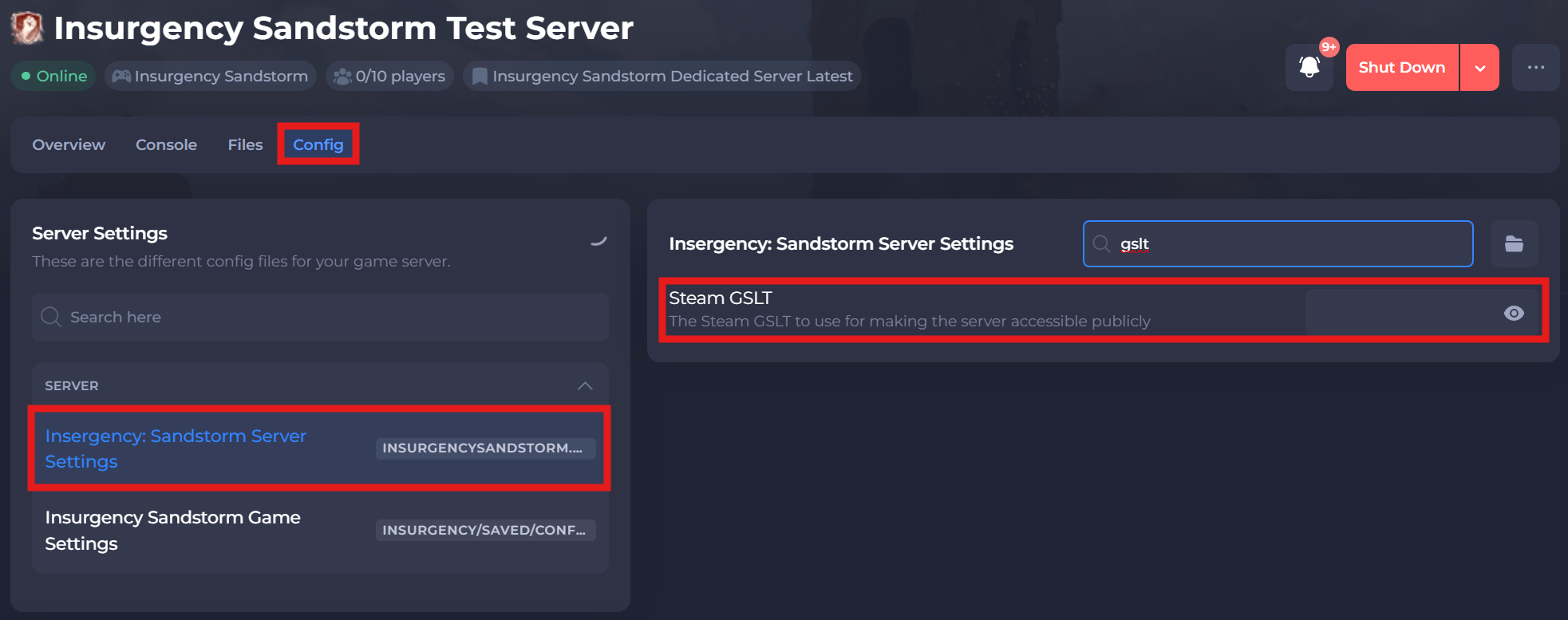
Access your Control Panel and navigate to the Config tab.
-
Select the
Insurgency: Sandstorm Server Settingsand locate theSteam GSLTkey. -
Implement your newly generated GSLT Key from the previous steps,
-
Save and restart your server to ensure the new changes apply.
If you require any further assistance, please contact our support at: https://shockbyte.com/billing/submitticket.php