Table Of Contents
Adding an AdminStill have questions?
Come chat with us and we will get back to you as soon as possible!

Shockbyte
Support Team

How to Add an Admin on your Insurgency Sandstorm Server
This guide explains how to add an administrator to your Insurgency: Sandstorm server. Administrators have access to a wide range of server management commands and tools used to moderate and control gameplay.
Most server administration is handled through the in-game admin panel, allowing admins to manage players, settings, and gameplay directly while connected to the server. The steps below will walk you through assigning admin permissions successfully.
#Adding an Admin
To add an admin on your server, you must locate their SteamID64 and add it to your Admin List in your Insurgency Sandstorm Server Settings file.
-
Locate your desired Steam user's SteamID64 by following this guide.
-
Access your Control Panel and navigate to the Config tab.
-
Locate the
Admin Listoption and add your Steam64ID.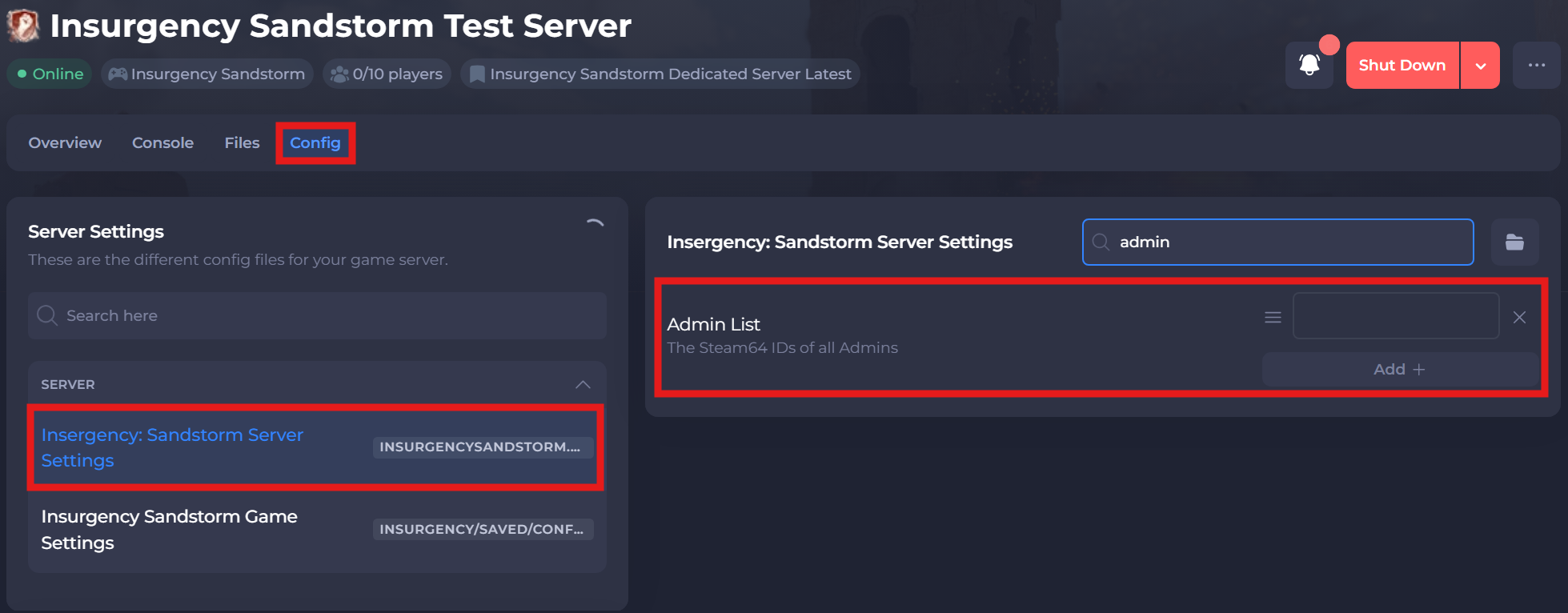
-
Save and restart your server to ensure the new changes apply.
If you require any further assistance, please contact our support at: https://shockbyte.com/billing/submitticket.php