Table Of Contents
Locating the PresetsStill have questions?
Come chat with us and we will get back to you as soon as possible!

Shockbyte
Support Team
How to Change GameSettingsPreset for your V Rising Server
V Rising
·Nov 14, 2024
·1 min read
All V Rising servers have the option of set predefined configurations. These are non-configurable presets allowing you to quickly setup a server without having to make many changes to server settings.
#Locating the Presets
All presets can be found under the Config tab of the panel.
-
Access your Control Panel and Stop your server.
-
Navigate to the Config tab, select the Server Host Settings.
-
Locate the
GameDifficultyPresetand theGame Settings Presetdropdowns to make your desired changes.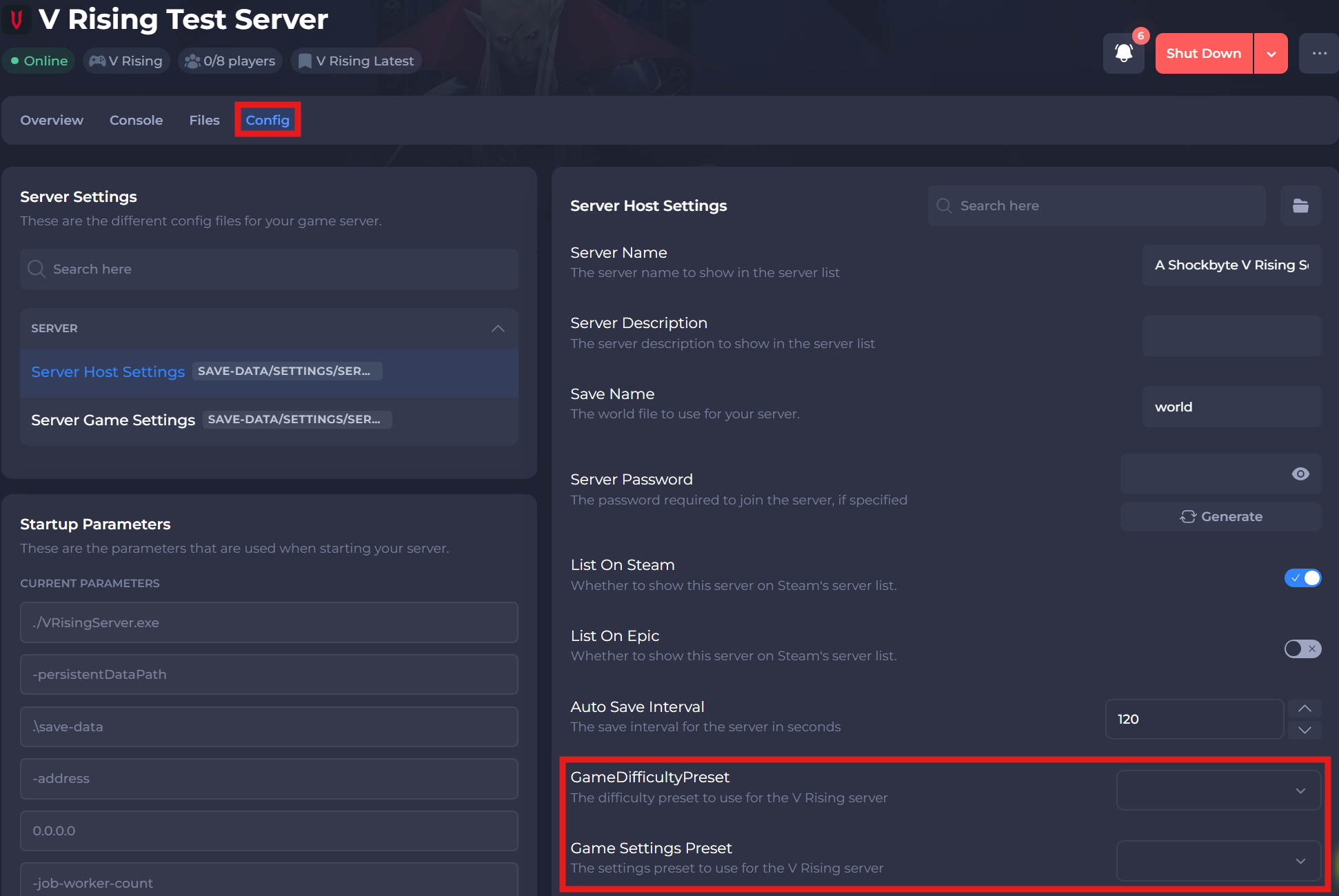
-
Save and restart your server to ensure the changes apply.
If you require any further assistance, please contact our support at: https://shockbyte.com/billing/submitticket.php