Table Of Contents
Changing the MOTDStill have questions?
Come chat with us and we will get back to you as soon as possible!

Shockbyte
Support Team

How to Change the MOTD of your Insurgency Sandstorm Server
This guide explains how to change the Message of the Day (MOTD) on your Insurgency: Sandstorm server. The MOTD is displayed to players on the loading screen while they connect, making it a great place to share server information, rules, or announcements.
Customizing your MOTD can help provide players with important details before they join the game. The steps below will walk you through updating the MOTD so your message appears correctly in-game.
#Changing the MOTD
It is possible to set or change your server's MOTD in the Insurgency Sandstorm Server Settings found in your server's control panel.
-
Access your Control Panel and navigate to the Config tab.
-
Select the
Insurgency: Sandstorm Server Settingsfile. Locate theMessage of the Dayfield. Write short message that is shown to players on the loading screen when connecting to your server.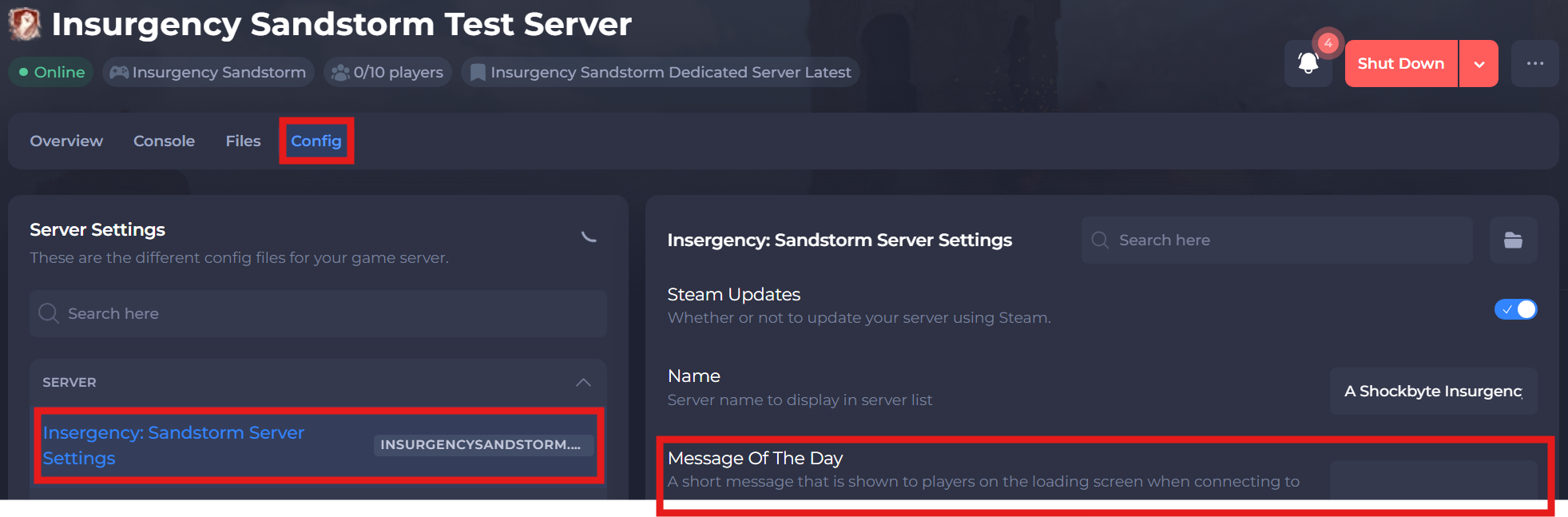
-
Save and restart your server to ensure the new changes apply.
If you require any further assistance, please contact our support at: https://shockbyte.com/billing/submitticket.php