Still have questions?
Come chat with us and we will get back to you as soon as possible!

Shockbyte
Support Team

How to Change the Name of your BeamMP Server
This guide explains how to change the name of your BeamMP server. Your server name is what players see in the server list, making it important for identification and visibility.
You can update this by editing the Server Name option in the Config section of your panel. The steps below will walk you through applying this change so it appears in-game.
#Changing your Server Name
To add a special name to your BeamMP server, follow these steps:
-
Access your Control Panel and navigate to the Config tab.
-
Locate the
Server Nameoption and set your desired Server Name. This will be shown as the name / title of your server in the server list. You can use special characters to format this with colors and styles (detailed later in this guide).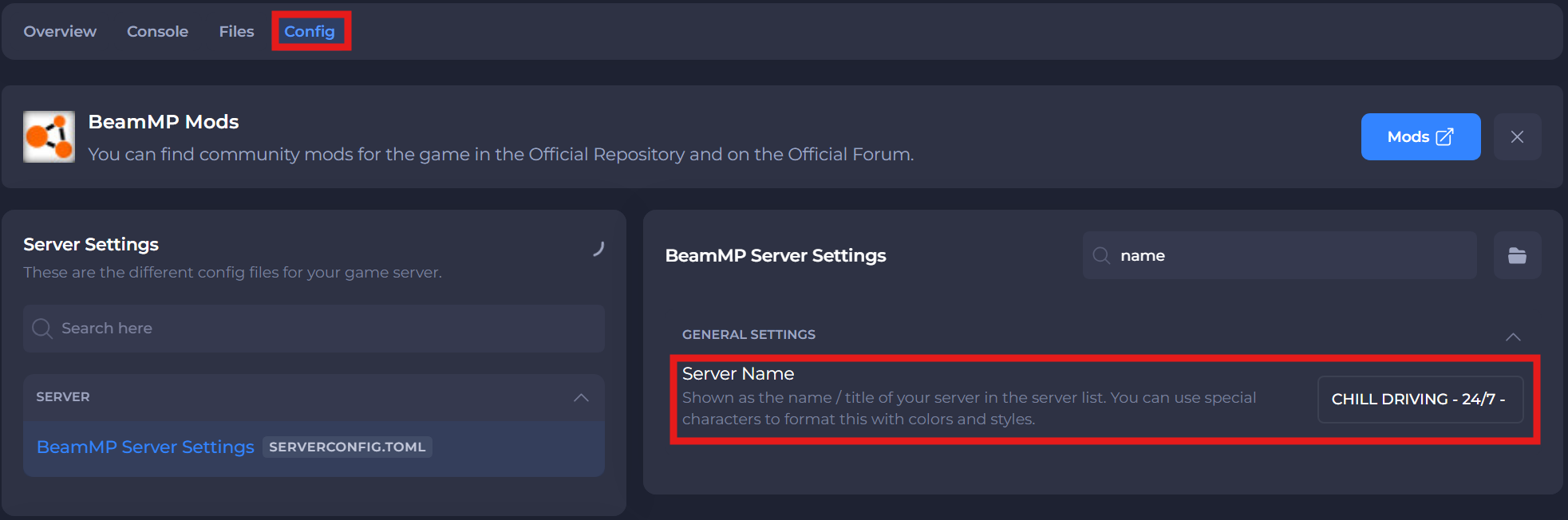
-
Save and restart your server to ensure the new changes apply.
#Formatting Special Codes
Use these special symbols before your text and it'll apply an effect to that text in the server list:
| Code | Description |
|---|---|
^r | Reset |
^p | Newline (descriptions only) |
^n | Underline |
^l | Bold |
^m | Strike-through |
^o | Italic |
^0 | Black |
^1 | Blue |
^2 | Green |
^3 | Light blue |
^4 | Red |
^5 | Pink |
^6 | Orange |
^7 | Grey |
^8 | Dark Grey |
^9 | Light Purple |
^a | Light Green |
^b | Light Blue |
^c | Dark Orange |
^d | Light Pink |
^e | Yellow |
^f | White |
This is better detailed in BeamMP's Server Maintenance Document, here: https://docs.beammp.com/server/server-maintenance/#customize-the-look-of-your-server-name
If you require any further assistance, please contact our support at: https://shockbyte.com/billing/submitticket.php