Table Of Contents
Setting the Server NameStill have questions?
Come chat with us and we will get back to you as soon as possible!

Shockbyte
Support Team

How to Change the Name of your Insurgency Sandstorm Server
This guide explains how to change the name of your Insurgency: Sandstorm server. Your server name is displayed in the in-game server browser and helps players identify and connect to your server.
Many server owners also use the server name to provide a short description of the experience their server offers, such as gameplay style, rules, or modded content. The steps below will walk you through updating your server name so it appears correctly in-game.
#Setting the Server Name
Your server's name can be updated in the Insurgency Sandstorm Server Settings section of your server's control panel.
-
Access your Control Panel and navigate to the Config tab.
-
Select the
Insurgency: Sandstorm Server Settingsfile. Locate theNamefield and set your desired Server Name.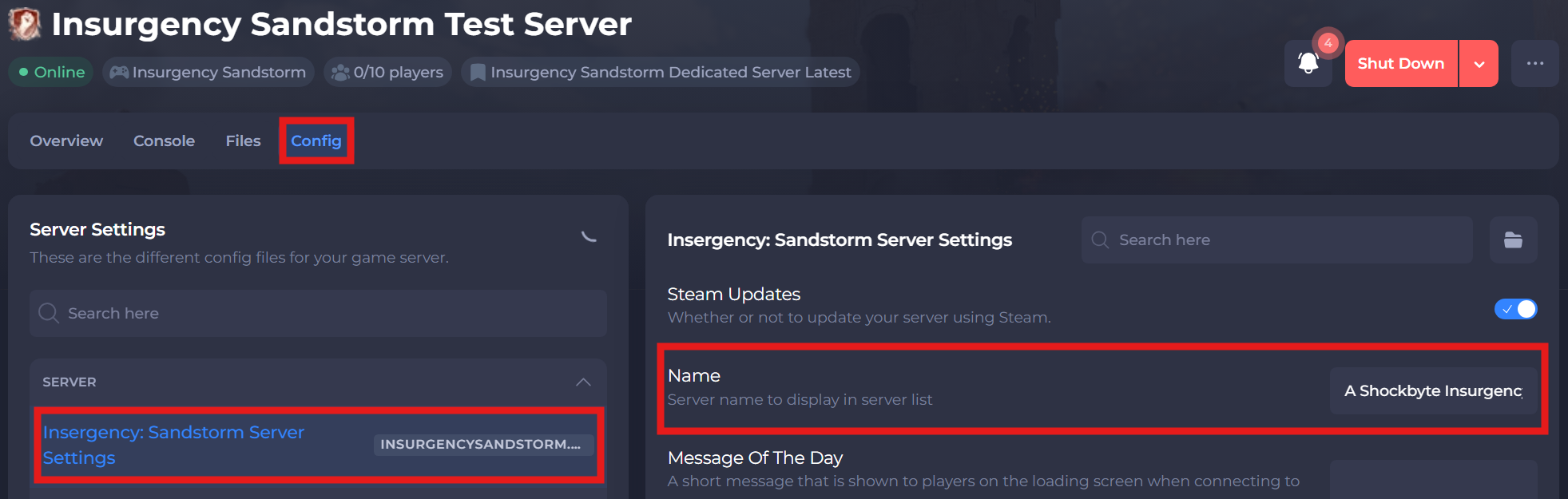
-
Save and restart your server to ensure the new changes apply.
If you require any further assistance, please contact our support at: https://shockbyte.com/billing/submitticket.php