Still have questions?
Come chat with us and we will get back to you as soon as possible!

Shockbyte
Support Team

How to Change the Scenario on your Factorio Server
Factorio offers multiple Scenario types (or game modes) which can drastically change the objective of the game. More information on each of the game modes that Factorio supports can be found on their wiki, available here.
If you would like to play a specific type of scenario on your Shockbyte Factorio server, you can do so by following the provided steps below.
Note
It's recommended that you fully reset your server before changing the scenario type on your Factorio server to prevent file corruption.
#Configuring the Factorio Scenario
Your Factorio server's active scenario can easily be set by editing your factorio.properties file using your server's control panel.
-
Access your Control Panel and Stop your server.
-
Navigate to the Config tab and locate the
Scenario. -
Enter in the name of your desired scenario. It is also recommended that you change your world name to prevent any corruption from occurring.
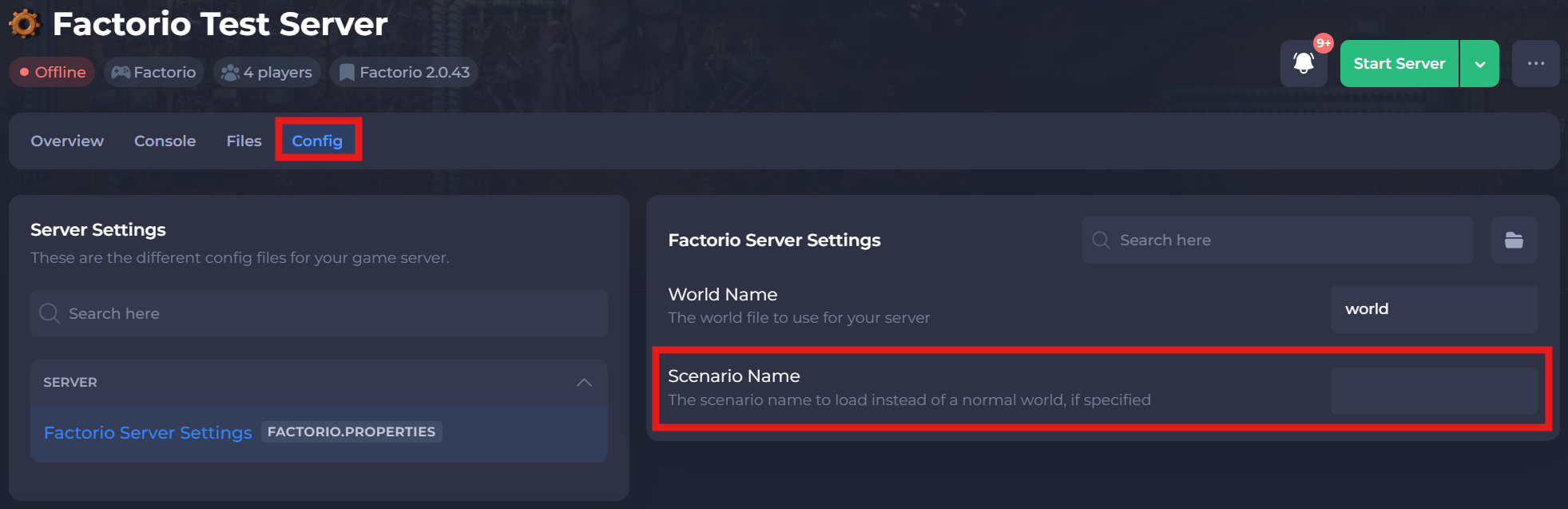
-
Save and restart your server to ensure the changes apply.
#Available Scenario Types
| Scenario | Description |
|---|---|
| freeplay | The intended way of playing Factorio. Your task is to launch a rocket into space. |
| pvp | Blow up your friends. (Only available in Multiplayer) |
| rocket-rush | Try to launch a rocket as fast as possible with all technologies already unlocked. (Wiki) |
| sandbox | A creative mode where the player can have all technologies researched and spawn in items. |
| supply | A timed challenge to produce and deliver specified items for each level. (Wiki) |
| team-production | Compete as small teams to complete short production-based objectives. (Only available in Multiplayer) |
| wave-defense | Defend the rocket silo against waves of enemy biters and launch a rocket to win. (Wiki) |
If you require any further assistance, please contact our support at: https://shockbyte.com/billing/submitticket.php