How to Configure Lighting Conditions on your Insurgency Sandstorm Server
Table Of Contents
Configuring Lighting ConditionsStill have questions?
Come chat with us and we will get back to you as soon as possible!

Shockbyte
Support Team

How to Configure Lighting Conditions on your Insurgency Sandstorm Server
This guide explains how to configure lighting conditions on your Insurgency: Sandstorm server. Since the release of the 1.7 update, server owners can choose whether maps are played during the day or at night.
Changing lighting conditions is a great way to create a different gameplay experience, as night maps can require players to rely on night vision goggles or flashlights due to reduced visibility. The steps below will walk you through configuring day and night settings for your server.
#Configuring Lighting Conditions
Server owners are able to select the scenario lighting, by editing the Insurgency Sandstorm Server Settings found on their control panel.
-
Access your Control Panel and navigate to the Config tab.
-
Select the
Insurgency: Sandstorm Server Settingsfile and locate theScenario Lightingoption. Type eitherDayorNightinto the field.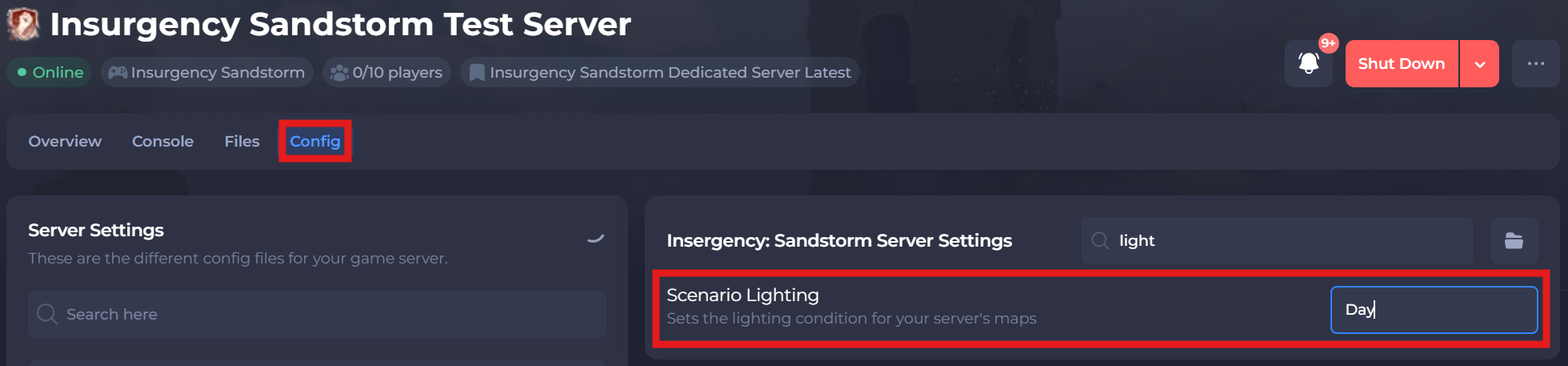
-
Save and restart your server to ensure the new changes apply.
If you require any further assistance, please contact our support at: https://shockbyte.com/billing/submitticket.php