Table Of Contents
Configuring MutatorsStill have questions?
Come chat with us and we will get back to you as soon as possible!

Jay Miller
Game Engineer
How to Configure Mutators on your Insurgency Sandstorm Server
This guide explains how to configure mutators on your Insurgency: Sandstorm server. Mutators, previously known as rulesets, allow server owners to customize gameplay by applying unique game rules and modifiers.
Mutators can change a wide range of gameplay elements, including weapon restrictions, supply points, player movement speed, and more. The steps below will walk you through enabling and configuring mutators on your server. A complete list of available mutators can also be referenced for additional customization options, here.
#Configuring Mutators
Add mutators to your server by entering their ID in the Scenario Mutators field in the Insurgency Sandstorm Server Settings found in your server's control panel.
-
Access your Control Panel and navigate to the Config tab.
-
Navigate to the
Insurgency: Sandstorm Server Settings. -
Locate the
Scenario Mutatorsoption and set your desired mutators.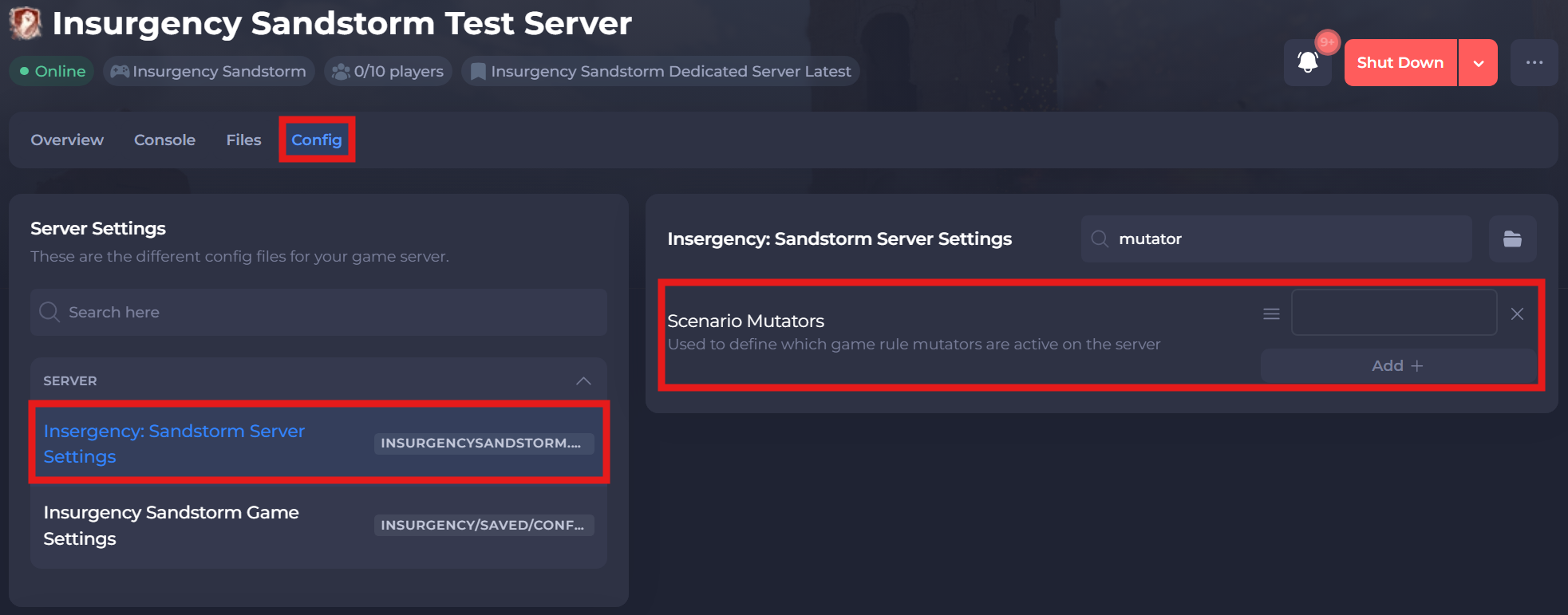
-
Save and restart your server to ensure the new changes apply.
If you require any further assistance, please contact our support at: https://shockbyte.com/billing/submitticket.php