How to Configure the Siege Gamemode on your Mount & Blade 2 Server
Still have questions?
Come chat with us and we will get back to you as soon as possible!

Jay Miller
Game Engineer
How to Configure the Siege Gamemode on your Mount & Blade 2 Server
Siege allows you to experience the brutality of medieval sieges by defending or attacking from large-scale fights. Allowing you to use siege engines and more to achieve victory by capturing the keep. Individual settings for this mode can easily be updated in your server's Siege.txt file.
#Setting your Game Mode
In order to apply these settings, your Game Mode must be set to Siege.
- Access your control panel and Stop your server.
- Navigate to the Config tab and locate the
Game Modeoption. Set your desired Game Mode toSiege.
#Configuring the Siege Game Mode Settings
Once you have your game mode set to Battle, you can easily make any desired changes to its settings using your server's control panel.
-
Access your control panel and Stop your server.
-
Navigate to the Files tab and locate the
/Modules/Nativedirectory. -
Select the settings file for
Siege.txtand make any desired changes to the Game Mode.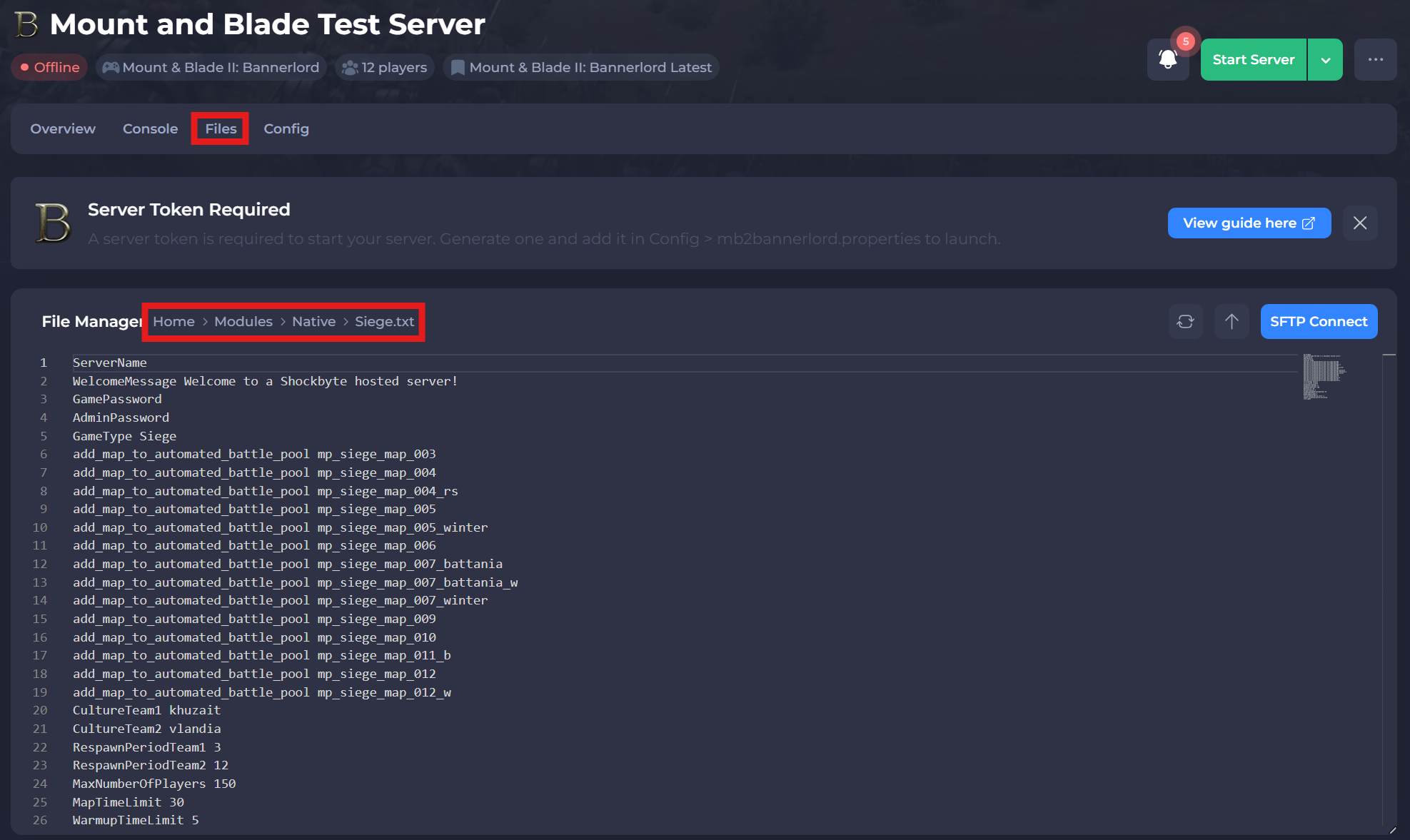
-
Save and Start your server.
A list of settings and available options can be found below:
| Setting | Available Options | Description |
|---|---|---|
| CultureTeam1 | Aserai, Battanians, Empire, Khuzaits, Sturgians, Vlandians | Sets the first team's Culture on the server. |
| CultureTeam2 | Aserai, Battanians, Empire, Khuzaits, Sturgians, Vlandians | Sets the second team's culture on the server. |
| AllowPollsToKickPlayers | True or False | Creates a poll that can allow players to vote kick players |
| AllowPollsToBanPlayers | True or False | Creates a poll that can allow players to vote ban players |
| AllowPollsToChangeMap | True or False | Creates a poll that can allow players to vote on a new map |
| MapTimeLimit | Any value in minutes (e.g. 30 = 30 minutes) | Sets the time limit for a game mode. |
| MinNumberOfPlayersForMatchStart | Any number greater than or equal to 0. | Sets the minimum number of players connected to the server to allow a game to start. |
| RespawnPeriodTeam1 | Any number greater than or equal to 0. | Sets the amount of time before a player can respawn for team 1. |
| RespawnPeriodTeam2 | Any number greater than or equal to 0. | Sets the amount of time before a player can respawn for team 2. |
| NumberOfBotsTeam1 | Any number greater than or equal to 0. | Sets the number of bots in team 1. |
| NumberOfBotsTeam2 | Any number greater than or equal to 0. | Sets the number of bots in team 2. |
| enable_automated_battle_switching | N/A | Automatically starts a new battle after the previous one has ended. |
| add_map_to_automated_battle_pool | Any Siege map. | Adds a specific map to the automated battle pool. |
| GoldGainChangePercentageTeam1 | Any number greater than or equal to 0. | Adds an increase in gold earned by team 1. |
| GoldGainChangePercentageTeam2 | Any number greater than or equal to 0. | Adds an increase in gold earned by team 2. |
| WarmupTimeLimit | Any number greater than 2 (in minutes). | Sets the duration of the warmup before the game begins. |
If you need help with troubleshooting your server, be sure to reach out to our support team.