Still have questions?
Come chat with us and we will get back to you as soon as possible!

Ruben B
Partnership Manager
How to Configure your Counter Strike 2 Server
Being able to configure your server is the perfect way to customise and personalise your CS2 server. With a Shockbyte server, we provide a custom server settings file that is accessible and easy to use. This configuration file facilitates settings such as server name, maps, password, and more.
#Accessing your Server Settings
Your primary server settings can easily be found in the Config files section of your server's control panel.
- Navigate to your control panel and Stop your server.
- Go to the
Configtab.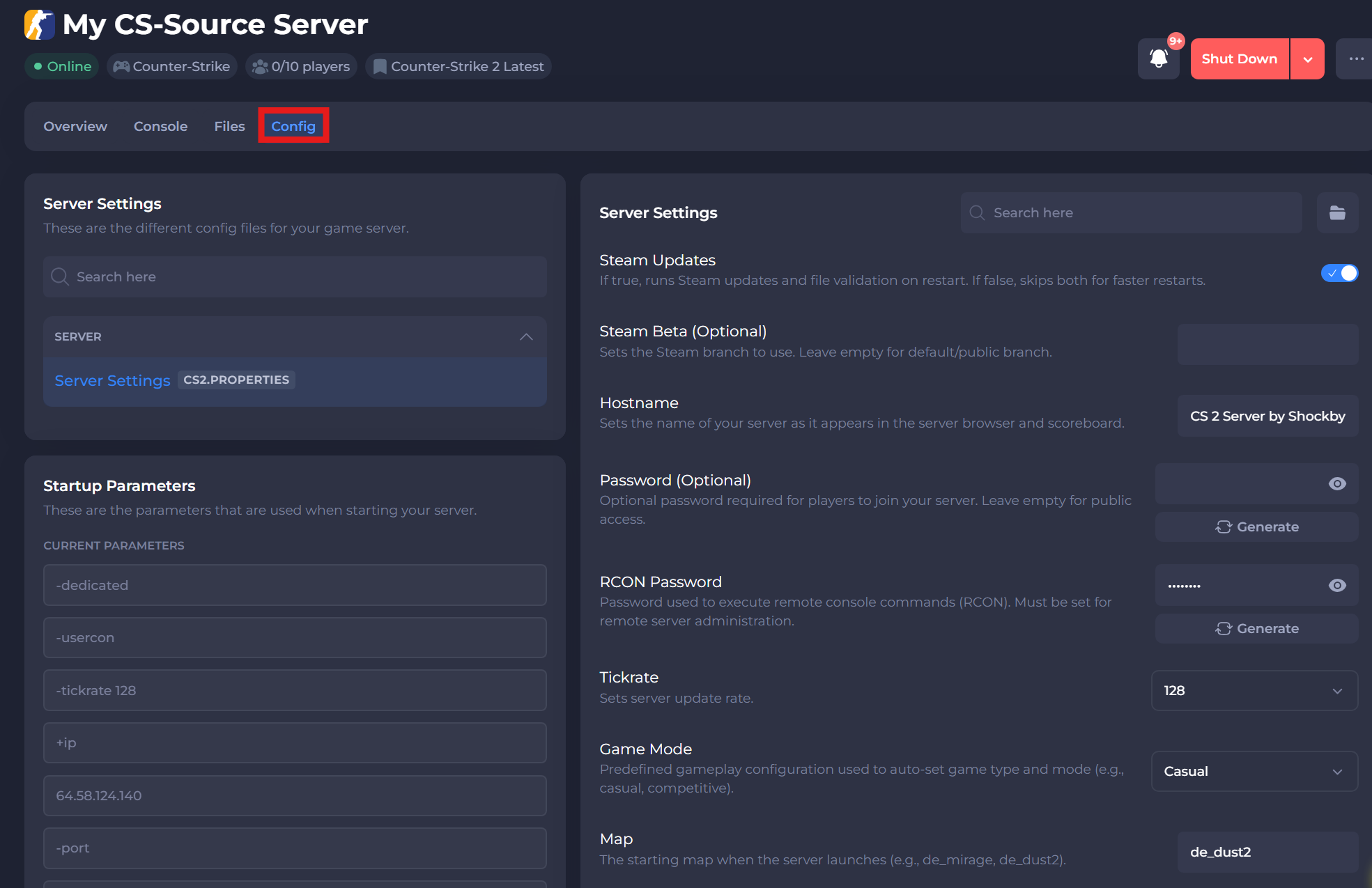
- Change your desired server settings.
- Save the changes and Start your server again.
#Configuring your Server Settings
Once you have access to your config files, you can make any desired changes. To learn about each setting available in your server settings, please reference the table below.
| Option | Description |
|---|---|
| Steam Updates | If true, runs Steam updates and file validation on restart. If false, skips both for faster restarts. |
| Steam Beta (Optional) | Sets the Steam branch to use. Leave empty for default/public branch. |
| Hostname | Sets the name of your server as it appears in the server browser and scoreboard. |
| Password (Optional) | Optional password required for players to join your server. Leave empty for public access. |
| RCON Password | Password used to execute remote console commands (RCON). Must be set for remote server administration. |
| Tickrate | Sets server update rate. |
| Game Mode | Predefined gameplay configuration used to auto-set game type and mode (e.g., casual, competitive). |
| Map | The starting map when the server launches (e.g., de_mirage, de_dust2). |
| Workshop Map ID | The ID of a Workshop map to load at startup. Overrides the map key (e.g., 3070290869). |
| Workshop Collection ID | Steam Workshop collection ID used to load multiple maps. |
| Server Tags | Keywords to help players find your server in the browser. Separate each tag with a comma (,) (e.g., 1v1,training,awp). |
| Steam GSLT | Enter a Steam Game Server Login Token to link your server with Steam services. |
| Pure | Controls whether clients can use custom game files. |
| Enable Cheats | Enables developer cheats on the server (e.g., noclip, god). |
| Enable GoTV | Activates GOTV for delayed game spectating and optional demo recording. Useful for broadcasting or replays. |
| Private Server | Hides the server from the Steam and in-game community server browser, making it joinable only via direct IP. |
| Enable Metamod & CounterStrikeSharp (Plugins) | Installs and enables Metamod and CounterStrikeSharp for plugin support. |
| Insecure | Toggles VAC (Valve Anti-Cheat) for the server. |
If you require any further assistance, don't hesitate to get in touch with our support at: https://shockbyte.com/billing/submitticket.php