KnowledgebaseEuro Truck Simulator 2 (ETS2 & ATS)
How to Disable Name Tags on your Euro Truck Simulator 2 Server (ETS2 & ATS)
Table Of Contents
Disabling Name TagsStill have questions?
Come chat with us and we will get back to you as soon as possible!

Ruben B
Partnership Manager

How to Disable Name Tags on your Euro Truck Simulator 2 Server (ETS2 & ATS)
Euro Truck Simulator 2 (ETS2 & ATS)
·Nov 9, 2024
·1 min read
By default in Euro Truck Simulator 2 and American Truck Simulator, name tags are displayed above player trucks. Server owners may want to disable this feature to prevent name tags from being shown on passing trucks to make the experience more immersive.
#Disabling Name Tags
-
Access your control panel and navigate to the Config tab.
-
Locate the
Name Tagssetting and disable it.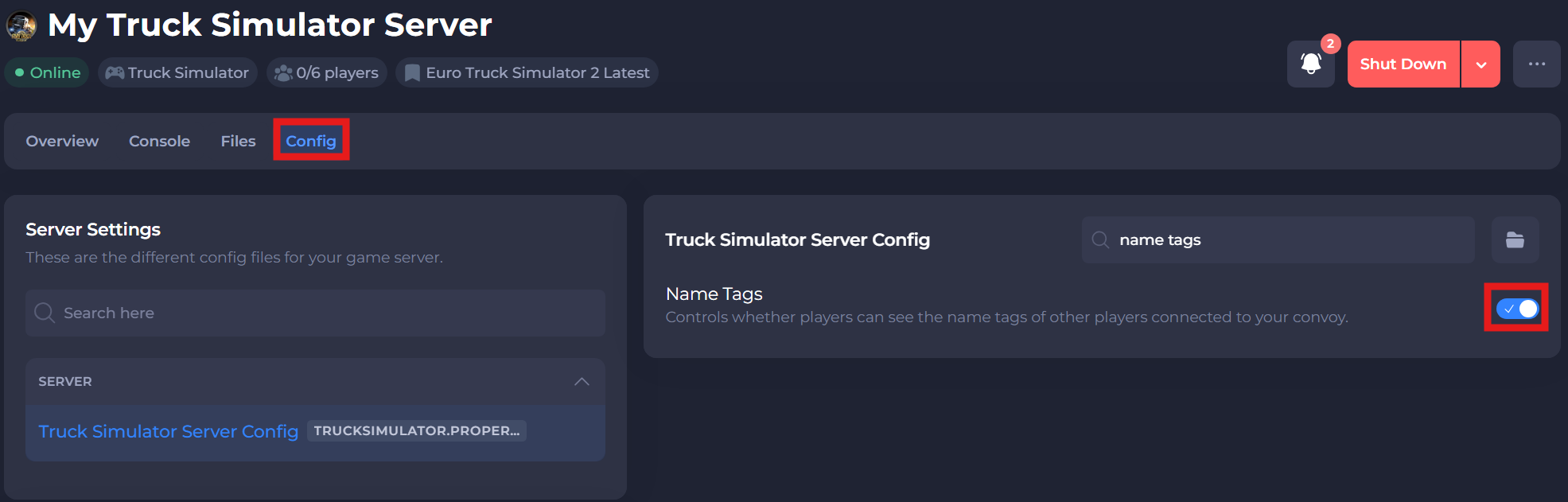
-
Save and restart your server to ensure the new changes apply.
If you require any further assistance, please contact our support at: https://shockbyte.com/billing/submitticket.php