KnowledgebaseEuro Truck Simulator 2 (ETS2 & ATS)
How to Disable Traffic on your Euro Truck Simulator 2 Server (ETS2 & ATS)
Table Of Contents
Disabling TrafficStill have questions?
Come chat with us and we will get back to you as soon as possible!

Shockbyte
Support Team

How to Disable Traffic on your Euro Truck Simulator 2 Server (ETS2 & ATS)
Euro Truck Simulator 2 (ETS2 & ATS)
·Nov 9, 2024
·1 min read
By default, traffic is enabled for players connected to your convoy. It is possible to completely remove all AI traffic on the roads allowing for easier deliveries with less chance of a collision.
#Disabling Traffic
-
Access your control panel and navigate to the Config tab.
-
Locate the
Show Trafficsetting and disable it.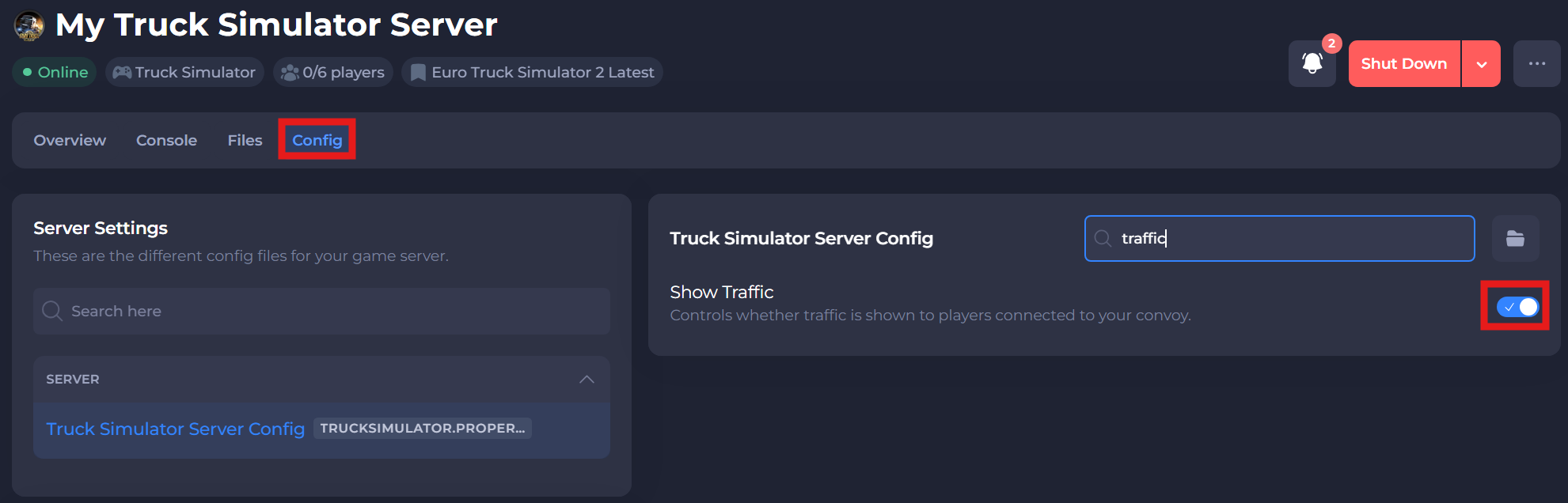
-
Save and restart your server to ensure the new changes apply.
If you require any further assistance, please contact our support at: https://shockbyte.com/billing/submitticket.php