Table Of Contents
Disabling Valve Anti-Cheat (VAC)Still have questions?
Come chat with us and we will get back to you as soon as possible!

Shockbyte
Support Team

How to Disable VAC on your Garry's Mod Server
You may be unable to play on secure Garry's Mod servers due to a variety of VAC-related reasons. Examples of this could be caused by clients that use custom textures, skin changers, or software that modifies game files.
Important
We suggest that you do not disable VAC (Valve Anti-Cheat) as it can cause security risks for your server as players that use a modified client can connect.
#Disabling Valve Anti-Cheat (VAC)
You can disable VAC via Garry's Mod Server Settings available in your Control Panel.
-
Access your Control Panel and Stop your server.
-
Navigate to the Config tab and select the Garry's Mod Server Setting file.
-
Locate the
Insecuresetting and toggle the button to enable it.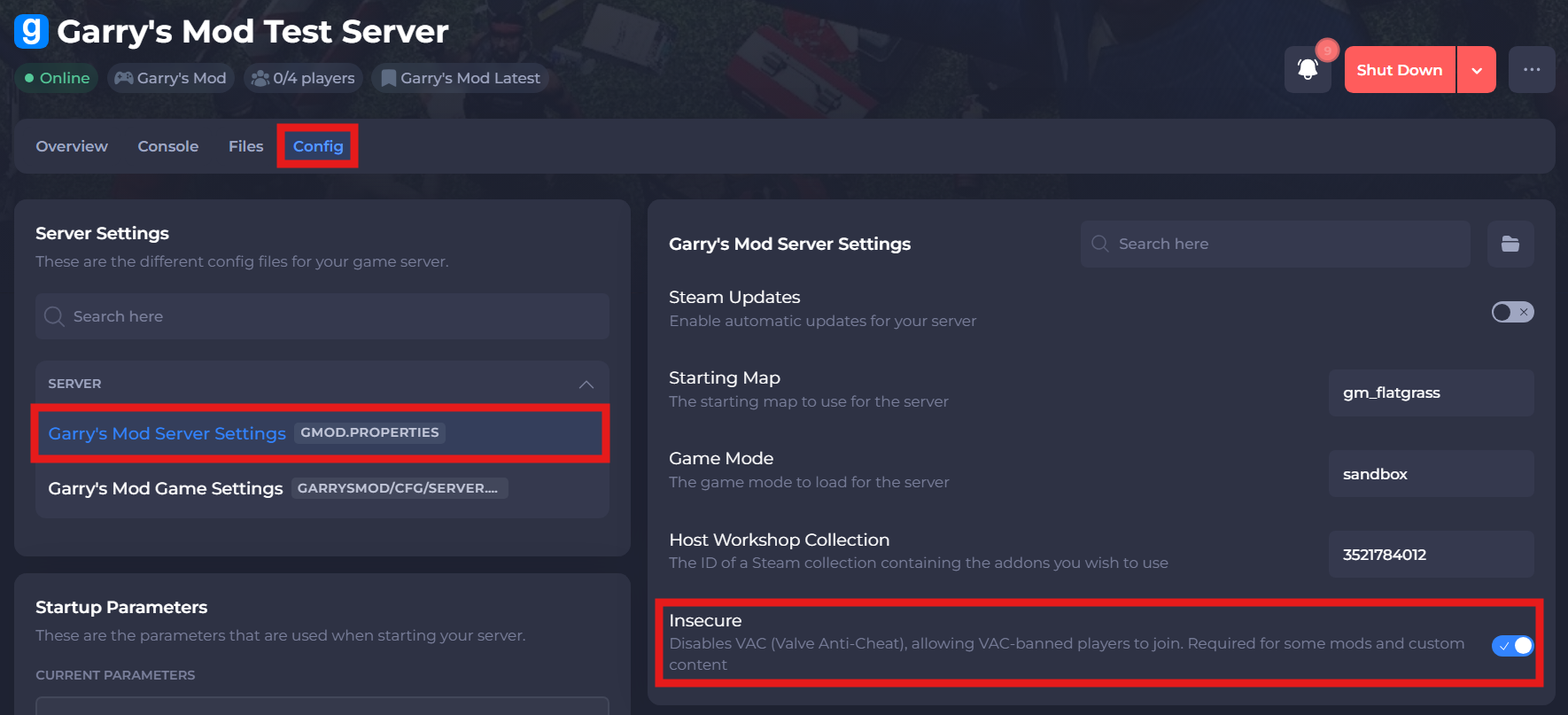
-
Save and restart the server to ensure the new changes apply.
If you require any further assistance, please contact our support at: https://shockbyte.com/billing/submitticket.php