Table Of Contents
Enabling Caves On Your ServerStill have questions?
Come chat with us and we will get back to you as soon as possible!

Ruben B
Partnership Manager

How to Enable Caves on your Don't Starve Together Server
Don't Starve Together
·Nov 9, 2024
·1 min read
If you want to take a deep dive into Don't Starve Together's cave world and you're on a supported plan, this article will walk you through the process of enabling them.
#Enabling Caves On Your Server
In order to enable caves, you will need to be on either the Webber or Maxwell plan.
-
Access your Control Panel and navigate to the Config tab.
-
Locate the
Allow Cavessetting and selectEnabled.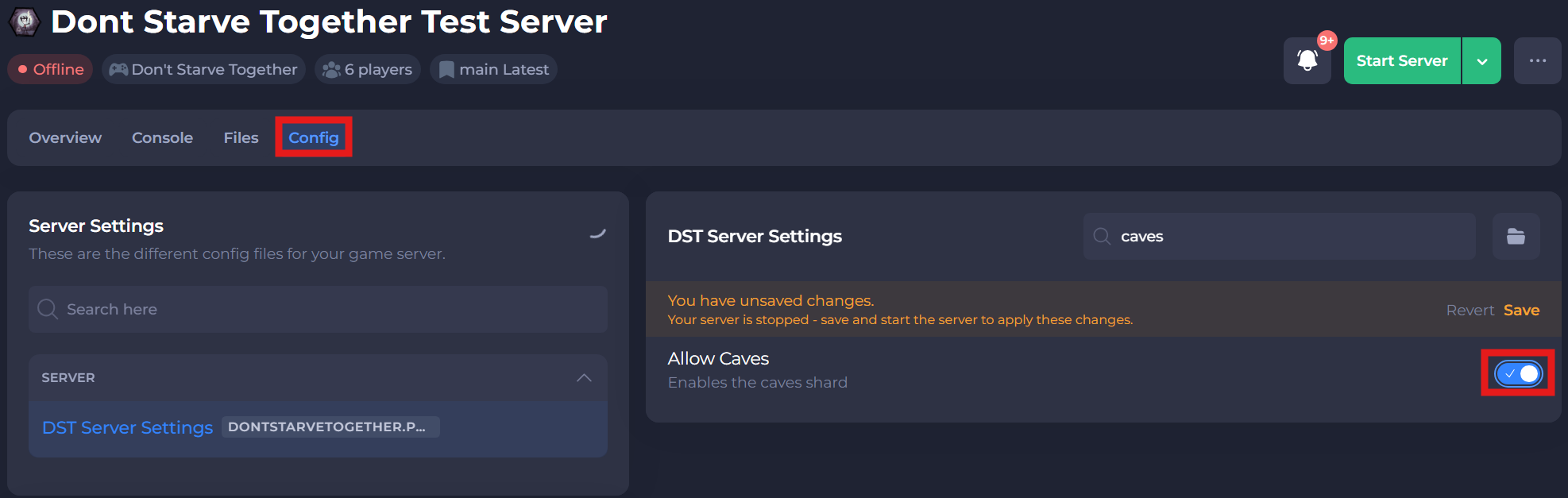
-
Save and restart your server to ensure the new changes apply.
If you require any further assistance, please contact our support at: https://shockbyte.com/billing/submitticket.php