Table Of Contents
Enabling/Disabling Player VotingStill have questions?
Come chat with us and we will get back to you as soon as possible!

Shockbyte
Support Team

How to Enable Player Voting on your Insurgency Sandstorm Server
This guide explains how to enable player voting on your Insurgency: Sandstorm server. The voting system allows players to start votes, such as vote kicks, to help manage disruptive behaviour when moderators or admins are unavailable.
When enabled, players can press Esc and select Call Vote to begin a vote. During an active vote, players can press F1 to vote yes or F2 to vote no. The steps below will walk you through enabling and configuring player voting on your server.
#Enabling/Disabling Player Voting
To enable voting on your Insurgency: Sandstorm server, simply stop your server, enable voting in your server properties, and then start your server again.
-
Access your Control Panel and navigate to the Config tab.
-
Select the
Insurgency: Sandstorm Game Settingsfile. -
Locate the
Voting Enabledoption and select the button to enable it.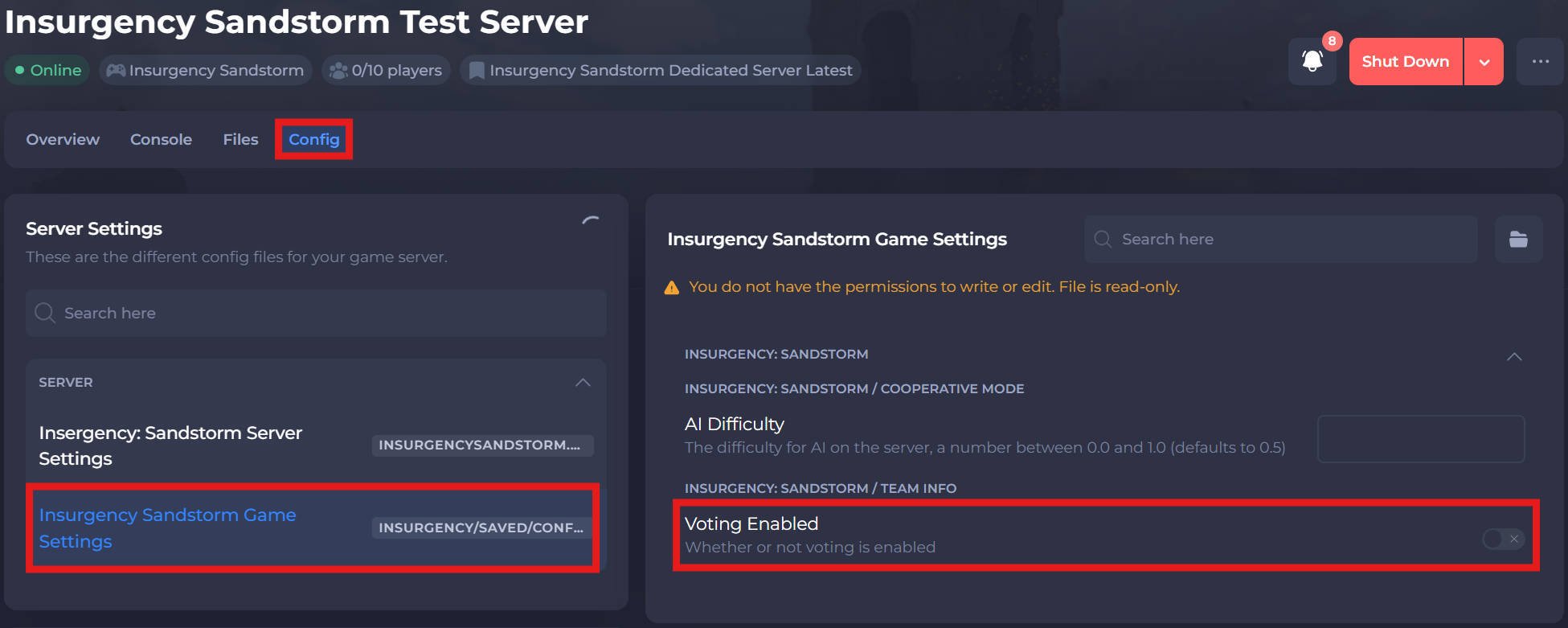
-
Save and restart your server to ensure the new changes apply.
If you require any further assistance, please contact our support at: https://shockbyte.com/billing/submitticket.php