Table Of Contents
Enabling World Backups on StartupStill have questions?
Come chat with us and we will get back to you as soon as possible!

Shockbyte
Support Team

How to Enable World Backups on Startup for your Soulmask Server
This guide explains how to enable startup world backups on your server. This feature creates a snapshot of your world save each time the server starts, providing a clean restore point in case anything goes wrong.
It is especially recommended to enable this before restarts and updates to help protect your progress. The steps below will walk you through turning this setting on in your panel.
#Enabling World Backups on Startup
-
Access your Control Panel and Stop your server.
-
Navigate to the Config tab, locate the
Startup World Backupsetting and enable it.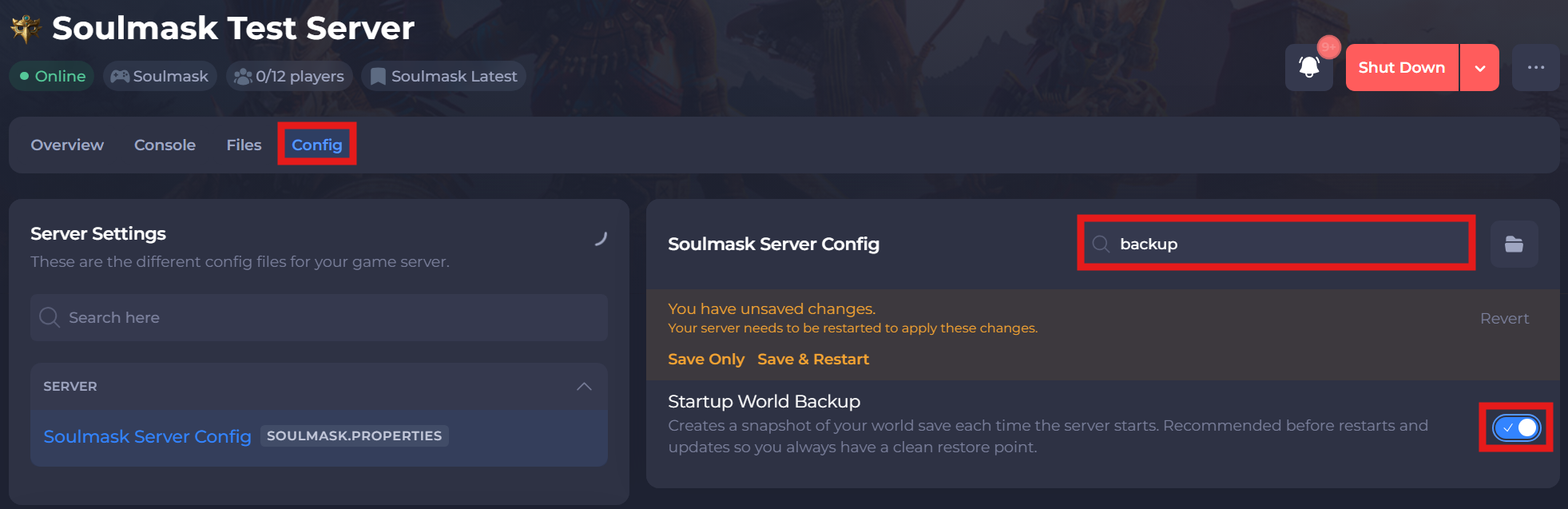
-
Save and restart your server to ensure the new changes apply.
If you require any further assistance, please contact our support at: https://shockbyte.com/billing/submitticket.php