Still have questions?
Come chat with us and we will get back to you as soon as possible!

Ruben B
Partnership Manager
How to Fix your Stardew Valley Server Events and Festivals Bugs
Due to the nature of how Stardew Servers are hosted, they each require a ServerBot which acts as the server Host. This means when certain events occur during your Stardew Valley experience, the host is required to activate these events (e.g. opening the Community Centre).
Unfortunately, we cannot control the host bot however there are a few features implemented to help fix this. By default, we have enabled the Community Centre to be active from day 1 of your server.
Note:
In order to follow the steps in this article, you will need to be connected as an admin.
#Helpful Fixes
Below are some of the available admin commands that may help troubleshoot any event issues.
- The host bot automatically reads all the mail every day (set by default on all servers).
- A few debugging commands that admins can use.
!hostmails- Shows all the mail in the host's mailbox.!readhostsmails- Reads all the mail in the host's mailbox.!debug event <event ID>- Makes the host see the event, but does not trigger it.!forceevent- Skips voting and immediately starts the event.!newday- Forces the server to advance to the next day.
To find out each of the events and their IDs, you can reference the documentation found here.
#Completing Community Centre
If you find that you have completed the Community Centre, but have not received the final cutscene and the Jojomart is still active you can use the command !debug ebi 191393 to trigger the event for completion.

#Mayor Lewis Grange Display
If you encounter an issue during the Stardew Valley Fair (Fall 16) where speaking to Mayor Lewis does not trigger the Grange Display evaluation after the first year, you can resolve this by running a debug command in the server console.
- Open your server control panel.
- Start the server and wait for it to go online.
- Run the following command in the console:
debug loaddialogue Lewis "Strings/StringsFromCSFiles:Event.cs.1535"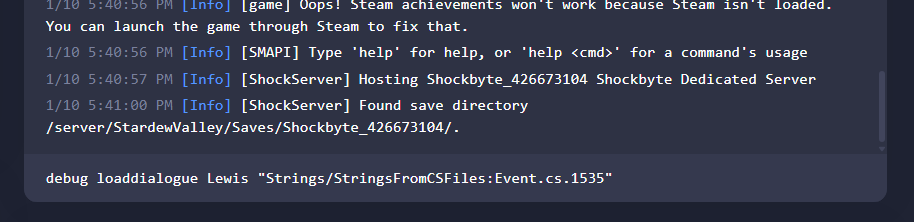
Please ensure you notify us via ticket if you find any events still having issues after these fixes.
To learn more about Stardew Server dedicated server hosting, you can check out our knowledgebase articles found here.