Still have questions?
Come chat with us and we will get back to you as soon as possible!

Nuno Paiva
Game Integration Specialist @ Shockbyte
How to Generate and Add a GSLT Key to your The Forest Server
#Adding a Game Server Login Token (GSLT)
Adding a Game Server Login Token (GSLT) to your server is required for it to appear in the in-game server browser. This token is generated through Steam and links your server to the Steam network, allowing players to connect easily.
#Why GSLT Keys Are Required
Many games require you to have what is known as a Game Server Login Token to run your server. This ensures that servers are created by real people and helps maintain accountability if those servers violate the game’s Terms of Service.
To generate a GSLT, your Steam account must:
- Not be banned or blocked.
- Not be limited.
- Have a qualifying registered phone attached.
- Own the game for which you are creating the key.
- Not have reached the cap of 1,000 GSLT keys.
If your server is found to be breaking Valve’s ToS, both your server and Steam account may be banned by Valve.
#Generating a GSLT
You can generate a GSLT by creating a new game server account through the Steam Community website.
-
Navigate to Steam Game Servers Account.
-
Scroll to the Create a new game server account section.
-
Enter the App ID of your game. You can find this by searching for your game on SteamDB.

-
Optionally, add a Memo to identify your token later.
-
Click Create.
Your GSLT key will appear as the Login Token.

#Adding a GSLT to Your Server
Once you have generated your GSLT, you can add it to your server through the configuration files.
-
Go to your Control Panel.
-
Navigate to Files > Config Files.
-
Open your game’s server configuration file.
-
Locate the Steam GSLT Token option and enter your key.
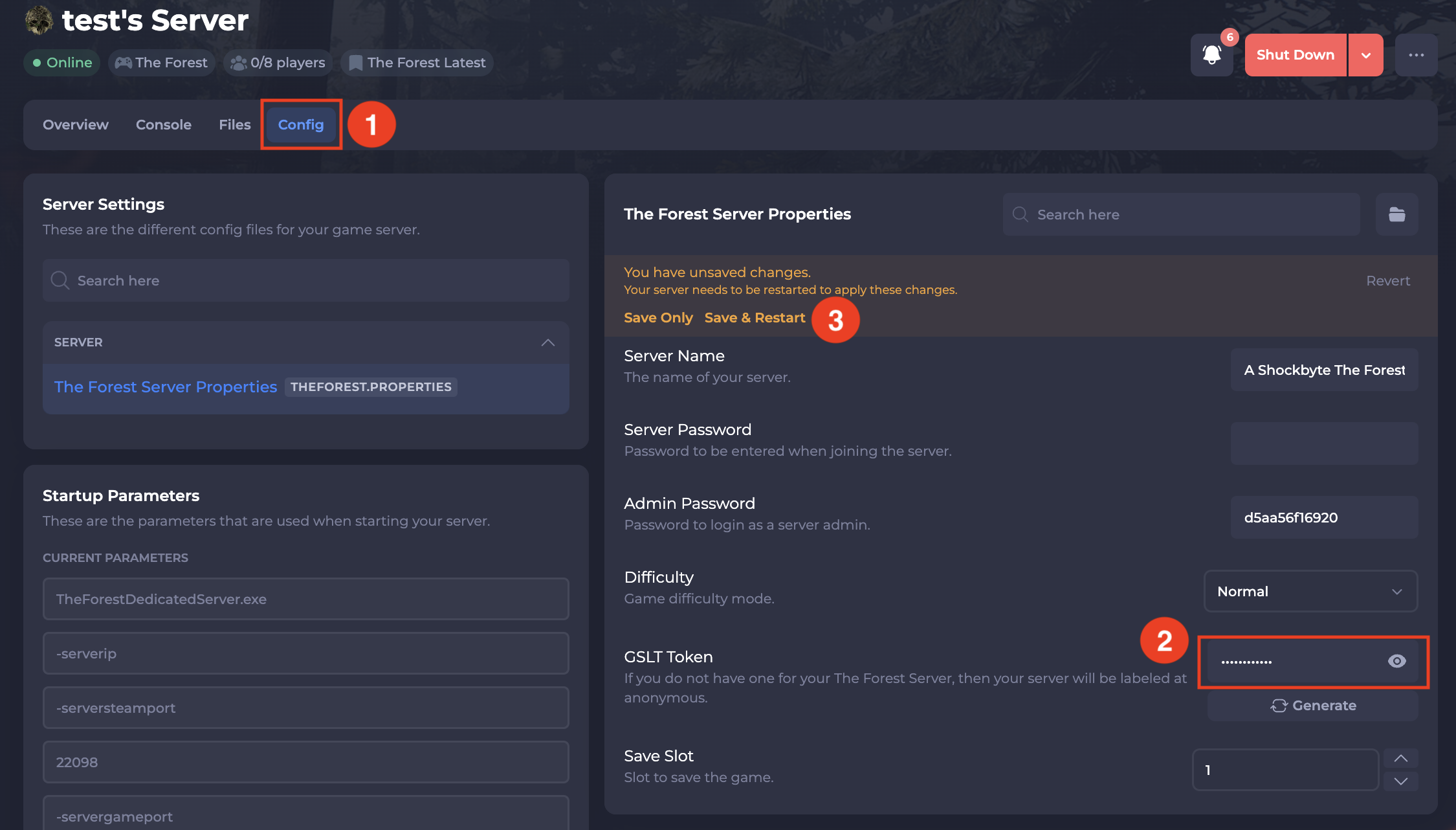
- Click Save and restart your server.