Still have questions?
Come chat with us and we will get back to you as soon as possible!

Shockbyte
Support Team
How to Install the ISMC Mod on your Insurgency Sandstorm Server
This guide explains how to install the ISMC mod on your Insurgency: Sandstorm server. ISMC is a popular overhaul mod that adds a large variety of new content, including weapons, attachments, cosmetics, factions, and gameplay features.
Once installed on your server, players will automatically download the required ISMC files when joining, so no manual client installation is needed. The steps below will walk you through configuring and enabling the mod on your server.
Important
In order to install mods you're required to have a Mod.io account. If this is your first time installing a mod you will need to complete the first section of this article before proceeding.
#Installing ISMCmod
To install ISMCmod you will need to subscribe to the mod in mod.io and then place your desired scenario mutator into the servers Insurgency Sandstorm Server Settings.
-
After following the steps from our How to Install Mods on your Insurgency Sandstorm Server guide, navigate to the mod's mod.io page: https://mod.io/g/insurgencysandstorm/m/ismcmod1#description.
-
Click
Subscribeto it and any other dependencies the mod may need, and then scroll down to the mod's description area. Copy the name of the specific mutator you wish to use.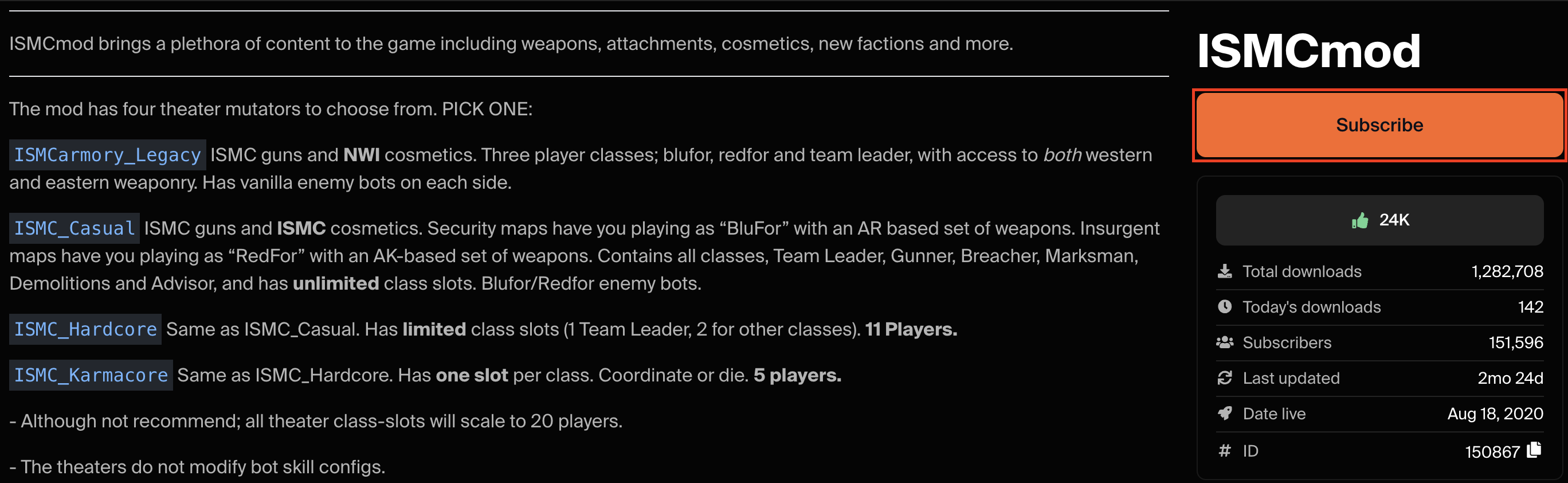
-
Access your Control Panel and navigate to the Config tab. 4.. Navigate to the
Insurgency: Sandstorm Server Settingsfile and locate theScenario Mutatoroption and add the name of the scenario mutator you copied in step 2.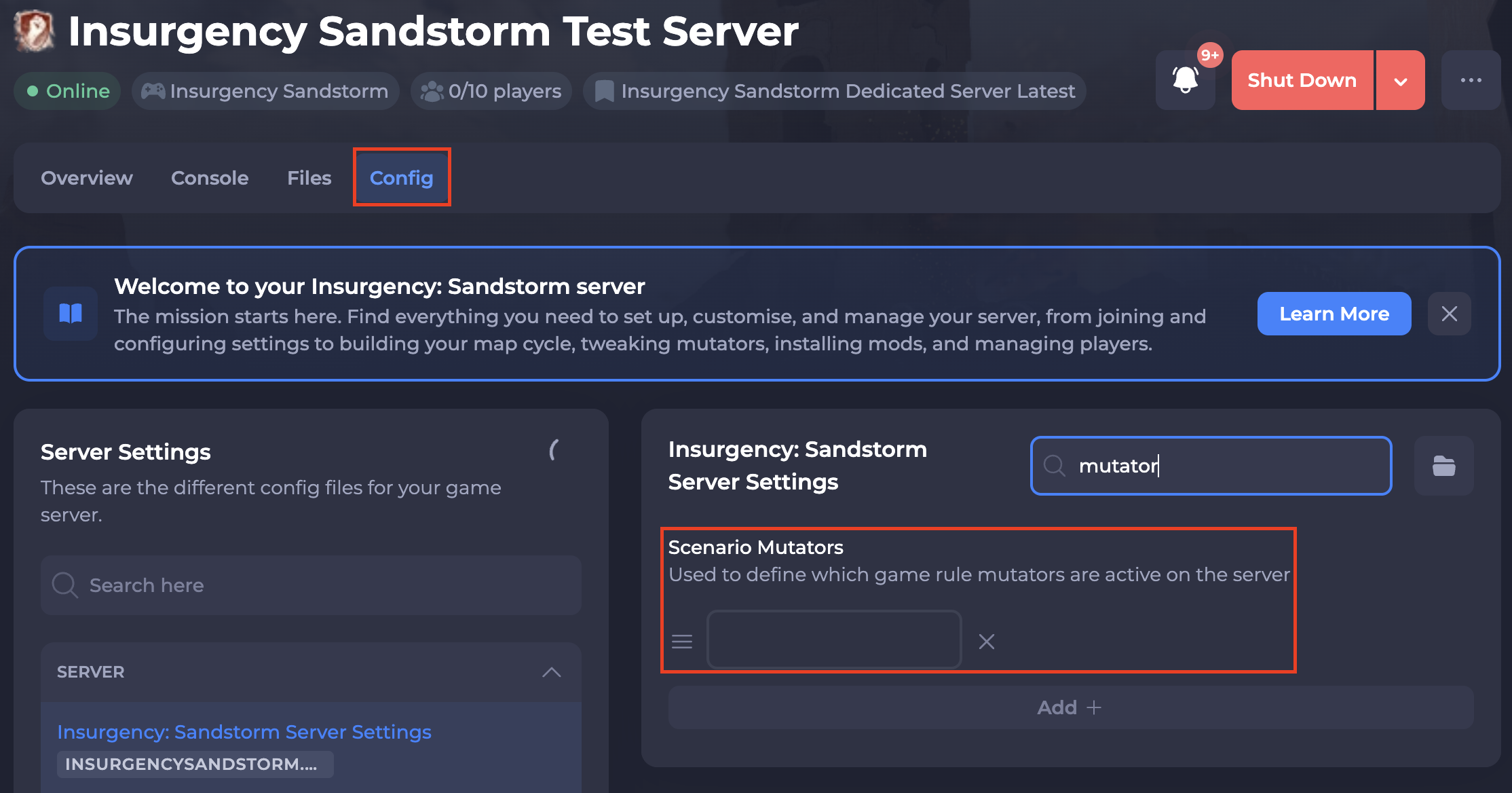
You can use one of the following:
ISMCarmory_Legacy- ISMC guns and NWI cosmetics. Three player classes; blufor, redfor and team leader, with access to both western and eastern weaponry. Has vanilla enemy bots on each side.ISMC_Casual- ISMC guns and ISMC cosmetics. Security maps have you playing as “BluFor” with an AR-based set of weapons. Insurgent maps have you playing as “RedFor” with an AK-based set of weapons. Contains all classes, Team Leader, Gunner, Breacher, Marksman, Demolitions and Advisor, and has unlimited class slots. Blufor/Redfor enemy bots.ISMC_Hardcore- Same as ISMC_Casual. Has limited class slots (1 Team Leader, 2 for other classes). 11 Players.ISMC_Karmacore- Same as ISMC_Hardcore. Has one slot per class. Coordinate or die. 5 players.
- Save and restart your server to ensure the new changes apply.
#Enabling ISMCmod
In order for all of ISMC's features to be enabled you need to add the relevant settings to your server's Game.ini file.
-
Access your Control Panel and navigate to the Files tab.
-
Navigate to
/Insurgency/Saved/Config/LinuxServer. Open theGame.inifile.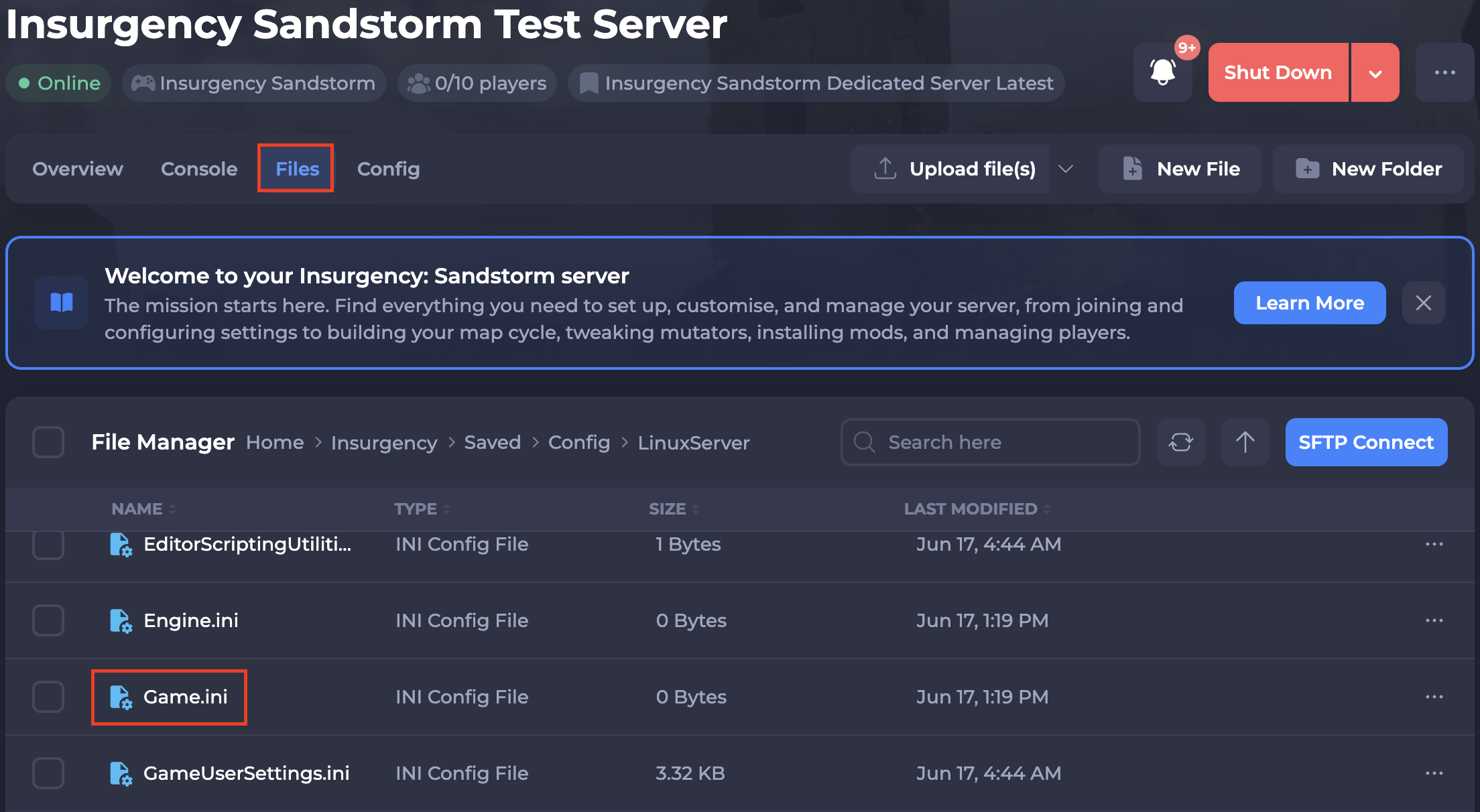
-
Paste one of the following (depending on the mutator selected in the previous section) at the bottom of the Game.ini file:
ISMCarmory_LegacyISMC_CasualISMC_HardcoreISMC_Karmacore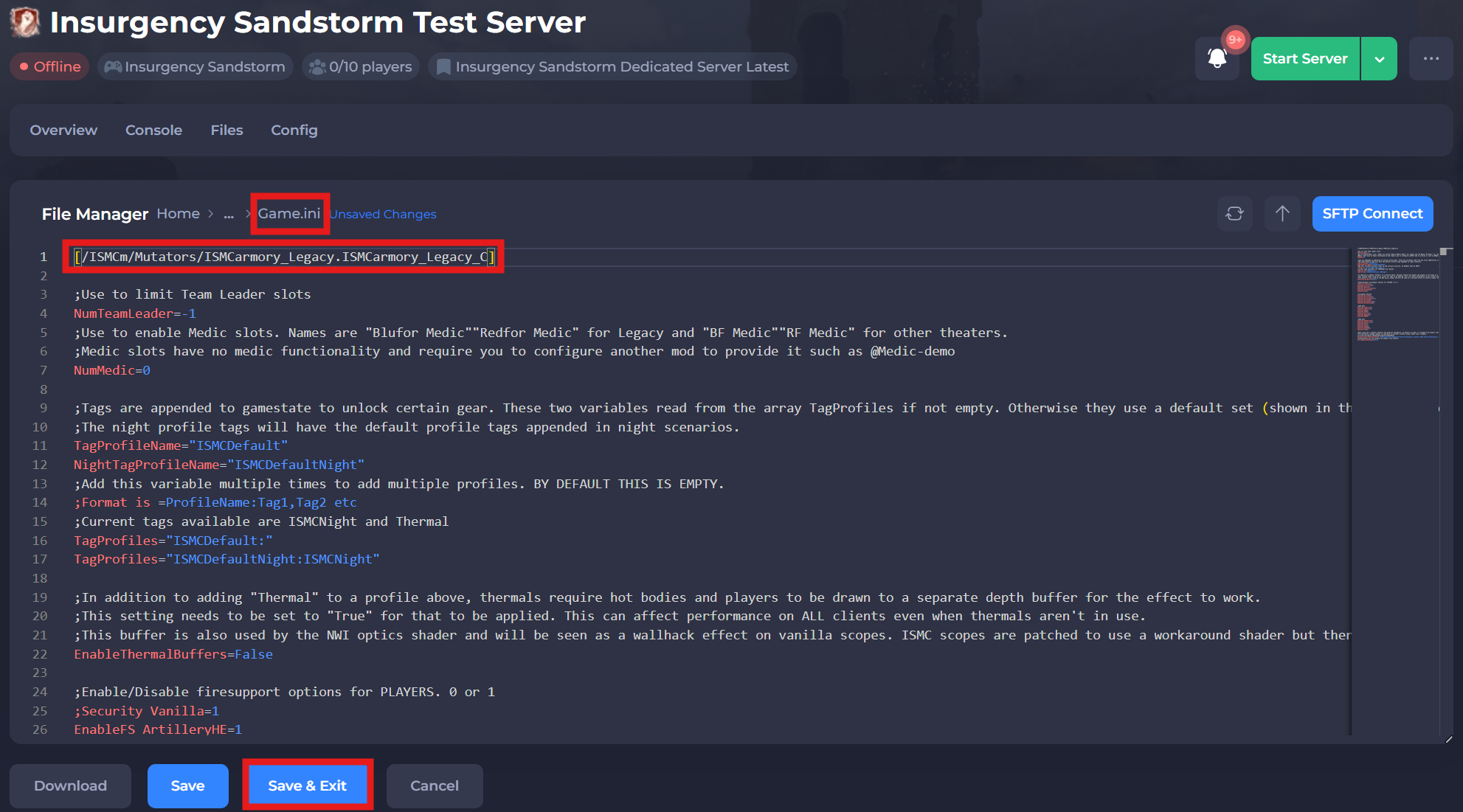
For this example we will be using the ISMCarmory_legacy scenario mutator:
[/ISMCm/Mutators/ISMCarmory_Legacy.ISMCarmory_Legacy_C]

;Use to limit Team Leader slots
NumTeamLeader=-1
;Use to enable Medic slots. Names are "Blufor Medic""Redfor Medic" for Legacy and "BF Medic""RF Medic" for other theaters.
;Medic slots have no medic functionality and require you to configure another mod to provide it such as @Medic-demo
NumMedic=0

;Tags are appended to gamestate to unlock certain gear. These two variables read from the array TagProfiles if not empty. Otherwise they use a default set (shown in the override example below)
;The night profile tags will have the default profile tags appended in night scenarios.
TagProfileName="ISMCDefault"
NightTagProfileName="ISMCDefaultNight"
;Add this variable multiple times to add multiple profiles. BY DEFAULT THIS IS EMPTY.
;Format is =ProfileName:Tag1,Tag2 etc
;Current tags available are ISMCNight and Thermal
TagProfiles="ISMCDefault:"
TagProfiles="ISMCDefaultNight:ISMCNight"

;In addition to adding "Thermal" to a profile above, thermals require hot bodies and players to be drawn to a separate depth buffer for the effect to work.
;This setting needs to be set to "True" for that to be applied. This can affect performance on ALL clients even when thermals aren't in use.
;This buffer is also used by the NWI optics shader and will be seen as a wallhack effect on vanilla scopes. ISMC scopes are patched to use a workaround shader but there may still be traces of vanilla scopes in the theaters.
EnableThermalBuffers=False

;Enable/Disable firesupport options for PLAYERS. 0 or 1
;Security Vanilla=1
EnableFS_ArtilleryHE=1
EnableFS_Apache=1
EnableFS_ArtillerySmoke=1
EnableFS_BlackHawk=1
EnableFS_A10=1

;Insurgents Vanilla
EnableFS_MortarHE=1
EnableFS_MortarSmoke=1
EnableFS_MortarChemical=1
EnableFS_DroneIED=1
EnableFS_RocketBarrage=1
EnableFS_DroneGrenade=1

;ISMC West
EnableFS_A10Strafe=1
EnableFS_A10Strike=1
EnableFS_AH64=1
EnableFS_UH60=1
EnableFS_Harrier=1
EnableFS_BuggyUS=1
EnableFS_MRAP=1

;ISMC East
EnableFS_SU25Strafe=1
EnableFS_SU25Strike=1
EnableFS_MI17=1
EnableFS_MI24=1
EnableFS_YAK38=1
EnableFS_BUGGYRU=1
EnableFS_TIGR=1

;When using the 3 cosmetic theaters and hardcore checkpoint, by default all gear is stripped from players resulting in invisible players.
;An alternative respawn loadout is available to provide a default player model until resupply.
[/script/insurgency.INSCheckpointHardcoreGameMode]
RespawnLoadoutsDataAssetPath="/ISMCm/Game/Data/Gamemodes/HardcoreCheckpoint_Loadouts_ISMC.HardcoreCheckpoint_Loadouts_ISMC"
;Alternatively you can disable the weapon strip feature.
bStripWeaponsOnRespawn=False
If you selected a different scenario mutator, please refer to the mod's description for configuration instructions, here.
- Save and restart your server to ensure the new changes apply.
If you require any further assistance, please contact our support at: https://shockbyte.com/billing/submitticket.php