How to Join your Euro Truck Simulator 2 Server (ETS2 & ATS)
Table Of Contents
Searching for your Session Search IDStill have questions?
Come chat with us and we will get back to you as soon as possible!

Ruben B
Partnership Manager

How to Join your Euro Truck Simulator 2 Server (ETS2 & ATS)
There are multiple ways to connect to your ETS2/ATS server, however, we recommend that you always search for your convoy using your Search Session ID. Alternatively, you can find your server in the convoy browser by searching for it by name or browsing all available game sessions.
Note
In this example, we will be joining a Euro Truck Simulator 2 server, however, the same steps can be followed to join an American Truck Simulator server.
#Searching for your Session Search ID
Although you can find your server in the server browser by searching for your server's name, searching by using the search session ID is far more accurate.
Important
In order for your server to have a Session Search ID, you will need to have a GSLT Key set on your server. Please follow our guide that explains How to Add a GSLT Key to your Euro Truck Simulator 2 Server before proceeding with the next steps.
-
Access your Control Panel and navigate to the Console.
-
Locate the
Session Search IDin your Console and copy it.
-
Open Euro Truck Simulator 2, select your preferred profile, and click the
Convoysbutton.
-
Paste your
Session Search IDinto the search bar.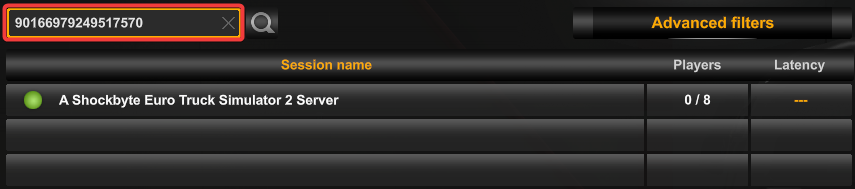
-
Click your server, then click
Join Convoy.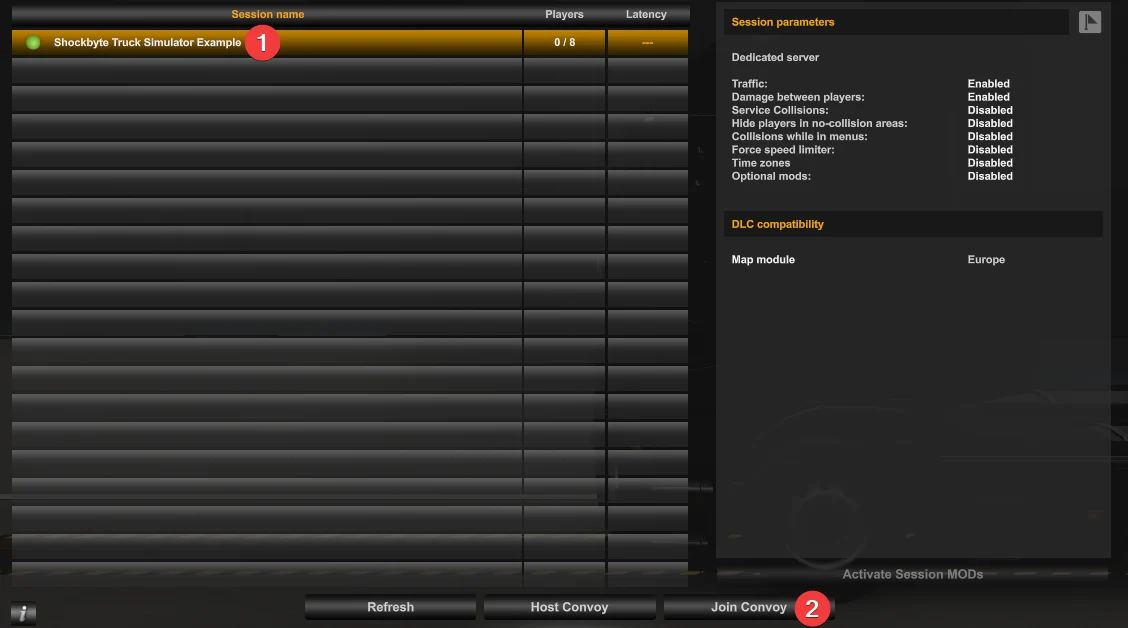
If you require any further assistance, please contact our support at: https://shockbyte.com/billing/submitticket.php