Still have questions?
Come chat with us and we will get back to you as soon as possible!
Contact Support
Shockbyte
Support Team

How to Join your s&box Server
S&Box
·Apr 28, 2026
·2 min read
This guide explains how to join your s&box server. Connecting is quick and can be done through the in-game server browser using your server's hostname.
#Finding your Server Hostname
Your server hostname is the name displayed in the server browser. To find it:
- Log in to your Control Panel and navigate to the Config tab.
- Locate the
Hostnamefield - this is the name you'll use to search for your server in-game.
For more information on setting your hostname, see How to Change the Hostname on your s&box Server.
#Joining via the In-Game Server Browser
- Open s&box and navigate to the Servers tab.
- Type your server hostname into the search bar to filter the server list.
- Enable Show Empty to make your server visible if no players are connected.
- Click the Play button on the right side of your server to join.
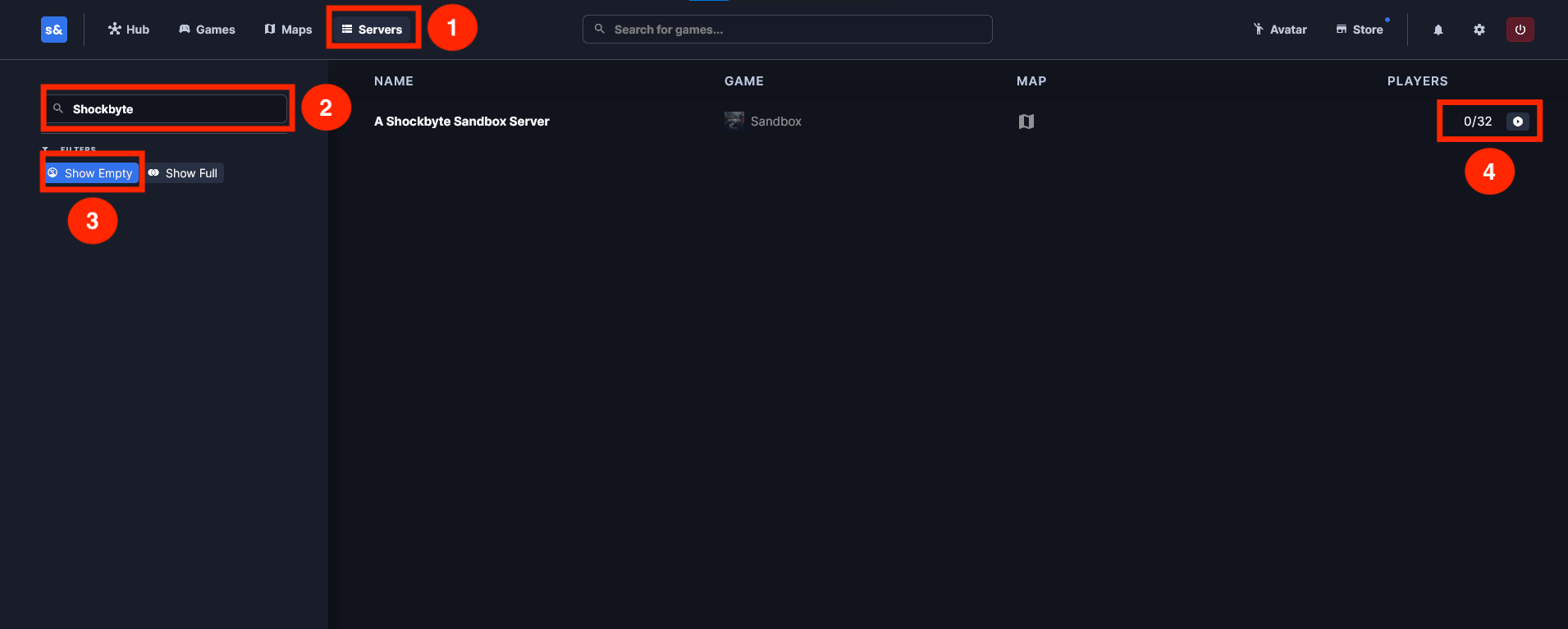
s&box will automatically download and load everything required to run the game on your client.
If you require any further assistance, please contact our support at: https://shockbyte.com/billing/submitticket.php