Table Of Contents
Resetting your Conan Exiles ServerStill have questions?
Come chat with us and we will get back to you as soon as possible!

Shockbyte
Support Team

How to Reset your Conan Exiles Server
This guide explains how to reset your Conan Exiles server. Resetting your server will completely wipe world progress, including player data, buildings, NPCs, and other saved information.
This can be done by deleting the game.db file from your server files. Once removed, the server will generate a fresh world the next time it starts. The steps below will walk you through this process safely.
#Resetting your Conan Exiles Server
Your server's game.db file can easily be deleted using your control panel's built-in file manager or an external FTP client.
-
Go to your control panel and Stop your server.
-
Navigate to the Files tab and open the
/ConanSandbox/Saveddirectory. -
Locate the
game_X.dbfile (the X represents the number of the save) and delete it.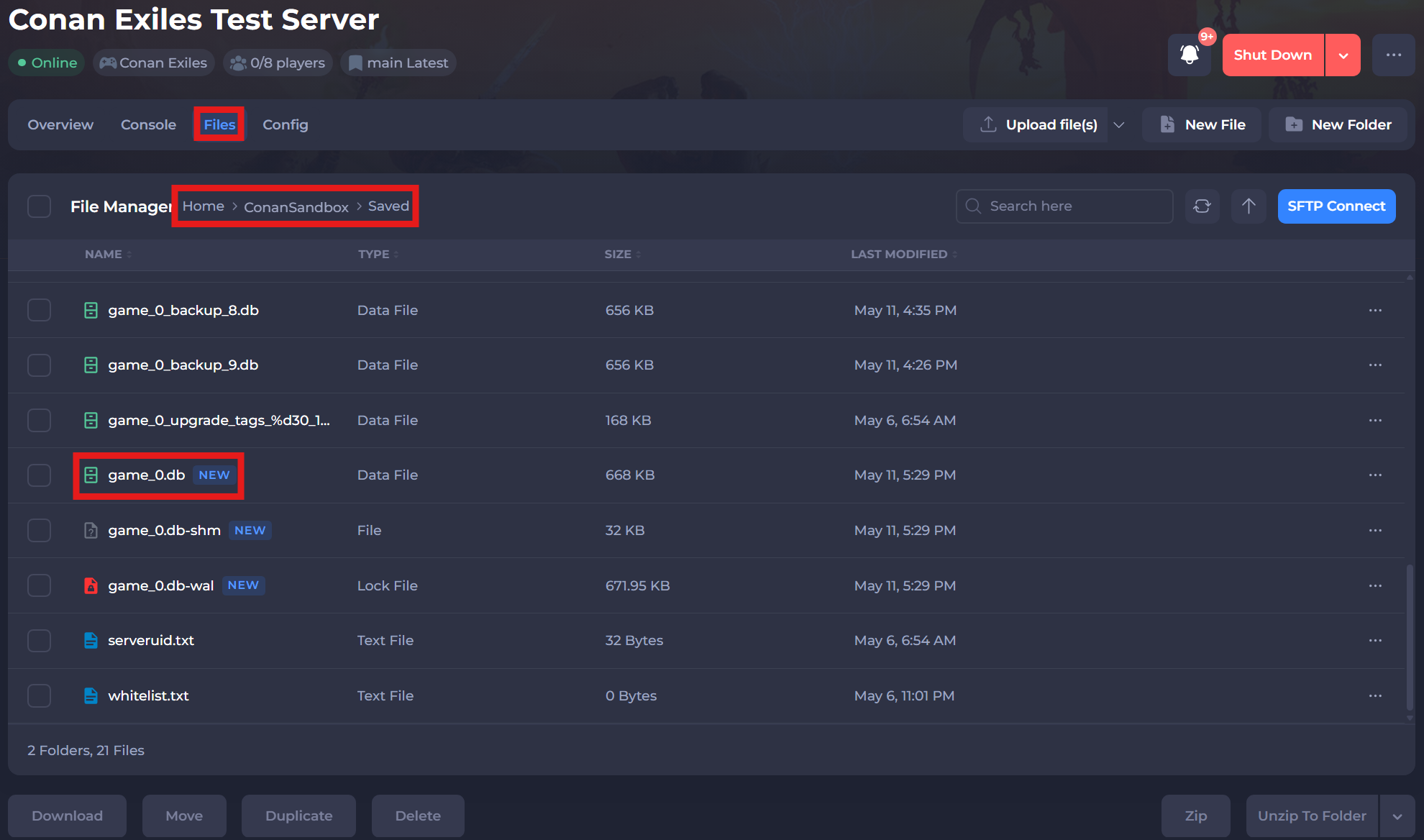
-
Restart your server to ensure the new changes apply.
If you require any further assistance, please contact our support at: https://shockbyte.com/billing/submitticket.php