Table Of Contents
Changing your Server NameStill have questions?
Come chat with us and we will get back to you as soon as possible!

Shockbyte
Support Team

How to Set the Server Name of your Myth of Empires Server
Myth of Empires
·Nov 12, 2024
·2 min read
Currently, the only way to connect to your Myth of Empires server is by locating it on the in-game server list. This is why it is important to configure a unique and easily identifiable server name.
Changing your Server Name
You can change the name of your server in the Config tab.
- Access your control panel and Shut Down your server.
- Go to the Config tab.
- Locate the
Server Namefield and enter your desired name between the quotations.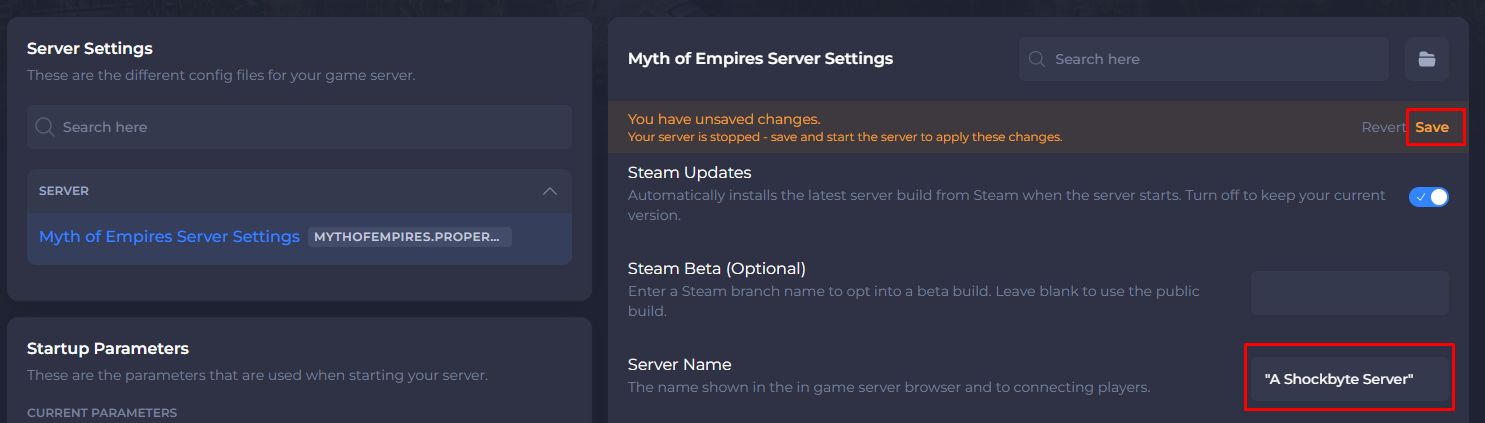
- Save the changes and Start your Server.
When your server finishes starting up, it will now appear on the in-game server list with the new name you configured.
If you need help with troubleshooting your server, be sure to reach out to our support team.