Table Of Contents
Scheduling WipesStill have questions?
Come chat with us and we will get back to you as soon as possible!

Shockbyte
Support Team
How to Setup Scheduled Wipes on your V Rising Server
V Rising
·Nov 14, 2024
·2 min read
Scheduled wipes are a great way to prevent your map from being over-saturated by player-built objects, you can set this to a specific amount of days or on a specific day.
#Scheduling Wipes
Setting up automatic wipes can be done easily via your server's Server Host Settings file.
Note
Reset Days Interval - Dictates how many days are in a wipe, any integer is accepted. Set to 0 to disable this feature. Day Of Reset - Dictates which day the server will wipe, any day from Monday - Sunday. Set to Any if you would not like to specify a day.
- Access your Control Panel and Stop your server.
- Navigate to the Config tab of your panel and select the Server Host Settings file.
- Locate the
Reset Days IntervalandDay Of Resetoptions and set your desired values.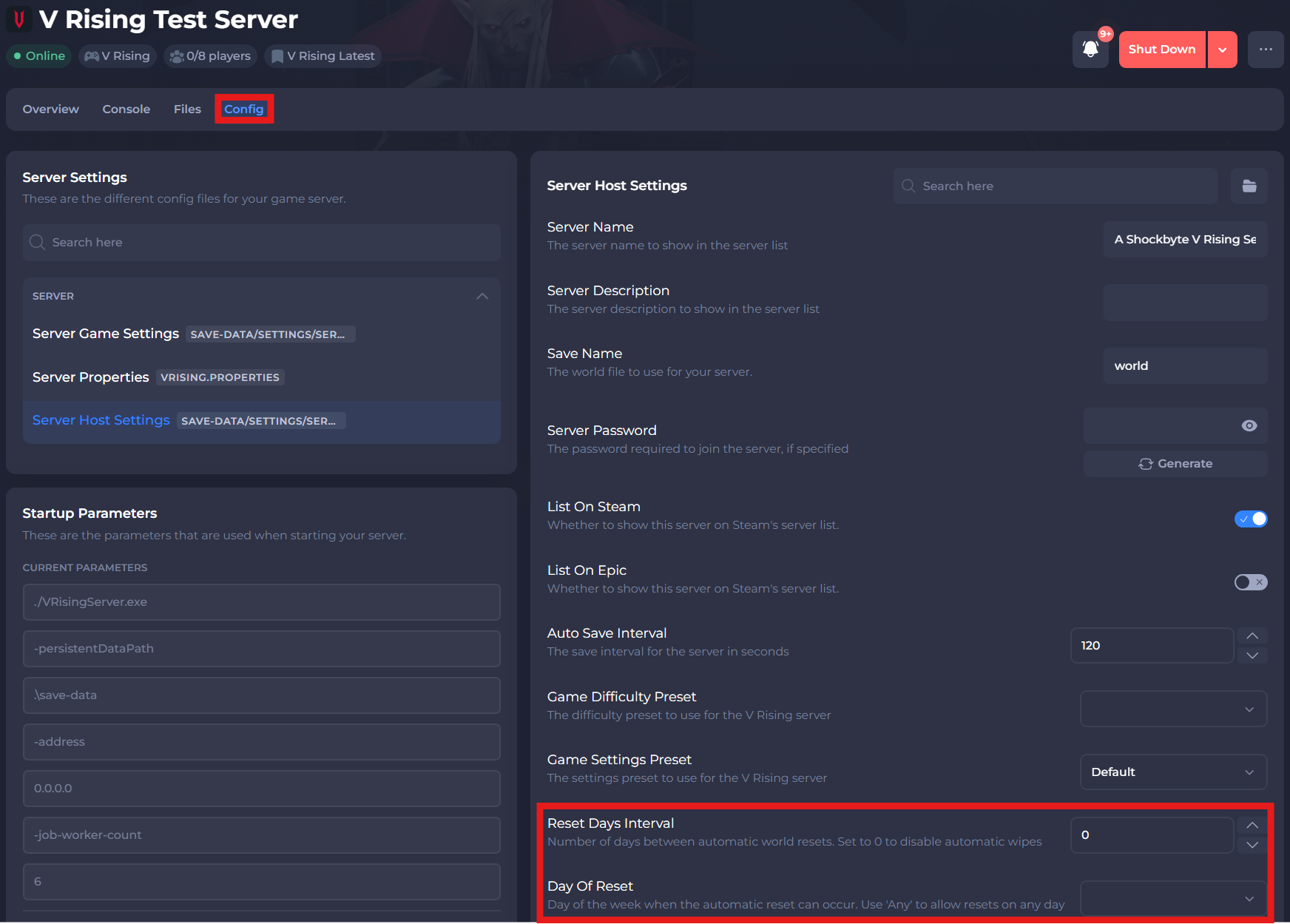
- Save and restart your server to ensure the changes apply.
If you require any further assistance, please contact our support at: https://shockbyte.com/billing/submitticket.php