Still have questions?
Come chat with us and we will get back to you as soon as possible!

Shockbyte
Support Team

How to Whitelist Players on Your Factorio Server
A whitelist is a list of people that are permitted to join your server. This prevents unwanted players from joining and changing your server.
#Adding/Removing Whitelists in the Config Files
You can whitelist players in the panel in the Config area.
-
Access your Control Panel and Stop your server.
-
Navigate to the Config tab and locate the
Whitelisted Playerssetting.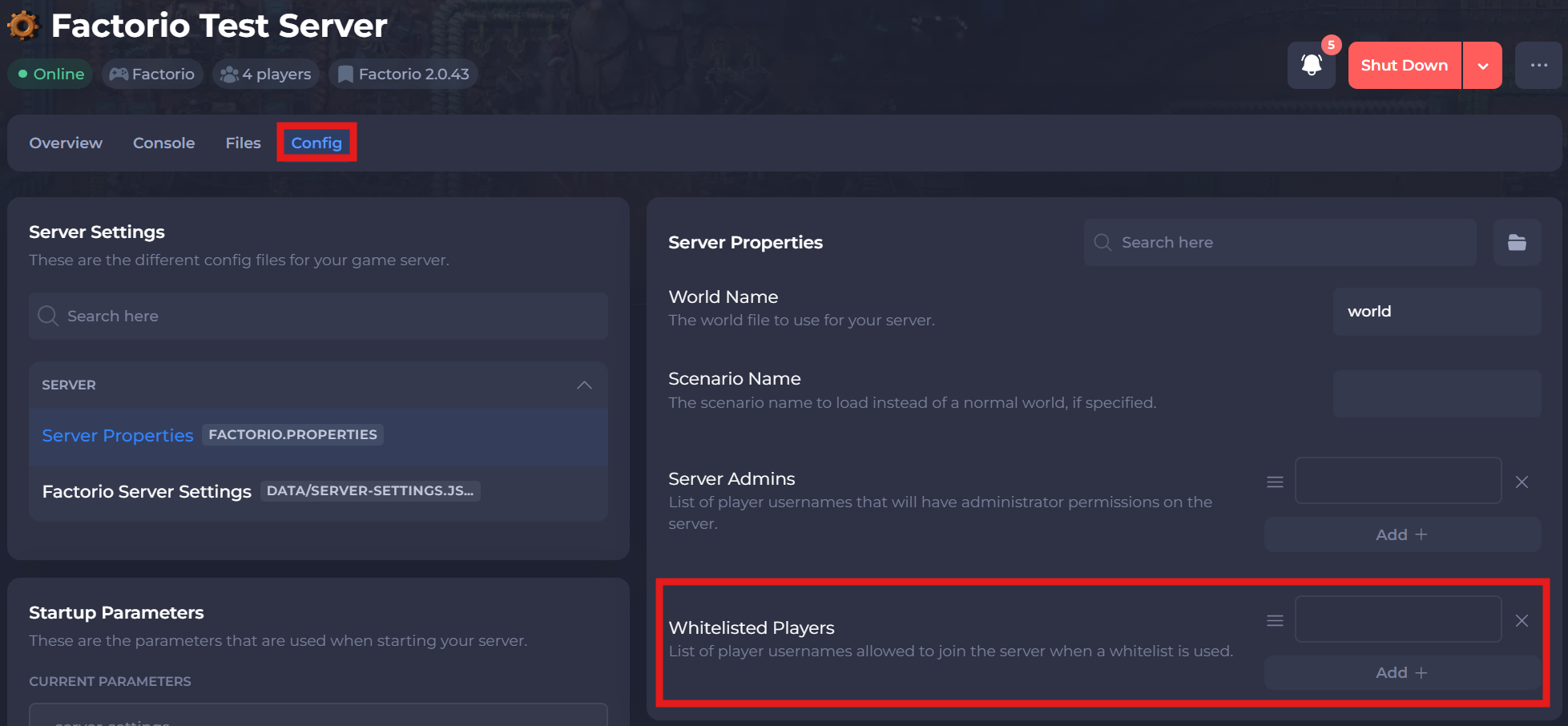
-
List the player's usernames that you would like to be whitelisted.
-
Save and restart your server to ensure the changes apply.
#Adding/Removing Whitelists In-Game
Note
To use the in-game console, you must be a Server Admin. Please ensure you have followed our guide that explains How to Add an Admin on your Factorio Server.
Once you are an Admin, hit the grave key to open the in-game chat system. A text box will open where you can chat with other players, or more importantly, use console commands.
| Command | Description |
|---|---|
/whitelist add <username> | Adds a player to the whitelist. |
/whitelist remove <username> | Removes a player from the whitelist. |
/whitelist get | Prints a list in the chat of the currently whitelisted players. |
/whitelist clear | Removes all players from the current whitelist and will disable it. |
If you require any further assistance, please contact our support at: https://shockbyte.com/billing/submitticket.php