Still have questions?
Come chat with us and we will get back to you as soon as possible!

Shockbyte
Support Team

How to Find and Fix YAML Config Errors
YAML (YAML Ain't Markup Language or Yet Another Markup Language) is widely used by games like Minecraft (Spigot, Paper, plugins) and server management tools. Unlike JSON, YAML relies heavily on indentation and spacing to define data structures. Indentation errors or improper character usage will cause parsing failures and prevent plugins or server files from loading.
#Using the Built-in Control Panel Validation
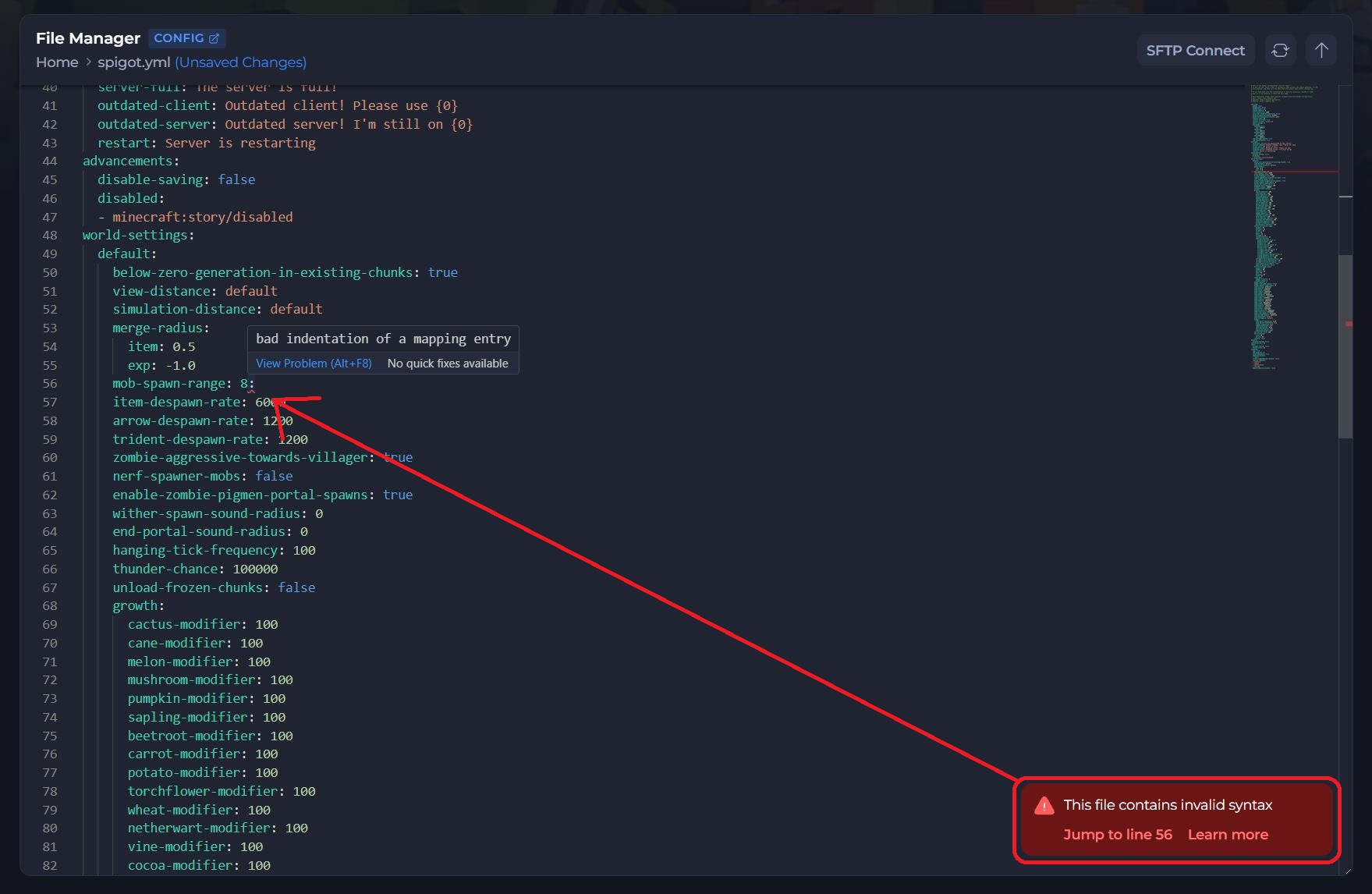
Our built-in text editor automatically checks your .yml files for syntax errors in real time.
-
When an error notification appears, click Jump to Section in the bottom-right banner.
-
The editor will automatically scroll to and highlight the exact line containing the error.
-
Look for a red wavy line under the broken code or a red indicator marker on the right.
-
Hover your cursor over the highlighted area to view the error breakdown.
#Common YAML Formatting Mistakes
Because YAML uses clean, human-readable formatting, syntax mistakes usually come down to spacing, tabs, or special characters:
1. Using Tabs Instead of Spaces
YAML strictly forbids the use of the Tab key for indentation. All indentation must be done using standard spaces (typically 2 spaces per level).
- Correct: Using
[Spacebar]spaces to line up key levels. - Incorrect: Using
[TAB]to indent sub-keys.
Tip
The control panel editor automatically converts pressings of the Tab key into spaces when editing .yml files, but copy-pasting code from external editors may bring unwanted tab characters with it.
2. Incorrect Indentation Alignment
Child items must align vertically under their parent key. Misaligning a single line by one space will cause a parsing error or corrupt the structure.
- Correct
settings:
  pvp: true
  motd: "Welcome!"
- Incorrect
settings:
  pvp: true
 motd: "Welcome!"
3. Missing Space After Colons or Dashes
In YAML, keys and list items require a single space after the defining punctuation:
A colon : after a key name must be followed by a space. A dash - for list items must be followed by a space.
- Correct:
enable-pvp: trueor- item_one - Incorrect:
enable-pvp:trueor-item_one
4. Unquoted Special Characters
If a text value contains special characters (such as :, {, }, [, ], ,, &, *, #, or ?), the entire string must be wrapped in double (" ") or single (' ') quotes.
- Correct: motd:
motd: "Welcome to the server: Have fun!" - Incorrect: motd:
motd: Welcome to the server: Have fun!(the second colon breaks parsing)
#External Troubleshooting Tools
If you are struggling to spot an indentation issue, copy your entire file into a YAML parser:
- YAML Lint: Validates YAML formatting and points directly to broken line numbers and tab issues.
Tip
Always click Save Changes and restart your server after resolving syntax errors for the updated configurations to take effect.