Still have questions?
Come chat with us and we will get back to you as soon as possible!

Shockbyte
Support Team

How to Adjust your Startup Parameters
Startup parameters allow you to pass an advanced instructions directly to your server's executable file upon boot. This guide covers how to add custom parameters and explains why certain parameters may be locked in your control panel.
#Finding Game-Specific Startup Parameters
Because launch arguments are created by game developers, each game hosted on our panel utilizes a unique set of supported parameters.
Before adding custom parameters, you can find the complete list of supported parameters for your specific game through some of the following sources:
-
Official Developer Documentation & Wiki pages: Most game developers maintain dedicated server documentation or unofficial community wiki pages such as the Minecraft Wiki, Valve Developer Community, Bohemia Interactive Wiki, or official Unreal Engine docs) detailing all supported command-line arguments.
-
Community Guides: Popular platforms like Steam Community Hubs, Reddit, and GitHub often feature community-curated lists of optimal launch parameters for server performance.
#How to Add Custom Parameters
- Access your Control Panel and Stop your server.
- Navigate to the Config Tab at the top of your control panel.
- Locate the Startup Parameters section near the bottom left of the page.
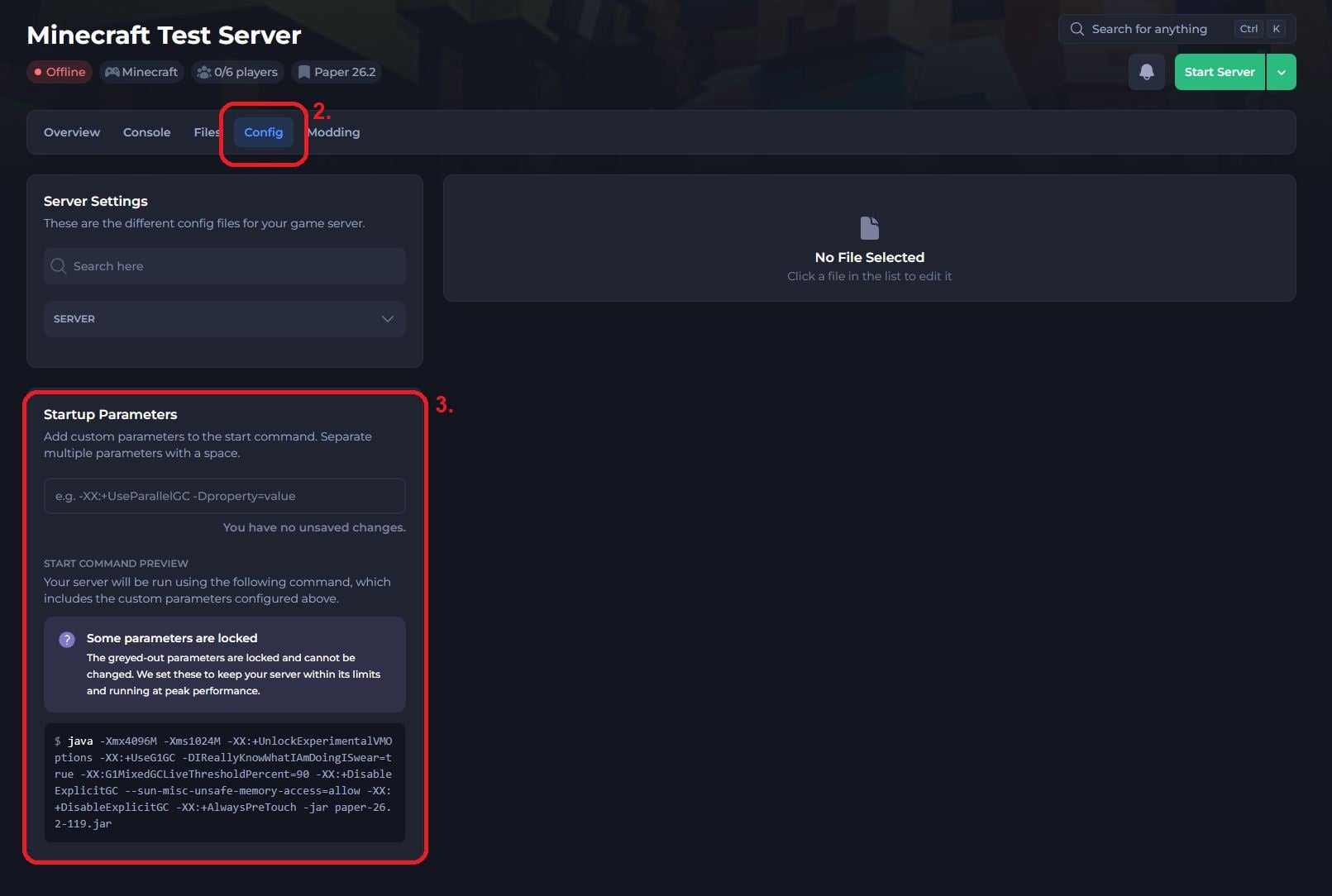
- Enter your desired parameters within the text box. If you are adding more than one, separate each parameter with a single space (e.g., -XX:+DisableExplicitGC -XX:+AlwaysPreTouch).
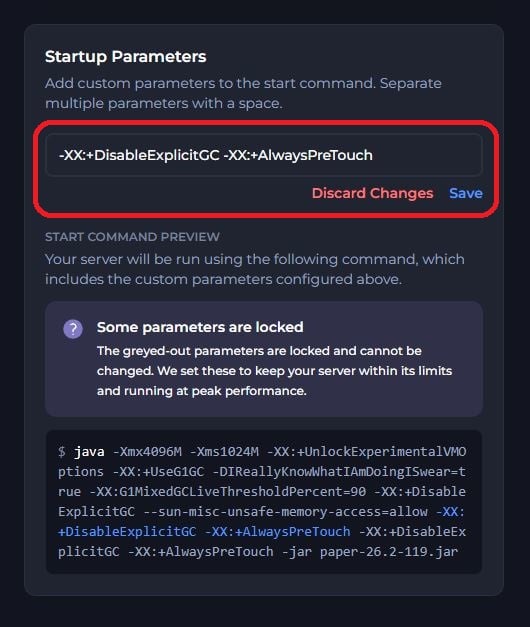
- Click Save and restart your server.
Important
Startup parameters are case-sensitive for many game engines. Always ensure you double-check the syntax before saving.
#Understanding Locked Parameters
While scrolling through the Startup Parameters page, you may notice that several options are greyed out or uneditable. Parameters are locked for two main reasons:
-
Resource Allocation & Hosting Limits: Certain flags dictate memory limits, CPU core bindings, port assignments, and IP binding. Lock settings ensure your server stays within your plan's allocated resources, preventing server crashes or host-level IP conflicts.
-
Peak Performance & Stability: Parameters like process priority, garbage collection routines, or specific core network flags are set automatically by our system. We enforce these settings to deliver the fastest, most stable performance possible in a shared hosting environment.
#Frequently Asked Questions
Can I request a locked parameter to be changed?
Because locked parameters are tied directly to backend server stability and hardware limits, they cannot be modified on standard hosting plans.
Why do I see different parameters than another game?
Startup parameters are defined by game developers, not Shockbyte. Because each game engine uses different launch arguments, the available options will vary depending on the game your server is running.