Still have questions?
Come chat with us and we will get back to you as soon as possible!

Ruben B
Partnership Manager
How To Reset Your Satisfactory World
Satisfactory
·Nov 12, 2024
·2 min read
Resetting your world can add a fresh twist to your server or assist in any world corruptions that may occur. This can easily be done either in-game or using your server's control panel.
#Resetting Via In-game
-
Whilst connected to your server, press the escape (esc) key.
-
Select Server Manager.

- Click Create Game, select a Starting Area, enter a Session Name, and click Start Game.

#Resetting Via FTP
-
Access your Control Panel.
-
Stop your server and wait for it to go Offline.
-
Click on Files.

-
Navigate to
/.config/Epic/FactoryGame/Saved/SaveGames/. -
Delete the
serverfolder.
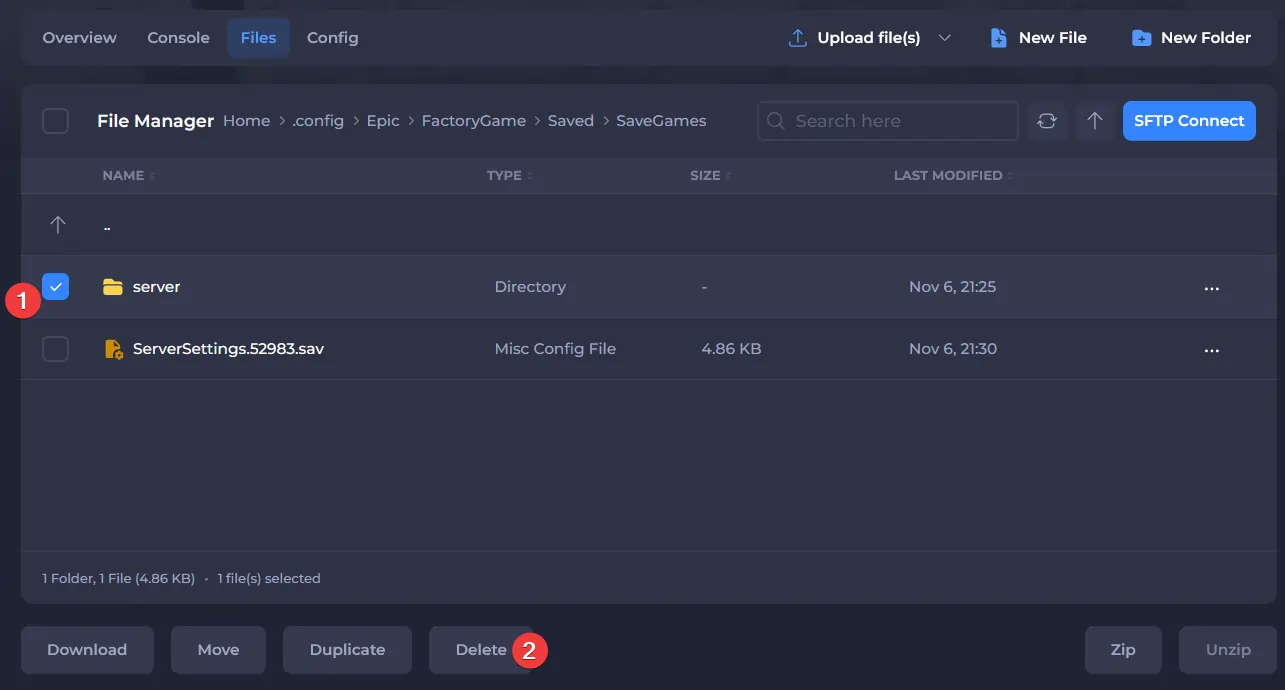
- Start the server.
If you wish to upload a previous save game to your server, we have an excellent Knowledgebase article here.