KnowledgebaseMount & Blade 2 Bannerlord
How to Set your Mount & Blade 2: Bannerlord Server to Private
Table Of Contents
Setting a PasswordStill have questions?
Come chat with us and we will get back to you as soon as possible!

Shockbyte
Support Team
How to Set your Mount & Blade 2: Bannerlord Server to Private
Mount & Blade 2 Bannerlord
·Nov 10, 2024
·2 min read
Having a private server allows you to stop any unwelcome players from connecting to your server, as you may wish to play alone with friends.
#Setting a Password
Currently, the only method of creating a private server is by using a password. A password can easily be set using your server's control panel.
- Access your control panel and Stop your server.
- Navigate to the Config tab and locate the
Server Passwordoption. Here you can set your desired password or generate a random one.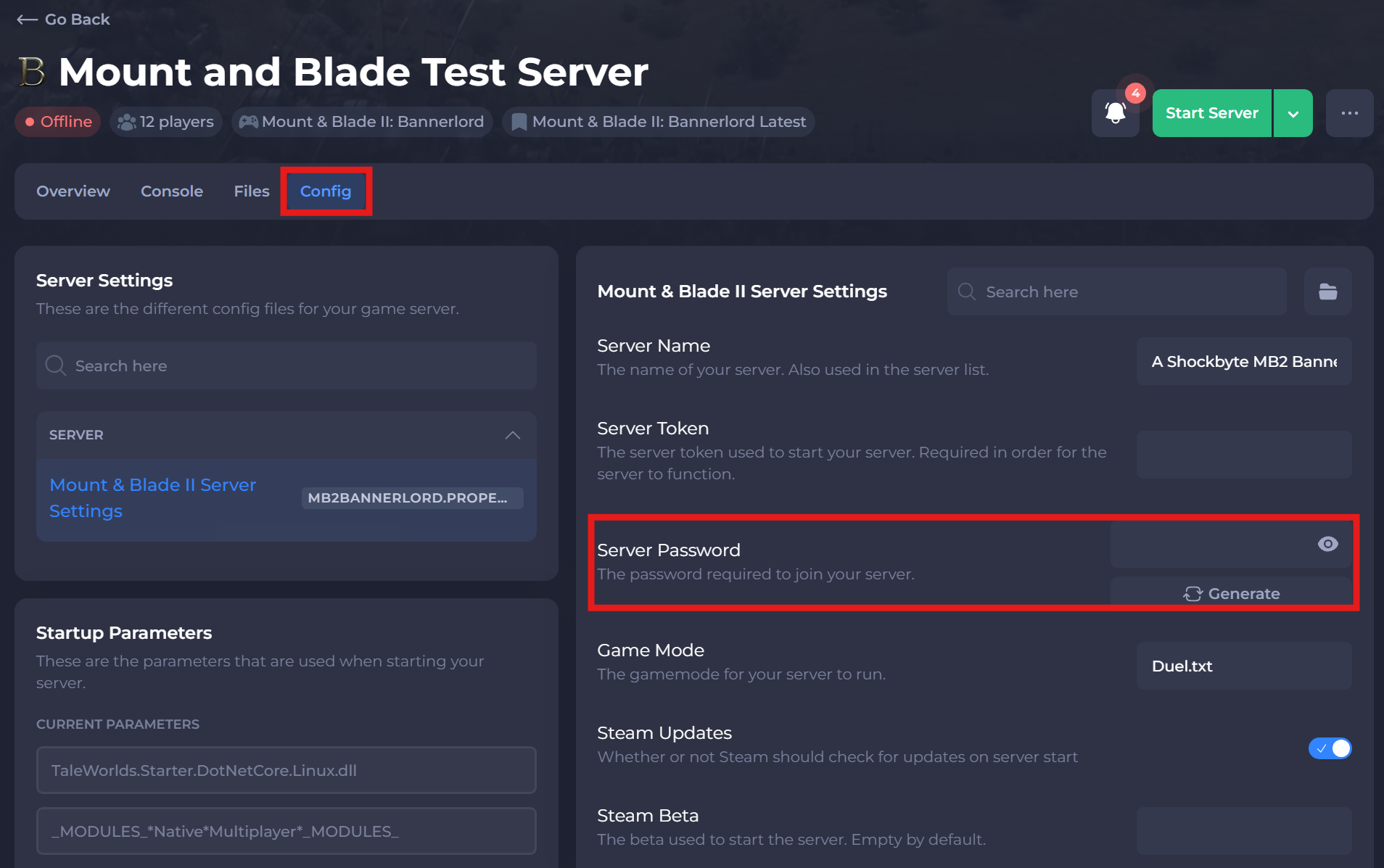
- Save and Start your server.
If you need help with troubleshooting your server, be sure to reach out to our support team.