Still have questions?
Come chat with us and we will get back to you as soon as possible!

Shockbyte
Support Team
How to Add a Resource Pack on a Java Edition Minecraft Server
Resource packs allow you to change Minecraft’s textures. You can make your own resource pack or download a public resource pack from sites like Planet Minecraft.
You can add your resource pack to your server so players are prompted to use it when they connect.
#How to get started
- Download a resource pack.
- Check the size of your resource pack.
| Minecraft Server Version | Size requirement |
|---|---|
| Below 1.15 | Maximum size of 50mb |
| 1.15 and above | Maximum size of 100mb |
- Upload your resource pack to the mc-packs website and keep the page open.
We strongly recommend using the mc-packs website, as resource packs uploaded on other sites may fail to download when joining the server.
#How to add the Resource Pack to your Server
-
Open your control panel and Stop the server.
-
Navigate to the Files tab and open the
server.propertiesfile. -
Locate the settings
resource-pack=andresource-pack-sha1=and paste both of the values from the mc-packs website.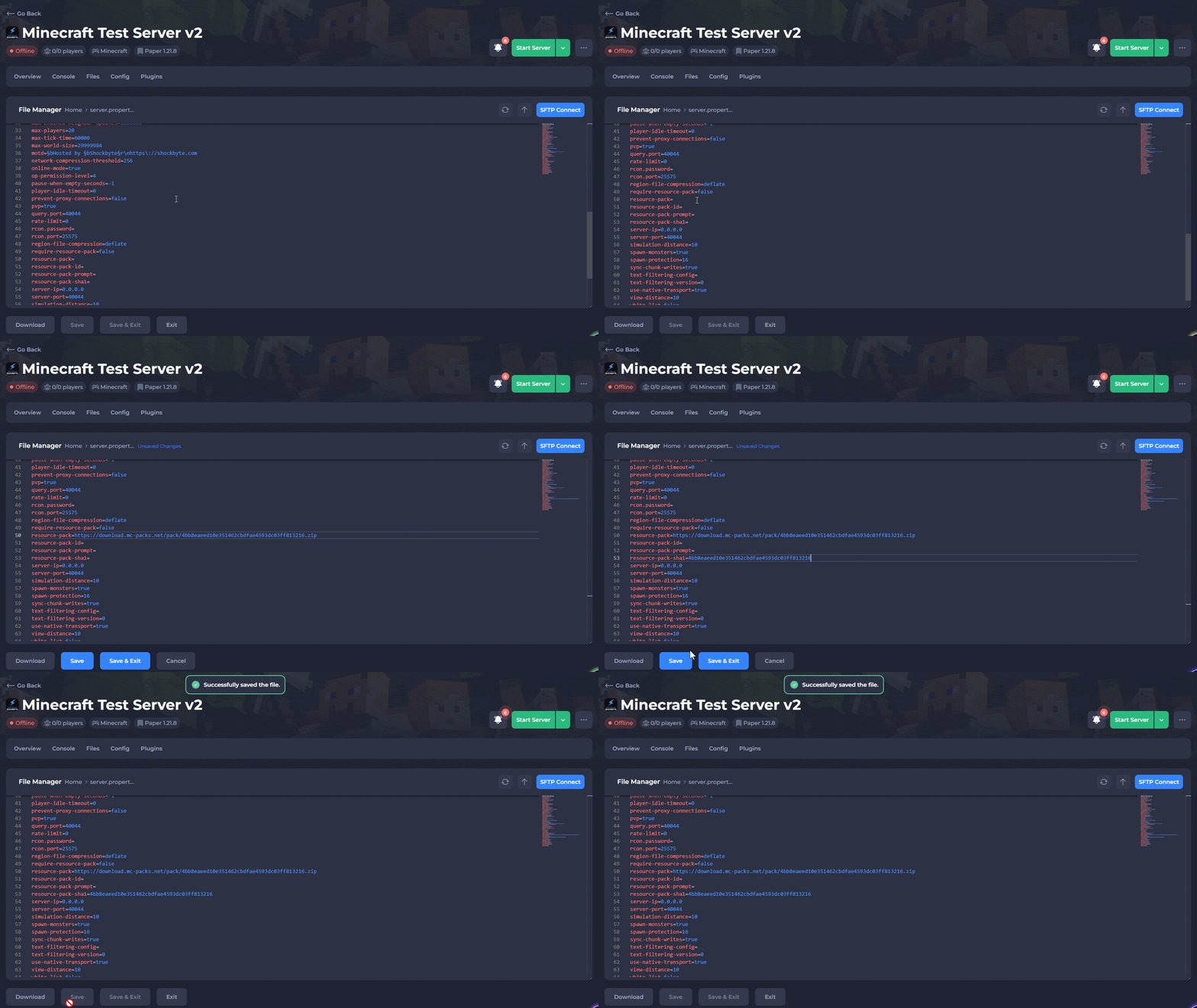
-
Save the file and start your server.
Your server should now prompt users to download the resource pack when they join.