Table Of Contents
Enabling CheatsStill have questions?
Come chat with us and we will get back to you as soon as possible!

Shockbyte
Support Team

How to Enable Cheats on Your Unturned Server
Unturned
·Nov 14, 2024
·2 min read
Enabling cheats is necessary if you wish to enable useful commands on your Unturned server. If you want to use these commands from in-game, you will also need to add yourself as an admin.
#Enabling Cheats
Note
These settings are set per-world. This means that if you change your world name, you will need to change your server settings again for the new world. If you have multiple worlds on your server, ensure that you select the config file for the correct world.
- Access your server Control Panel.
- Navigate to the Settings tab and select Unturned Server Properties.
- Locate the Cheats option and select the toggle button to enable cheats.
- Click Save & Restart to ensure the new changes apply.
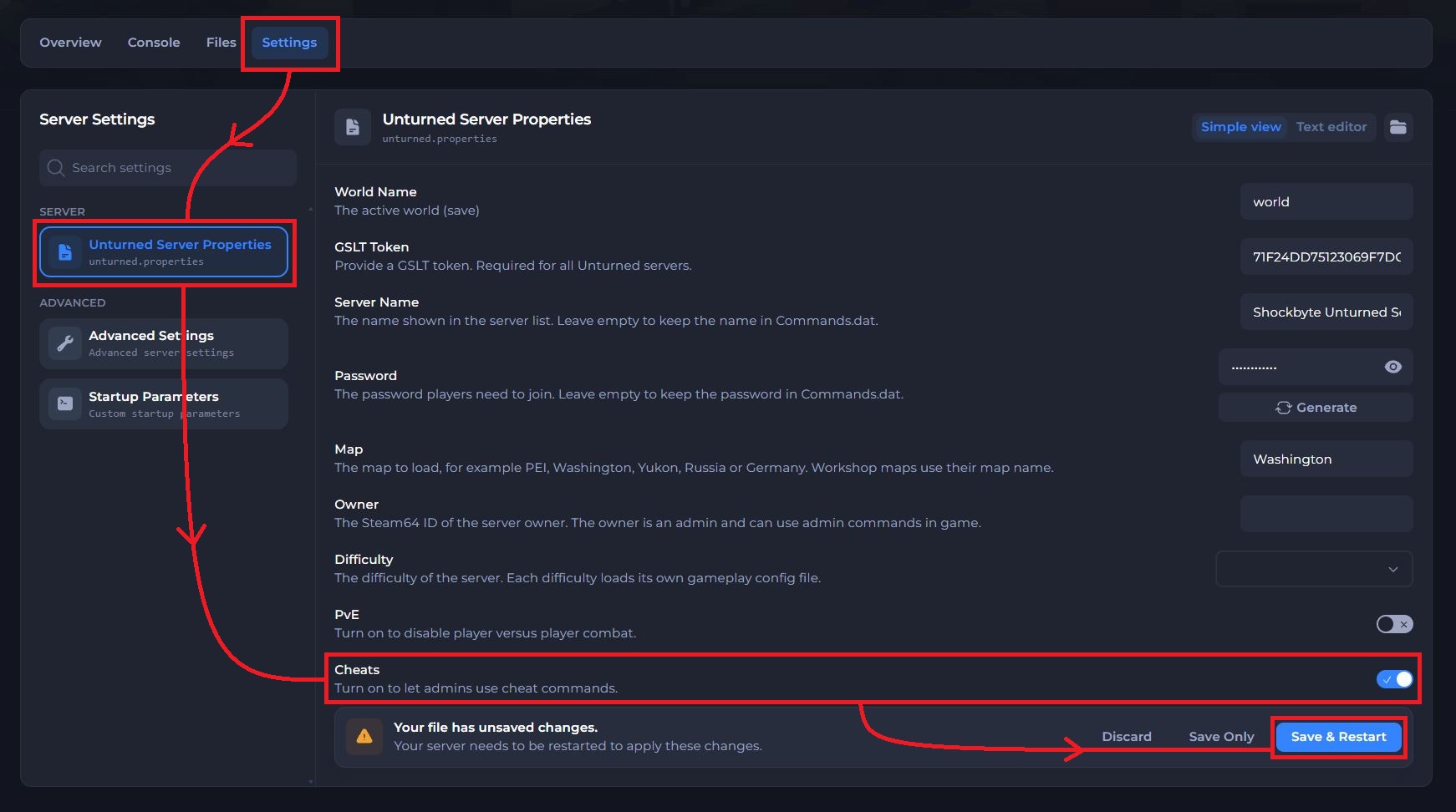
As an Admin, you can now use all available console commands.
To learn more about Unturned server hosting, you can browse our library of Knowledgebase articles here.